


Technical Datasheet LabelManager™ Wireless PnP
Technical Datasheet LabelManager™ Wireless PnP
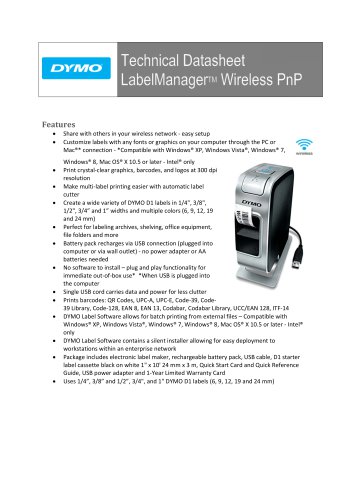
- Wireless sharing capability with easy setup.
- Customizable labels using any fonts or graphics via PC or Mac connection.
- High-resolution printing at 300 dpi for clear graphics, barcodes, and logos.
- Automatic label cutter for efficient multi-label printing.
- Supports a variety of DYMO D1 label sizes and colors.
- Rechargeable battery via USB, eliminating the need for AA batteries or power adapters.
- Plug and play functionality with no software installation required.
- Single USB cord for data and power to reduce clutter.
- Supports various barcode formats including QR Codes and UPC.
- DYMO Label Software for batch printing and easy deployment in enterprise networks.
- Print type: Thermal transfer/Direct thermal.
- Print resolution: 300 dpi.
- Max print height: 19.1 mm.
- Unlimited number of print lines.
- Print speed: 15 mm/s.
- Supported tape widths: 6, 9, 12, 19, 24 mm.
- Compatible with Windows and Mac operating systems.
- Supports various barcode types.
- USB and wireless connectivity options.
- Includes a Lithium-Polymer rechargeable battery pack.
- Battery life allows for printing up to 6 tape cassettes on a full charge.
- Charging times vary from 2.5 to 10 hours depending on the method.
- Supports 802.11b/g standards, not 802.11n.
- Operates on a 2.4 GHz frequency.
- Supports various security protocols including WPA and WPA2.
- Wireless connectivity is disabled when connected via USB to conserve battery.
- Print quality may decrease when using wireless without a wall adapter.
- Wireless setup may take a few minutes to appear in network utilities.
- WPS is not supported in the initial release.
Catalog excerpts
Share with others in your wireless network ‐ easy setup Customize labels with any fonts or graphics on your computer through the PC or Mac®* connection ‐ *Compatible with Windows® XP, Windows Vista®, Windows® 7, Windows® 8, Mac OS® X 10.5 or later ‐ Intel® only Print crystal‐clear graphics, barcodes, and logos at 300 dpi resolution Make multi‐label printing easier with automatic label cutter Create a wide variety of DYMO D1 labels in 1/4", 3/8", 1/2", 3/4” and 1” widths and multiple colors (6, 9, 12, 19 and 24 mm) Perfect for labeling archives, shelving, office equipment, file folders and more Battery pack recharges via USB connection (plugged into computer or via wall outlet) ‐ no power adapter or AA batteries needed No software to install – plug and play functionality for immediate out‐of‐box use* *When USB is plugged into the computer Single USB cord carries data and power for less clutter Prints barcodes: QR Codes, UPC‐A, UPC‐E, Code‐39, Code‐ 39 Library, Code‐128, EAN 8, EAN 13, Codabar, Codabar Library, UCC/EAN 128, ITF‐14 DYMO Label Software allows for batch printing from external files – Compatible with Windows® XP, Windows Vista®, Windows® 7, Windows® 8, Mac OS® X 10.5 or later ‐ Intel® only DYMO Label Software contains a silent installer allowing for easy deployment to workstations within an enterprise network Package includes electronic label maker, rechargeable battery pack, USB cable, D1 starter label cassette black on white 1" x 10' 24 mm x 3 m, Quick Start Card and Quick Reference Guide, USB power adapter and 1‐Year Limited Warranty Card
Open the catalog to page 1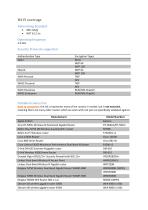
Authentication Type Encryption Types Open None Note to consumers: this list is represents many of the routers in market, but is not exclusive, meaning there are many other routers which we work with, but just not specifically validated against.
Open the catalog to page 3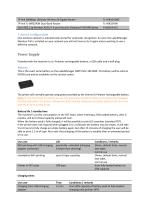
One wireless network is automatically stored for automatic recognition. So once the LabelManager Wireless PnP is installed on your network you will not have to do it again unless wanting to use a different network. Provided with the machine is a Li-Polymer rechargeable battery, a USB cable and a wall plug. This is the exact same battery as the LabelManager 500TS SKU 1814308. This battery will be sold on DYMO.com and be available via the contact center. The printer will normally operate using power provided by the internal Li-Polymer rechargeable battery. Note: On the first batch of printers we...
Open the catalog to page 4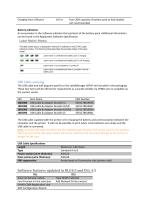
Charging from USB port from 20% capacity of battery pack to fully loaded, not recommended Battery indication An annunciator in the software indicates the load level of the battery pack. Additional information can be found in the Application Software Specification. The label maker status is displayed in the built-in software or the DYMO Label software window. The following tabie describes the possible states of the label maker. •£* Ol _abe maker is connected and battery Dock is cha-ging ti±4 r L# A HI _sc>e maker is ccnnec&d and battery cock c not charing J#ac Late maker ia not cormeeed or c turned...
Open the catalog to page 5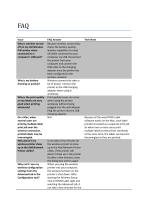
Tech Note Why is wireless turned off on my LM Wireless PnP printer when connected to a computer's USB port? Why is my battery draining so quickly? Because wireless connectivity drains the battery quickly, wireless capability it turned off while connected to your computer via USB. Disconnect the printer from your computer and connect the USB cable to the charging adapter once the printer has been configured to the wireless network. Wireless connectivity takes a lot of power. Connect the printer to the USB charging adapter when using it wirelessly. Why is the print quality on my labels not very...
Open the catalog to page 6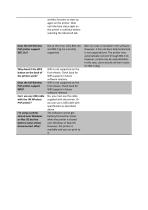
wireless function to start up again on the printer. Wait until the blue status light on the printer is sold blue before selecting the Advanced tab. Does the LM Wireless PnP printer support 802.11n? Not at this time. Only 802.11b and 802.11g are currently supported. Why doesn’t the WPS button on the back of the printer work? WPS is not supported on the first release. Check back for WPS support in future software releases. WPS is not supported on the first release. Check back for WPS support in future software releases. No, you must use the cable supplied with the printer. Or you can use a USB...
Open the catalog to page 7All Dymo catalogs and technical brochures
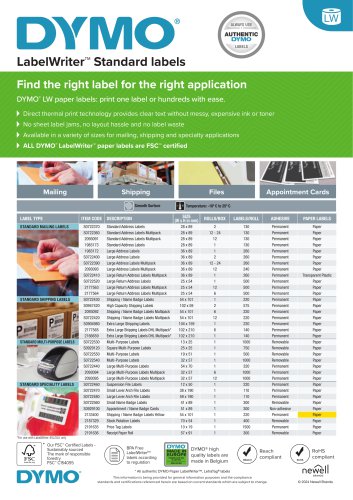 LabelWriter™ Standard labels
10 Pages
- Digital weighing scale
- Kilogram weighing scale
- Weighing scale with LCD display
- Label printer
- Thermal transfer label printer
- Electronic balance
- Polymer tag
- Benchtop weighing scale
- White label
- Roll label
- Desktop label printer
- Lb weighing scale
- Compact weighing scale
- Direct thermal label printer
- Compact labeling machine
- Oz scale
- Paper label
- Black text label
- Yellow label
- Manual label applicator