
- Catalogs
- Displaytech
- 64128Q-Series

64128Q-Series
64128Q-Series
The 64128Q Series LCD Module features a 128 x 64 dot display with a dot size of 0.40 mm x 0.40 mm. The module measures 75.00 mm x 52.70 mm x 6.90 mm, with an LED backlight option increasing thickness to 8.90 mm. It supports STN/FSTN LCD types and various polarizer modes, including reflective, transflective, and transmissive. Viewing angles are available at 6 o'clock and 12 o'clock, with backlight colors in yellow-green, white, blue, pure green, and amber.
The module operates with a power supply range of -0.3 to 7.0 V for logic and -0.3 to 13.0 V for the LCD. The normal operating temperature is 0°C to 50°C, with storage temperatures from -10°C to 60°C. For wide temperature operations, it functions between -20°C and 70°C, and stores between -30°C and 80°C.
At 25°C and VDD of 5.0V±5%, the power supply for the LCM is between 4.75 and 5.25 volts. Input voltage levels are defined as VIL (low) and VIH (high), with specific thresholds relative to VDD.
The recommended operating voltage (VLCD) is between 8.7 and 9.3 V at 25°C. The LCD response time is 150 ms at 25°C. The viewing angle is defined with a contrast ratio greater than 2, and current consumption is 10.8 µA at 25°C.
Backlight options include edge-lit and low power types with various colors. The edge-lit type measures 69.00 x 38.30 x 4.30 mm using 6x2 SMT LEDs, while the low power type measures 68.60 x 38.30 x 4.40 mm using 2 SMT LEDs. Forward voltages range from 3.2 to 4.2 V, with luminous intensities from 15 to 200 cd/m².
Inspection standards include functional tests and appearance inspections, with defect levels categorized as major or minor based on MIL-STD-105D sampling methods.
Guidelines emphasize careful handling to avoid damage. The LCD module is sensitive to ESD and should be handled with anti-static precautions. Avoid mechanical shock and excessive force on the display surface. Clean with isopropyl or ethyl alcohol, avoiding other solvents. Ensure proper installation to avoid twisting or warping, and do not disassemble the module.
Observe absolute maximum ratings for logic and LC drivers. Avoid reverse polarity and use a clean power source. Ensure VDD powers all devices accessing the display, and do not drive the data bus when the logic supply is off.
Do not plug or unplug the module when powered. Minimize cable length between the module and host MPU. For EL backlights, do not disable by interrupting the HV line. Operate within specified temperature limits.
Avoid improper soldering and mechanical stress. Prevent moisture build-up and store within specified environmental conditions.
Store LCD modules away from direct sunlight and fluorescent lamps, in conditions similar to those shipped.
Liquid crystals can solidify at low temperatures, causing defects. Ghost images may appear after prolonged use but do not affect reliability. Avoid holding exposed PCB areas and terminal sections.
Handle with care to avoid damage to glass and polarizers. Clean with recommended solvents and avoid prolonged contact with water or oils. Condensation can damage polarizers.
Use protective plates and ensure proper spacing to avoid stress on the module surface.
Ground yourself and the module to prevent ESD damage. Use grounded tools and maintain a humid work environment to reduce static electricity.
Follow specific temperature and time guidelines for soldering. Protect the LCD surface during soldering to prevent damage.
Adjust liquid crystal driving voltage for optimal viewing angle. Avoid exceeding voltage limits and ensure stable power conditions.
Store in sealed polyethylene bags in a dark place, avoiding extreme temperatures.
Dispose of damaged LCDs properly and wash off any leaked liquid crystal material.
DISPLAYTECH offers a one-year warranty for functionally defective modules, with specific conditions for cosmetic defects. Warranty is void if handling precautions are not followed.
Modules returned under warranty must not show signs of mishandling or unauthorized modifications.
Catalog excerpts

Website: www.displaytech.com.hk Product: 64128Q Series (128 x 64 Dots) Contents in this document are subject to change without notice. No part of this document may be reproduced or transmitted in any form or by any means, electronic or mechanical, for any purpose, without the express written permission of Displaytech Ltd.
Open the catalog to page 1
1. REVISION RECORD VERSION
Open the catalog to page 2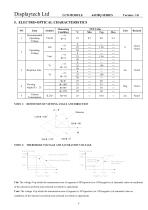
NOTE 2: THERSHOLD VOLTAGE AND SATURATION VOLTAGE Vth: The voltage Vop which the transmission rate of segment is 90%(positive) or 10%(negative) of saturated value on conditions of the selected waveform.(non-selected waveform is opposition) Vsat: The voltage Vop which the transmission rate of segment is 10%(positive) or 10%(negative) of saturated value on conditions of the selected waveform.(non-selected waveform is opposition)
Open the catalog to page 5
l.Driving waveform: static waveform. 2.Voltage applied to all segments NOTE 5: CONTRAST RATIO (CR) 5.1 POSITIVE TYPE: Measuring Methode Of Capacitance Voltage applied to all segments.
Open the catalog to page 6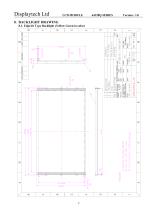
8. BACKLIGHT DRAWING 8.1. Edge-lit Type Backlight (Yellow Green in color)
Open the catalog to page 9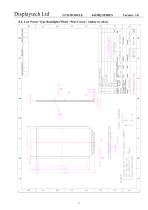
8.2. Low Power Type Backlight (White / Pure Green / Amber in color)
Open the catalog to page 10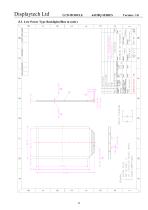
8.3. Low Power Type Backlight (Blue in color)
Open the catalog to page 11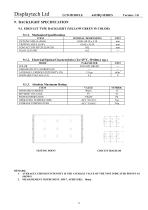
9. BACKLIGHT SPECIFICATION 9.1. EDGE-LIT TYPE BACKLIGHT (YELLOW GREEN IN COLOR) TESTING POINT CIRCUIT DIAGRAM 1. AVERAGE LUMINOUS INTENSITY IS THE AVERAGE VALUE OF THE NINE INDICATED POINTS AS SHOWN. 2. MEASUREMENT INSTRUMENT: BM-7, APERTURE: ' 10mm.
Open the catalog to page 12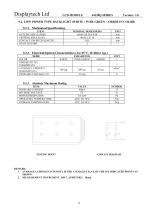
9.2. LOW POWER TYPE BACKLIGHT (WHITE / PURE GREEN / AMBER IN COLOR) TESTING POINT CIRCUIT DIAGRAM 1. AVERAGE LUMINOUS INTENSITY IS THE AVERAGE VALUE OF THE SIX INDICATED POINTS AS SHOWN. 2. MEASUREMENT INSTRUMENT: BM-7, APERTURE: ' 10mm.
Open the catalog to page 13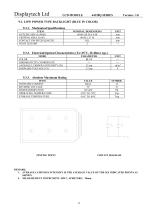
9.3. LOW POWER TYPE BACKLIGHT (BLUE IN COLOR) TESTING POINT CIRCUIT DIAGRAM 1. AVERAGE LUMINOUS INTENSITY IS THE AVERAGE VALUE OF THE SIX INDICATED POINTS AS SHOWN. 2. MEASUREMENT INSTRUMENT: BM-7, APERTURE: ' 10mm.
Open the catalog to page 14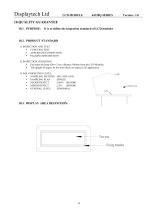
10.QUALITY GUARANTEE 10.1. PURPOSE: It is to define the inspection standard of LCD modules • FUNCTION TEST • APPEARANCE INSPECTION • PACKING SPECIFICTION • Put under the lamp (20w*2) at a distance 100mm from the LCD Modules. • Tilt upright 45 degree by the front (back) to inspect LCD appearance. • SAMPLING METHOD • SAMPLING PLAN • MAJOR DEFECT • MINOR DEFECT • GENERAL LEVEL 0.65% (MAJOR) 2.5% (MINOR) II/NORMAL
Open the catalog to page 15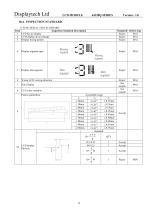
1) FUNCTIONAL TEST STANDARD Inspection Standard Description Defect type Display wrong pattern Display segment open Dimsegment I Dimsegment Reject Wrong LCD viewing direction Pattern parallelism
Open the catalog to page 16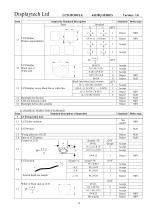
2) COSMETIC INSPECTION STANDARD
Open the catalog to page 17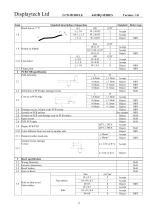
Standard description of inspection Standard Defect type Black line in L cd Line defect Finger print PCB/COB specification PCB deformity Deformity at PCB edge, damage circuit. Damage excess 2x2mm at the PCB corner Scratch on PCB coat/leakage coat on PCB surface Open circuit Color different from one side to another side. Repaired solder mask area Scratch circuit, damage Circuit Bezel specification
Open the catalog to page 18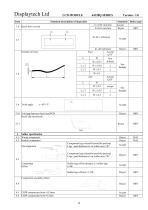
Standard description of inspection h≦0.01 mm/mm h>0.01 mm/mm Standard Defect type Accept Reject MIN 3.10 Void gap between bezel and PCB Bezel clip incorrectly 4 Solder specification 4.1 Wrong component 4.2 Broken component Reject Reject Component legs extend beyond the pad and Legs >pad distance(w) on solder area >W2 Component legs extend beyond the pad and Legs >pad distance(w) on solder area 1/4W 4.5 CHIP components hoist≦0.5mm 4.6 CHIP components hoist>0.5mm Accept Reject
Open the catalog to page 19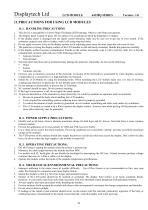
Displaytech Ltd LCD MODULE 64128Q SERIES Version : 1.0 1. This device is susceptible to Electro-Static Discharge (ESD) damage. Observe Anti-Static precautions. 2. The display panel is made of glass. Do not subject it to a mechanical shock by dropping it or impact. 3. If the display panel is damaged and the liquid crystal substance leaks out, be sure not to get any in your mouth. If the substance contacts your skin or clothes, wash it off using soap and water. 4. Do not apply excessive force to the display surface or the adjoining areas since this may cause the color tone to vary. 5. The polarizer...
Open the catalog to page 21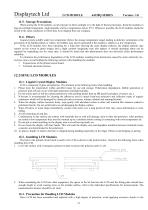
11.5. Storage Precautions When storing the LCD modules, avoid exposure to direct sunlight or to the light of fluorescent lamps. Keep the modules in bags (avoid high temperature / high humidity and low temperatures below 0°C). Whenever possible, the LCD modules should be stored in the same conditions in which they were shipped from our company. 11.6. Others Liquid crystals solidify under low temperature (below the storage temperature range) leading to defective orientation or the generation of air bubbles (black or white). Air bubbles may also be generated if the module is subject to a low temperature....
Open the catalog to page 22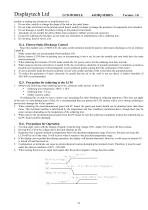
LCD MODULE 64128Q SERIES Version : 1.0 module or making any alterations or modifications to it. 1. Do not alter, modify or change the shape of the tab on the metal frame. 2. Do not make extra holes on the printed circuit board, modify its shape or change the positions of components to be attached. 3. Do not damage or modify the pattern writing on the printed circuit board. 4. Absolutely do not modify the zebra rubber strip (conductive rubber) or heat seal connector. 5. Except for soldering the interface, do not make any alterations or modifications with a soldering iron. 6. Do not drop, bend...
Open the catalog to page 23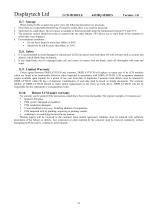
LCD MODULE 64128Q SERIES Version : 1.0 12.7. Storage When storing LCDs as spares for some years, the following precaution are necessary. 1. Store them in a sealed polyethylene bag. If properly sealed, there is no need for desiccant. 2. Store them in a dark place. Do not expose to sunlight or fluorescent light, keep the temperature between 0°C and 35°C. 3. The polarizer surface should not come in contact with any other objects. (We advise you to store them in the container in which they were shipped.) • Do not leave them for more than 168hrs. at 60°C. • Should not be left for more than 48hrs....
Open the catalog to page 24All Displaytech catalogs and technical brochures
 DT024ETFT-IPS, DT024ETFT-IPS-SHB
17 Pages
 DT024DTFT
11 Pages
 DT024CTFT & DT024CTFT-TS
13 Pages
 DT018BTFT, DT018BTFT-SHB
17 Pages
 DT018ATFT
12 Pages
 DT010ATFT
13 Pages
 64240C-Series
22 Pages
 64128P-Series
22 Pages
 64128N-Series
19 Pages
 64128M-Series
21 Pages
 64128LX-Series
21 Pages
 64128L-Series
21 Pages
 64128KX-Series
21 Pages
 64128K-FC-BW-RGB
25 Pages
 32128A-Series
19 Pages
 128240D-RGB-Series
21 Pages
 128240D-Series
21 Pages
 128240C-RGB-Series
21 Pages
 128240C-Series
21 Pages
- DC power supply
- AC/DC power supply
- LCD display panel
- CE power supply
- Compact power supply
- Lithium battery
- RGB display panel
- RoHS power supply
- IEC battery
- Graphic display panel
- SPI display
- UL power supply
- Adjustable thermostat
- Rectangular battery
- Monochrome display
- Dot-matrix display panel
- Power supply with USB outlet
- Digital thermostat