
- Catalogs
- Displaytech
- 128240C-RGB-Series

128240C-RGB-Series
128240C-RGB-Series
The 128240C-RGB Series LCD Module features a 240 x 128 dot display with a dot size of 0.22 x 0.22 mm. The view area is 70.0 mm x 35.0 mm, and the module size is 77.4 mm x 52.4 mm x 9.3 mm. It uses FSTN LCD type with a transflective polarizer and a viewing angle of 6/12 o'clock. The backlight is RGB LED with an external power driver, and the controller is ST7529-G, operating on a 1/144 duty and 1/12 bias.
Operating temperatures range from 0°C to 50°C, and storage temperatures from -10°C to 60°C. The power supply for logic is between -0.5V and 4.0V, and for LCD, it is between -0.5V and 20.0V.
At 25°C and VDD=3.0V, the power supply for LCM is between 2.85V and 3.15V. Input voltage levels are VIL (0.3VDD) and VIH (0.7VDD). The supply current for LCM is 2.0 mA, and for LED backlight, it is 80 mA.
The recommended operating voltage is 14.5V at 25°C. Response time is 240 ms for Tr and 200 ms for Tf at 25°C. The viewing angle is 40° at 0° and 35° at 180°.
The backlight dimensions are 77.40 x 52.40 x 9.30 mm, with a viewing area of 72.00 x 41.00 mm. It uses 4 SMT LEDs with a forward voltage of 3.2V and a forward current of 120mA. Operating temperature is -20°C to 70°C.
Inspection includes functional tests, appearance inspection, and packing specification. AQL inspection level follows MIL-STD-105D with a major defect rate of 0.65% and a minor defect rate of 2.5%.
Handle with care to avoid ESD damage, mechanical shock, and contamination. Use specified solvents for cleaning and ensure proper grounding during assembly. Avoid reverse polarity and ensure a clean power source.
- Do not plug or unplug the module while powered.
- Minimize cable length between module and host MPU.
- For EL backlights, avoid disabling by interrupting the HV line to prevent voltage extremes.
- Operate within specified temperature limits.
- Avoid improper soldering and use of flux cleaner.
- Mount module free from torque and stress.
- Handle LCD surface carefully to avoid scratches.
- Use anti-static procedures and prevent moisture build-up.
- Avoid direct sunlight and handle liquid crystal material with care.
- Avoid exposure to sunlight and fluorescent lamps.
- Store in conditions similar to shipping conditions.
- Maintain temperature within specified range.
- Avoid contact with hard objects and use recommended cleaning agents.
- Prevent condensation and avoid touching with bare hands.
- Ensure proper spacing to avoid stress on module surface.
- Ground yourself when handling LCM.
- Ensure same electric potential between module and body.
- Use grounded tools and maintain humidity at 50%-60%.
- Follow specified temperature and time for soldering.
- Protect LCD surface during soldering.
- Adjust VO for best contrast.
- Avoid driving LCD above voltage limits.
- Prevent condensation on terminals.
- Store in sealed polyethylene bags in dark places.
- Maintain temperature between 0°C and 35°C.
- Crush and wash damaged LCDs with solvents.
- Wash hands thoroughly if in contact with leaked liquid.
- One-year warranty for functionally defective modules.
- Cosmetic defects must be reported within 90 days.
- No warranty if precautions are disregarded.
- Modules must be returned with a description of failures.
- Version 1.0: Initial revision on 29 July 2008.
- Version 1.1: Added remark on 2 October 2008.
Catalog excerpts
Website: www.displaytech.com.hk Product: 128240C-RGB Series LCD Module (240 x 128 DOTS)
Open the catalog to page 1
Displaytech Ltd LCD MODULE 128240C-RGB SERIES Version : 1.1 P 2 of 21 ■ ABSOLUTE MAXIMUM RATINGS ■ PRECAUTIONS FOR USING LCD MODULES Contents in this document are subject to change without notice. No part of this document may be reproduced or transmitted in any form or by any means, electronic or mechanical, for any purpose, without the express written permission of Displaytech Ltd.
Open the catalog to page 2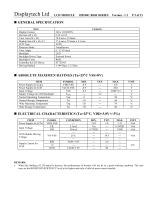
Displaytech Ltd LCD MODULE 128240C-RGB SERIES Version : 1.1 P 3 of 21 • When the loading of LCD panel is heavier, the performance of booster will not be in a good working condition. The user may set the BOOSTER EFFICIENCY level to be higher and only a little bit more current needed.
Open the catalog to page 3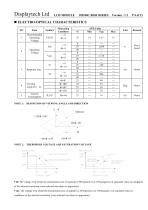
Displaytech Ltd LCD MODULE 128240C-RGB SERIES Version : 1.1 P 4 of 21 Displaytech Ltd LCD MODULE 128240C-RGB SERIES Version : 1.1 P 4 of 21 NOTE 1: DEFINITION OF VIEWING ANGLE AND DIRECTION NOTE 2: THERSHOLD VOLTAGE AND SATURATION VOLTAGE Vth: The voltage Vop which the transmission rate of segment is 90%(positive) or 10%(negative) of saturated value on conditions of the selected waveform. (non-selected waveform is opposition) Vsat: The voltage Vop which the transmission rate of segment is 10%(positive) or 10%(negative) of saturated value on conditions of the selected waveform. (non-selected waveform...
Open the catalog to page 4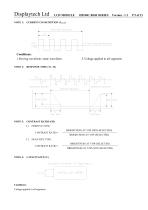
Displaytech Ltd LCD MODULE 128240C-RGB SERIES Version : 1.1 P 5 of 21 NOTE 3: CURRENT CONSUMPTION (I LCD) Displaytech Ltd LCD MODULE 128240C-RGB SERIES Version : 1.1 P 5 of 21 Conditions:l.Driving waveform: static waveform. 2.Voltage applied to all segments NOTE 4: RESPONSE TIME (Tr, Tf) NOTE 5: CONTRAST RATIO (CR) Measuring Methode Of Capacitance Voltage applied to all segments.
Open the catalog to page 5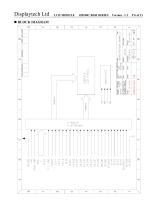
Displaytech Ltd BLOCK DIAGRAM
Open the catalog to page 6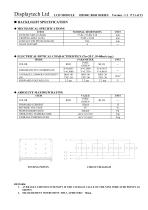
Displaytech Ltd LCD MODULE 128240C-RGB SERIES Version : 1.1 P 11 of 21 ♦ ABSOLUTE MAXIMUM RATING CIRCUIT DIAGRAM 1. AVERAGE LUMINOUS INTENSITY IS THE AVERAGE VALUE OF THE NINE INDICATED POINTS AS SHOWN. 2. MEASUREMENT INSTRUMENT: BM-7, APERTURE: ' 10mm.
Open the catalog to page 11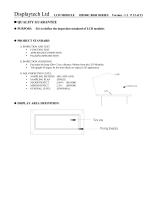
Displaytech Ltd LCD MODULE 128240C-RGB SERIES Version : 1.1 P 12 of 21 • FUNCTION TEST • APPEARANCE INSPECTION • PACKING SPECIFICTION • Put under the lamp (20w*2) at a distance 100mm from the LCD Modules. • Tilt upright 45 degree by the front (back) to inspect LCD appearance. • SAMPLING METHOD • SAMPLING PLAN • MAJOR DEFECT • MINOR DEFECT • GENERAL LEVEL 0.65% (MAJOR) 2.5% (MINOR) II/NORMAL View area Viewing boundary
Open the catalog to page 12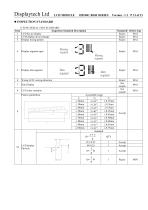
Displaytech Ltd LCD MODULE 128240C-RGB SERIES Version : 1.1 P 13 of 21 1) FUNCTIONAL TEST STANDARD Inspection Standard Description Defect type Display wrong pattern Display segment open Dimsegment I Dimsegment Reject Wrong LCD viewing direction Pattern parallelism
Open the catalog to page 13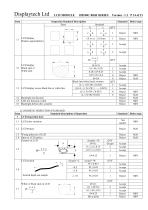
Displaytech Ltd LCD MODULE 128240C-RGB SERIES Version : 1.1 P 14 of 21
Open the catalog to page 14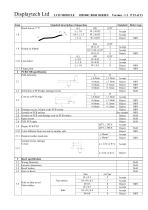
Displaytech Ltd LCD MODULE 128240C-RGB SERIES Version : 1.1 P 15 of 21 Standard description of inspection Defect type Line defect Finger print PCB/COB specification PCB deformity Deformity at PCB edge, damage circuit. Damage excess 2x2mm at the PCB corner Scratch on PCB coat/leakage coat on PCB surface Open circuit Color different from one side to another side. Repaired solder mask area Scratch circuit, damage Circuit Bezel specification
Open the catalog to page 15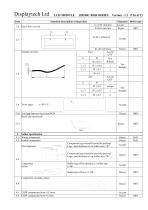
Standard description of inspection h≦0.01 mm/mm h>0.01 mm/mm Standard Defect type Accept Reject MIN 3.10 Void gap between bezel and PCB Bezel clip incorrectly 4 Solder specification 4.1 Wrong component 4.2 Broken component Reject Reject Component legs extend beyond the pad and Legs >pad distance(w) on solder area >W2 Component legs extend beyond the pad and Legs >pad distance(w) on solder area 1/4W 4.5 CHIP components hoist≦0.5mm 4.6 CHIP components hoist>0.5mm Accept Reject
Open the catalog to page 16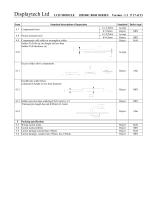
Displaytech Ltd LCD MODULE 128240C-RGB SERIES Version : 1.1 P 17 of 21
Open the catalog to page 17
Displaytech Ltd LCD MODULE 128240C-RGB SERIES Version : 1.1 P 18 of 21 ■ PRECAUTIONS FOR USING LCD MODULES 1. This device is susceptible to Electro-Static Discharge (ESD) damage. Observe Anti-Static precautions. 2. The display panel is made of glass. Do not subject it to a mechanical shock by dropping it or impact. 3. If the display panel is damaged and the liquid crystal substance leaks out, be sure not to get any in your mouth. If the substance contacts your skin or clothes, wash it off using soap and water. 4. Do not apply excessive force to the display surface or the adjoining areas since...
Open the catalog to page 18
Displaytech Ltd LCD MODULE 128240C-RGB SERIES Version : 1.1 P 19 of 21 When storing the LCD modules, avoid exposure to direct sunlight or to the light of fluorescent lamps. Keep the modules in bags (avoid high temperature / high humidity and low temperatures below 0°C). Whenever possible, the LCD modules should be stored in the same conditions in which they were shipped from our company. Liquid crystals solidify under low temperature (below the storage temperature range) leading to defective orientation or the generation of air bubbles (black or white). Air bubbles may also be generated if the...
Open the catalog to page 19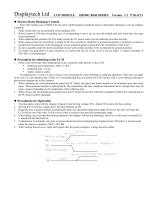
Displaytech Ltd LCD MODULE 128240C-RGB SERIES Version : 1.1 P 20 of 21 Since this module uses a CMOS LSI, the same careful attention should be paid to electrostatic discharge as for an ordinary CMOS IC. 1. Make certain that you are grounded when handing LCM. 2. Before remove LCM from its packing case or incorporating it into a set, be sure the module and your body have the same electric potential. 3. When soldering the terminal of LCM, make certain the AC power source for the soldering iron does not leak. 4. When using an electric screwdriver to attach LCM, the screwdriver should be of ground...
Open the catalog to page 20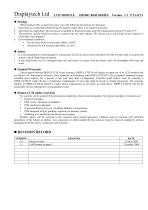
Displaytech Ltd LCD MODULE 128240C-RGB SERIES Version : 1.1 P 21 of 21 When storing LCDs as spares for some years, the following precautions are necessary. 1. Store them in a sealed polyethylene bag. If properly sealed, there is no need for desiccant. 2. Store them in a dark place. Do not expose to sunlight or fluorescent light, keep the temperature between 0°C and 35°C. 3. The polarizer surface should not come in contact with any other objects. (We advise you to store them in the container in which they were shipped.) • Do not leave them for more than 168hrs. at 60°C. • Should not be left for...
Open the catalog to page 21All Displaytech catalogs and technical brochures
 DT024ETFT-IPS, DT024ETFT-IPS-SHB
17 Pages
 DT024DTFT
11 Pages
 DT024CTFT & DT024CTFT-TS
13 Pages
 DT018BTFT, DT018BTFT-SHB
17 Pages
 DT018ATFT
12 Pages
 DT010ATFT
13 Pages
 64240C-Series
22 Pages
 64128Q-Series
24 Pages
 64128P-Series
22 Pages
 64128N-Series
19 Pages
 64128M-Series
21 Pages
 64128LX-Series
21 Pages
 64128L-Series
21 Pages
 64128KX-Series
21 Pages
 64128K-FC-BW-RGB
25 Pages
 32128A-Series
19 Pages
 128240D-RGB-Series
21 Pages
 128240D-Series
21 Pages
 128240C-Series
21 Pages
- DC power supply
- AC/DC power supply
- LCD display panel
- CE power supply
- Compact power supply
- Lithium battery
- RGB display panel
- RoHS power supply
- IEC battery
- Graphic display panel
- SPI display
- UL power supply
- Adjustable thermostat
- Rectangular battery
- Monochrome display
- Dot-matrix display panel
- Power supply with USB outlet
- Digital thermostat