
- Catalogs
- D.Electron
- G-Code programming manual

G-Code programming manual

G-Code programming manual
This document is a programming guide for CNC Z32 milling machines, aimed at users of D.Electron products. It emphasizes the importance of reading the guide thoroughly before installation and notes that information may change for performance improvements.
This section covers the fundamentals of programming, including machine behavior at reset, line numbering, and ISO line standards. It discusses G functions for feed and speed management, M functions for machine behavior, and tool change processes.
Details on programming movements such as rapid movement, linear and circular interpolation, and threading techniques are provided. Incremental coordinates programming and rigid tapping are also covered.
This section addresses tool radius correction, including error handling, approach and retract processes, and feed management with radius correction.
RTCP for rotating heads and turntables is explained, including static and dynamic usage, workpiece mounting errors compensation, and tool tip constant velocity.
Parametric programming involves parameter management, advanced lines, conditioning blocks, and program block repetition. It also covers writing CMOS programs and temporary subprograms.
This section introduces Z32 fixed cycles and provides examples such as drilling and deep drilling with chip breakage and extraction.
Includes rotation, translation, mirroring, and scale factor adjustments for machining operations.
G116 allows for roto-translation of machining on three axes, affecting all programmed movements.
Includes dwell, axes change, alive axes management, and positioning threshold scenarios.
Functions for suspending tool changes and reading mounted tool values are detailed.
Functions for reading real positions and programming radial/diametrical movements are explained.
Allows movement of axes with transducer alarms in semiauto mode.
Sets limits on continuous axes with modes for alarm, normal, and stop.
Automatic adjustment of profiles based on tool radius is discussed.
G109R can diagnose and resolve incompatible profile errors.
Methods for initiating radius correction are described.
Examples of programming machine movements using parametric expressions are provided.
System parameters can be assigned numeric values through parametric programming.
Parameters for programming axis movements independently of their real names are explained.
Advanced lines allow for logic-parametric programming, including conditional jumps and assignments.
Blocks of programs can be repeated using specific instructions.
The process for defining and executing CMOS programs and subprograms is outlined.
Temporary subprograms are defined and cleared after execution.
Fixed cycles and macros available in the Z32 CNC system are described.
Examples of fixed cycles such as drilling and tapping are provided.
Positioning macros are used in combination with fixed cycles or machining macros.
Parameters defined as optional in macros can be omitted if not needed.
Various G801K macros are detailed for different geometric configurations.
Machining macros are system subprograms activated by specific commands.
Machining macros can be used as fixed cycles by programming specific parameters.
Examples of programming syntax for activating and using machining macros are included.
The guide provides comprehensive instructions for CNC Z32 programming, emphasizing flexibility and customization through optional parameters and macro configurations.
Catalog excerpts

Document M323C0 31.01.07 Read thoroughly before installation Contains important information on: programming > This manual contains information exclusively devoted to the user of D.Electron products to allow a correct usage of delivered devices. No part of this manual can be duplicated or delivered to third parties for an usage not corresponding to that indicated.All information here contained have been accurately checked to be exact and reliable, but D.Electron doesn֒t assume any responsibility for possible inaccuracies. D.Electron reserves the right to make all modifications necessary to improve the performance and reliability of its products. D.Electron - Via R. Giuliani 140 - 50141 Firenze ITALY Internet: www.delectron.itTel ++39 - 055 - 416927 Fax ++39 - 055 - 434220 email [email protected] size="-1">
Open the catalog to page 1
CNC Z32 - Programming guide (Milling Machines) > This manual contains a simplified description of Z32 control programming. This document doesnt contain a detailed description of all functionalities available, focusing only on the most common and useful for the programming of milling machines or machining centers. For a complete and detailed description of all functionalities available in the Z32 numerical control, please consult ғProgramming Manual M96 .This manual is valid for SIS T109-8 version or later. >
Open the catalog to page 7
CNC Z32 - Programming guide (Milling Machines) > The base programming Z32 numerical controls follows the indications of ISO directions. The program for a workpiece (or part-program) is a text file composed by a series of instructions stored in sequential way. The ISO lines are composed by a line number (not mandatory) and by a series of elementary instructions. 2.1.1 Machine behavior at reset The machine behavior at reset is defined as the condition assumed by the machine when the pushbutton Reset Ӕ is pressed on the console. This behavior is important because it determines the machine functionality...
Open the catalog to page 8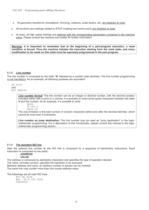
CNC Z32 - Programming guide (Milling Machines) All geometric transforms, translations, mirroring, rotations, scale factors, etc. are disabled at reset . All functions and settings related to RTCP (rotating tool centre point) are disabled at reset . At reset, all high speed settings are restored with the corresponding parameters contained in the machine setup . Please consult the machine tool builder for further information. Warning : it is important to remember that at the beginning of a part-program execution, a reset condition is forced. Thus the machine initiates the execution starting from...
Open the catalog to page 9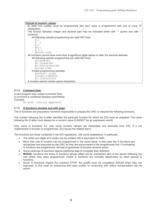
CNC Z32 - Programming guide (Milling Machines) Format of numeric values : - At least one number must be programmed (the zero value is programmed with one or more 0Ӕ characters) - The division between integer and decimal part may be indicated either with .Ӕ (point) and with ,Ӕ (comma). All following sample programming are valid ISO lines: X.1 X .1 X,1 X0,1 X 0.1 X00000,1000 - All numbers cannot have more than 9 significant digits before or after the decimal delimiter. All following sample programming are valid ISO lines: X123456789 X0.123456789 X0.0000123456789 X12345.6789 Invalid programming...
Open the catalog to page 10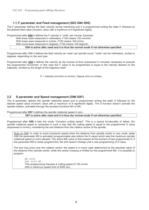
CNC Z32 - Programming guide (Milling Machines) > The F parameter defines the feed velocity during machining and it is programmed writing the letter F followed by the desired feed value (numeric value with a maximum of 9 significant digits). Programmed after G94 it defines the F velocity in unitsӔ per minute. Example: With linear axes measured in millimeters, F100 means 100 mm/min. With linear axes measured in inches, F100 means 100 in/min. With round axes measured in degrees, F100 means 100 deg/min. G94 is active after reset and it is thus the normal mode if not otherwise specified. Programmed...
Open the catalog to page 11
CNC Z32 - Programming guide (Milling Machines) > The M functions (miscellaneous) are mainly related to the machine tool behavior and their functionality is mostly defined by the machine tool builder. All M functions require a machine stop. The ISO standards indicate the functionality of many M codes: only some M codes are decoded and managed by the Z32, and only these codes will be discussed. The numeric value (two integer digits) following the letter MӔ, indicates the programmed M function. All leading zeros can be omitted (G0 = G00). ISO MӔ codes M0 - stop It stops the program execution; program...
Open the catalog to page 12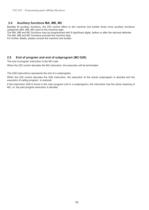
CNC Z32 - Programming guide (Milling Machines) 2.4 Auxiliary functions MA, MB, MC > Besides M auxiliary functions, the Z32 control offers to the machine tool builder three more auxiliary functions categories (MA, MB, MC) sent to the machine logic. The MA, MB and MC functions may be programmed with 9 significant digits, before or after the decimal delimiter. The MA, MB and MC functions provoke the machine stop. For further details, please consult the machine tool builder. 2.5 End of program and end of subprogram (M2 G26) > The end of program instruction is the M2 code. When the Z32 control decodes...
Open the catalog to page 13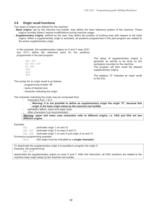
CNC Z32 - Programming guide (Milling Machines) > Two types of origins are defined for the machine: - Base origins : set by the machine tool builder, they define the fixed reference system of the machine. These origins normally doesnt require modifications during machine usage. - Supplementary origins : defined by the user, they define the position of working area with respect to the base origins. When a supplementary origin is activated, all positions programmed in the part-program are related to the active supplementary origin. The setup of supplementary origins is generally an activity to be...
Open the catalog to page 14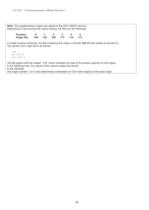
CNC Z32 - Programming guide (Milling Machines) Note : The supplementary origins are stored in the CNC CMOS memory. Depending on the process the origins belong, the files are the following: Process: 0 1 2 3 4 5 Origin file: 126 123 120 117 114 111 In single process machines, the file containing the origins is the file 126 (the file related to process 0). The syntax of an origin file is as follows: :OS X1=123.4 Y1=-231.5 The file begins with the header œ:OS which indicates the start of the section specific for the origins In the following lines, the values of the various origins are stored. In...
Open the catalog to page 15All D.Electron catalogs and technical brochures
 Z32 Products
8 Pages
 Z32 Programming Depliant
8 Pages
 Z32 SOLO CNC
2 Pages
 DSM-Series AXIS SERVOMOTORS
2 Pages
 Z32 SLIM SYSTEM
2 Pages
 Z-Star2 SERVODRIVES
2 Pages
 SOLO
SOLO2 Pages
 MOTOR DIMENSIONS
1 Page
 MOTORS SPINDLE DIMENSIONS
2 Pages
 Z32 SLIM SYSTEM
2 Pages
 DSM Series
1 Page


Archived catalogs
 Z32 human-machine-interface
38 Pages
 programming brochure
8 Pages
 products brochure
8 Pages

- Electromotor
- Synchronous motor
- Multipole motor
- Automation software solution
- Asynchronous motor
- Digital I/O
- EC motor
- USB keyboard
- Industrial keyboard
- Real-time software
- Three-phase motor
- Windows software
- IO module
- Control software
- Panel-mount keyboard
- Compact electromotor
- Analog I/O
- Keyboard with mechanical keys
- 2-pole motor
- Digital IO module