
- Catalogs
- Cubic Sensor and Instrument Co.,Ltd
- Test Instruction of AM1008W

- Company
- Products
- Catalogs
- News & Trends
- Exhibitions
Test Instruction of AM1008W

Test Instruction of AM1008W
To begin the testing process, ensure you have the following items ready: a test kit, connect cable, USB data line, Sensor-AM1008W, and the AM1008W Sensor Test Software.
Follow these steps to establish the necessary connections:
- Connect the test kit with the AM1008W sensor.
- Attach the USB data line to the test board.
- Connect the USB data line to the PC.
To configure the serial port, perform the following:
- Open and set the serial port with the following parameters: COM*, Baud rate: 9600, Data bits: 8, Stop bits: 1, Parity: None.
- Ensure the correct port number is selected on your computer.
- Set the receive and send settings to Hex.
- Send the appropriate command as instructed.
Open the AM1008W RS232 protocol and send the command: 11 02 01 01 EB (DF0 added). The expected response will provide data on CO2, VOC, RH, Temperature, and particulate matter (PM1.0, PM2.5, PM10) in both GRIMM and TSI formats. The response data is structured with specific bits representing each measurement.
Temperature data is adjusted by adding 500 to the practical measurement result. For example, a measurement of -20℃ corresponds to a value of 300. The formula for temperature value is (DF7 * 256 + DF8 - 500)/10. Measurement results are calculated using the formula: DFn * 256 + DFn+1.
Cubic Sensor and Instrument Co., Ltd. can be contacted via phone at +86-027-8162 8827, fax at +86-027-87401159, or email at [email protected]. Their website is www.gassensor.com.cn, and they are located at Fenghuang Yuan No.3 Road, Fenghuang Industrial Park, Eastlake Hi-tech Development Zone, Wuhan 430205, China.
Catalog excerpts
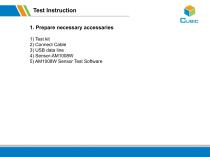
Test Instruction 1. Prepare necessary accessaries 1) Test kit ●正文第一级内容(24号) 2) Connect Cable 3) USB data line ● 正文第二级内容(20号) 4) Sensor-AM1008W ●正
Open the catalog to page 2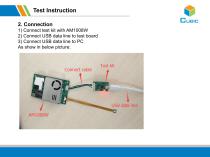
Test Instruction 2. Connection 1) Connect test kit with AM1008W 2) Connect USB data line to test board 3) Connect USB data line to PC ●正文第一级内容(24号) As show in below picture:
Open the catalog to page 3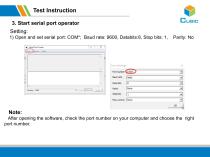
Test Instruction 3. Start serial port operator Setting: 1) Open and set serial port: COM*; Baud rate: 9600, Databits:8, Stop bits: 1, After opening the software, check the po
Open the catalog to page 4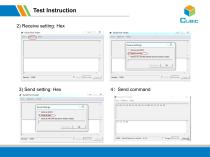
Test Instruction 2) Receive setting: Hex
Open the catalog to page 5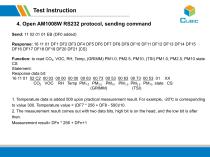
Test Instruction 4. Open AM1008W RS232 protocol, sending command Send: 11 02 01 01 EB (DF0 added) 1. Temperature data is added 500 upon practical measurement result. For example, -20℃ is corresponding to value 300. Temperature value = (DF7 * 256 + DF8 - 500)/10. 2. The measurement result comes out with two data bits, high bit is on the head, and th
Open the catalog to page 6
Cubic Sensor and Instrument Co., Ltd. Tell: +86-027-8162 8827 Fax: +86-027-87401159 Email: [email protected] Web: www.gassensor.com.cn Address: Fenghuang Yuan No.3 Road, Fenghuang Industrial Park, Eastlake Hi-tech Development Zone, Wuhan 430205, China
Open the catalog to page 7All Cubic Sensor and Instrument Co.,Ltd catalogs and technical brochures
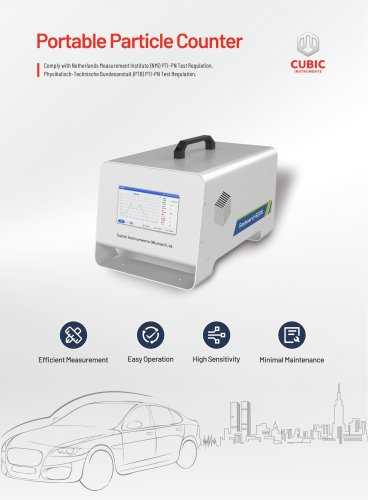
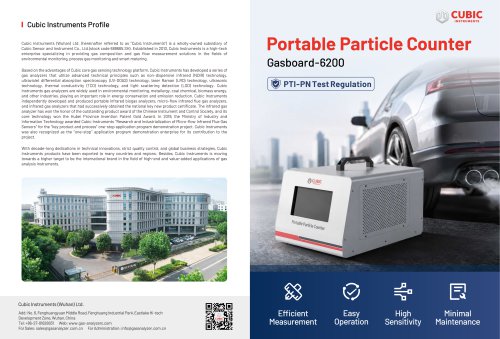 Portable Particle Counter
2 Pages
 Cubic TDLAS CH4 Sensor
4 Pages
 Gasboard-7500H-OPC
13 Pages
 NDIR CO2 Sensor Module-CM1106LS
18 Pages
 Laser Particle Sensor-PM2008M-M
22 Pages
 Laser Particle Sensor-PM2012
19 Pages
 Test Instruction of AM4100-I
7 Pages
 Test Instruction of PM5000
7 Pages
 Test Instruction of PM1006
8 Pages
 Test Instruction of CM1107T
7 Pages
 Test Instruction of CM1107BN
8 Pages
 Test Instruction of PM3006T
7 Pages
 Test Instruction of PM2009
8 Pages
 Test Instruction of CM1106SH
8 Pages
 Test Instruction of CM1107
8 Pages
 Test Instruction of CM1106S
8 Pages
 Test Instruction of CM1106LS
8 Pages
 Laser Particle Sensor-PM2008
21 Pages
 Laser Particle Sensor-PM2009
20 Pages
 Laser Particle Sensor-PM2105-M
20 Pages
 NDIR CO2 Sensor Module-CM1106S
18 Pages
 Gas Sensor Line-up
1 Page
 About Cubic
1 Page
 CEMS Solution - Gasboard 9050
22 Pages
 NDIR CO2 Sensor Modules
7 Pages
 Gasboard-7020
4 Pages
 Gasboard-7500
7 Pages
 Mainstream ETC02 module
5 Pages
 Gasboard 3400P
5 Pages
 Analyzer Gasboard 3800P
6 Pages
 LANDFILL APPLICATIONS
8 Pages













Archived catalogs
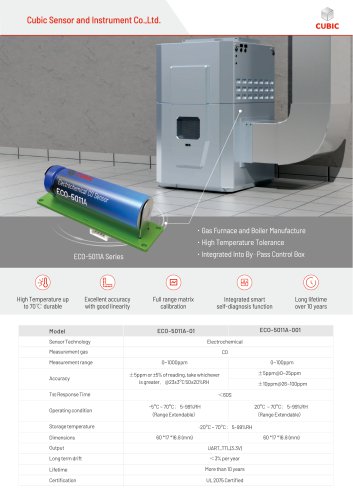 Cubic CO Sensor Brochure
2 Pages
 Air quality monitor AM7000
11 Pages
 RHB Series
8 Pages
 Syngas portable analyzers
4 Pages
 Opacity meter
1 Page
 Infrared Methane gas sensor
3 Pages


- Cubic flow meter
- Cubic volume flow meter
- Liquid flow monitor
- Cubic gas analyzer
- Cubic concentration analyzer
- Cubic monitoring analyzer
- Cubic liquids analyzer
- Measuring machine
- Cubic automatic analyzer
- Calibration system
- Cubic waterproof flow meter
- Cubic gas flow meter
- Benchtop analyser
- Cubic solids analyzer
- Stainless steel flow monitor
- Air blower
- Industrial flow monitor
- Cubic process analyzer
- Gas detector
- Pressure probe