

【NEW】WFK2 Series Wiring method

【NEW】WFK2 Series Wiring method
Catalog excerpts
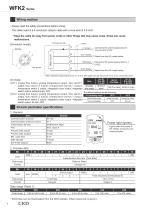
WFK2 Series Wiring method * Keep the cable far away from power cords or other things that may cause noise. Noise can cause malfunctions. Connector pin No. [Connector (male)] Allowable load weight IO-Link/Analog output Power light (green) Transmission bit rate Port Lights when the power is Error WARNING Flow rate range
Open the catalog to page 1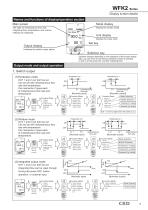
WFK2 Series Names and functions of display/operation section Main screen Mode display at the same time, and then releasing them. Output mode and output operation Can memorize 2 types each [Normally open] [Normally closed] Mode selection 2 seconds several seconds Response Time NPN/PNP Unit Select Swich_ Switch_ Mode Select Lower Limit Upper Limit Hysteresis Can memorize 2 types each [Normally open] [Normally closed] Mode selection several seconds Response Time NPN/PNP Unit Switch_ Mode Select Lower Limit Upper Limit Hysteresis Select Swich_ Threshold (Lo 1) setting Threshold (Hi 1) setting Hysteresis...
Open the catalog to page 2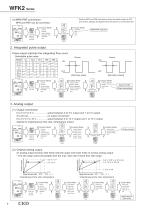
WFK2 Series (4) NPN/PNP conversion NPN and PNP can be converted. 2 seconds several seconds NPN/PNP selection Select NPN/PNP Response Time NPN/PNP Unit Press [Normally open] [Normally closed] Response Time NPN/PNP Unit Switch_Integrated Setting. Press Exit Integrated. Press 2 seconds several seconds Response Time NPN/PNP Unit Select Analog_Flow or Analog_Temp Range conversion 2 seconds several seconds Response Time NPN/PNP Unit Select Analog_Flow or Analog_Temp Lower Limit Upper Limit Exit Upper/Lower limit Press
Open the catalog to page 3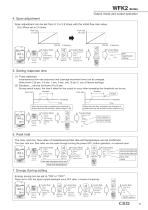
Flow rate 5 L/min Flow rate Span 2 seconds several seconds Response Time NPN/PNP Unit Color Peak Hold_Q Peak Hold_T Change the page with Select Span Times Exit 5. Setting response time (1) Timer selection Flow rate Response Time Timer 2 seconds several seconds Response Time NPN/PNP Unit Timer selection Sec Select Response Time Sec Exit Press 2 seconds several seconds Response Time NPN/PNP Unit Change the page with Color Peak Hold_Q Peak Hold_T Select Peak _Hold_ Peak Hold_Q Max L/min Min L/min Reset Exit Peak hold Reset Energy Saving 2 seconds several seconds Response Time NPN/PNP Unit Change...
Open the catalog to page 4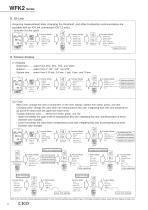
2 seconds several seconds Response Time NPN/PNP Unit Change the page with 2 seconds several seconds Response Time NPN/PNP Unit Change the page with Brightness Rotation Update Time Exit Color Peak Hold_Q Peak Hold_T character color changes. character color changes. 2 seconds several seconds Response Time NPN/PNP Unit Change the page with Color Flow Rate Integrated Flow Color Peak Hold_Q Peak Hold_T Select Color Exit Color Flow Rate Main Color Changed Color Lower Limit Upper Limit Upper/Lower limit setting Select Main Color Flow Rate Main Color White Green Red Exit Color Flow Rate Main Color Changed...
Open the catalog to page 5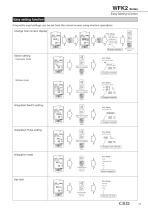
WFK2 Series Easy setting function Change main screen display Flow Rate Integrated Flow Selection Switch setting Hysteresis mode Hy °C Change threshold Press Window mode °C Change threshold Press Integrated Switch setting L °C Change threshold Press Integration reset Reset Integrated Flow? No Yes Reset integration Key lock Key lock UnLock Lock
Open the catalog to page 6All CKD catalogs and technical brochures
 【NEW】ABP2-HP1・AT2 Series Catalog
16 Pages
 FP Series Precautions
7 Pages
 FP Series Introduction
10 Pages
 【NEW】WFK2 Series Catalog
24 Pages
 【NEW】WFK2 Series Precautions
6 Pages
 MN4GA / 4GB
140 Pages
 4GD1 to 3R, 4GE1 to 3R
261 Pages
 MV3QR
MV3QR16 Pages
 4F ** 0EX series
28 Pages
 Pilot operated 5-port valve
74 Pages
 MV3QRA1/MV3QRB1 Series
20 Pages
 PV5G/PV5/GMF/PV5S-0
76 Pages
 4G unit valve
4 Pages
 SCP*3 Series
60 Pages
 SCS2 series
56 Pages
 Rodless cylinder SRL3
89 Pages
 Linear slide cylinder LCG
58 Pages
 Linear slide cylinder LCM
52 Pages
 Linear slide cylinder LCX
64 Pages
 Guided cylinder STM
24 Pages
 Cartridge cylinder CAT
6 Pages
 Compact cylinder SSD
221 Pages
 Compact cylinder SSD2
278 Pages
 Guided compact cylinder SSG
16 Pages
 Medium bore size cylinder SCS
46 Pages
 Medium bore size cylinder SCA2
161 Pages
 Tie rod cylinder SCG
87 Pages
 Medium bore size cylinder CMK2
107 Pages
 Round shaped cylinder SCM
116 Pages
 Medium bore size cylinder CMA2
20 Pages
 Pencil shaped cylinder SCP*3
60 Pages
 LMD series
15 Pages
 KBZ series
64 Pages
 AGD21R-A series
4 Pages
 WXU series
32 Pages
 AX6000M
24 Pages
 SCS-G Series
2 Pages
 CMK2 SR
7 Pages
 CMK2 Series Double acting
7 Pages
 SSD-F/SSD-KF Series
1 Page
 CMK2-T Series
1 Page
 SCPS2-V Series
4 Pages
 SCPD2-*C Series
1 Page
 SCPD2-K Series
3 Pages
 SCPS2-MSeries
4 Pages
 SCPD2-D/SCPD2-DT Series
3 Pages
 SCPD2-F Series
2 Pages
 SCPD2 Serie
3 Pages
 SCPD2 Series
2 Pages
 SCPS Series
1 Page
 SCM Series ø 20 to ø 63
2 Pages
 SCM Series
2 Pages
 GHV series
4 Pages
 High purity gas systems
2 Pages
 Component for chemicals
2 Pages
 Labor-Saving products
8 Pages
 General purpose valve
1 Page
 Pneumatic valves
8 Pages
 Pneumatic cylinders
12 Pages


Archived catalogs


- Valve
- Manual valve
- Control valve
- Flowmeter
- Cylinder
- Pneumatic valve
- Volume flow monitor
- Actuator
- Electrically operated valve
- Regulating valve
- Linear actuator
- Electric actuator
- Packing machine
- Gas solenoid valve
- 2-way solenoid valve
- NC solenoid valve
- Directional control valve
- Gas valve
- Double-acting cylinder
- Direct-operated solenoid valve