
- Catalogs
- CHINO CORPORATION
- TRAMS IV

TRAMS IV

TRAMS IV
- Easy setup of various parameters.
- Simultaneous connection of recorders, controllers, and indicators.
- Data analysis and report output using Excel.
- Real-time data monitoring and trend graph display.
- Parameter settings can be done online, from a file, or through device selections.
- Data acquisition includes real-time trend and numeric value display.
- Data analysis allows for trend graph replay and report output.
- Requires .NET Framework 4.0 and Microsoft Excel (2007-2016).
- Compatible with Windows 7, 8.1, and 10 (32-bit/64-bit).
- Minimum hardware requirements include a 1GHz CPU, 1GB RAM (32-bit), and 2GB RAM (64-bit).
- Supports various CHINO devices with specific communication protocols and file compatibility.
- MODBUS protocol is used for serial communication.
- Some devices require specific engineering cables for parameter setting.
- Ensure compatibility of communication interfaces when purchasing devices.
- Files from CHINO's KIDS and ZAILA software are not compatible with TRAMS IV.
Catalog excerpts

Integrated Package Software TRAMS IV Easy parameter set up of recorder, controllers, and indicators! Max. 100 points of data acquisition, data replay and analysis are available. NEW Integrated package software TRAMS IV is software to set parameters of CHINO recorders, controllers, and indicators, and acquire and analyze measured data. ●Easy set up of various parameters ●Max. 100 points of data acquisition and monitoring ●Recorders, controllers, and indicators can be connected at the same time ●Support Ethernet, serial communication, and USB (only when connected by engineering cable) ●Data analysis function is available ●Report output using
Open the catalog to page 1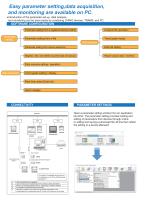
Easy parameter setting,data acquisition, and monitoring are available on PC. ●Introduction of the parameter set up, data analysis, and monitoring can be done easily by combining CHINO devices, TRAMS, and PC. SOFTWARE CONFIGURATION Parameter setting Parameter setting from a registered device (online) Analysis file operation Parameter setting from a file Trend graph replay Data analysis Parameter setting from device selections Data list replay Register, edit, and delete acquired data and groups Report output (daily / monthly) Data memory setting / operation Data acquistion Data Trand graph setting...
Open the catalog to page 2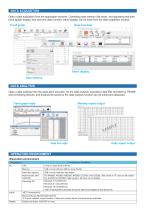
DATA ACQUISITION Open a data acquisition from the application launcher. Controlling data memory (file save), and displaying real time trend (graph display) and real time data (numeric value display) can be done from the data acquisition window. Trend graph Real time data Alarm display Data memory DATA ANALYSIS Open a data analysis from the application launcher. On the data analysis, acquisition data files recorded by TRAMS and connecting devices, and analysis file saved by the data analysis function can be unfold and displayed. Monthly report output Trend graph reply Data list reply Daily report...
Open the catalog to page 3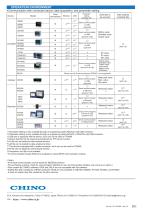
OPERATION ENVIRONMENT ●Communication with connected device, data acquisition, and parameter setting Device Serial communication Parameter setting (readable file) Senal communication or USB (pasconf/ ds/ dp) Serial communication or USB (pasconf / pkp) Setting value Indicated value Output value Serial communication or USB (pasconf) Data analysis (readable file) Serial communication or USB (pasconf) Data able to be acquired SP value PV value MV value Setting value Indicated value Output value Input switch status*(*Only DP2000G) Please use the SB setting software.(TRAMS is not supported.) Measured...
Open the catalog to page 4All CHINO CORPORATION catalogs and technical brochures
 IR-CZ series
8 Pages
 Pt-Co Temperature Probe
2 Pages
 LH100
LH1004 Pages
 ELECTRONIC MINI-RECORDER
2 Pages
 MR SERIES CARD LOGGERS
8 Pages
 General Catalog
14 Pages
 IR-BAT SERIES
4 Pages
 IR-FA SERIES
6 Pages
 IR-TA SERIES
2 Pages
 MODEL IR-TE
2 Pages
 On-line model
12 Pages
 C800
C8004 Pages
 KT-H503/KT-H504
2 Pages
 IR-R0A
2 Pages
 R000
R0004 Pages
 HN-EK
HN-EK2 Pages
 HN-EH
HN-EH2 Pages
 IR-HA
IR-HA2 Pages
 IR-TE
IR-TE2 Pages
 DP2000G
4 Pages
 KP3000
6 Pages
 AL4000 Dot-printing
6 Pages
 AH4000 Dot-printing
6 Pages
 KR3S
KR3S6 Pages
 KR5100
4 Pages
 HYBRID MEMORY RECORDER
8 Pages
 GRAPHIC RECORDER
6 Pages
 IR-BZ
IR-BZ2 Pages
 MILA-C5000PN
4 Pages
 Three-Phase JW
6 Pages
 Single-phase JU
4 Pages
 On-line model IR-SA
4 Pages
 Strip Chart Recorder ES600
2 Pages
 KR3000
6 Pages
 Sheathed Thermocouples
12 Pages
 Solidpak NC
6 Pages
 Fiber optic model
6 Pages
 Thermal Imaging Sensor
4 Pages
 Digital Program Setter
6 Pages
 Data Scanner
4 Pages
 Hybrid Recorder
6 Pages
 Hybrid Memory Recorder
6 Pages


Archived catalogs
 TP-S ( Termal image )
2 Pages
 KL4000
6 Pages
 AH4000 PEN
8 Pages
 KH4000
6 Pages
 AL4000 PEN
6 Pages
 EH3000 PEN
4 Pages
 KR2S
KR2S6 Pages
 TP
TP4 Pages
 Temperature Logger: MR5300
8 Pages
 Strip Chart Recorder: LE5000
8 Pages
 Graphic Recorder: KR2000
6 Pages
 Ubiquitous Recorder
4 Pages


- Temperature probe
- Concentration analyzer
- Data logger
- Resistance temperature sensor
- Test stand
- Calibration system
- Temperature datalogger
- Digital temperature control
- Digital pyrometer
- Digital indicator
- Panel panel meter
- Industrial thermometer
- Continuous analyzer
- Compact imager
- USB datalogger
- Thermocouple temperature transducer
- Pt100 temperature transducer
- Temperature controller
- Thermographic camera
- Data-logger with screen