
- Catalogs
- ChefsTemp (Leadtek Inc.)
- PROTEMP S1 SMART THERMOMETER HUB

PROTEMP S1 SMART THERMOMETER HUB
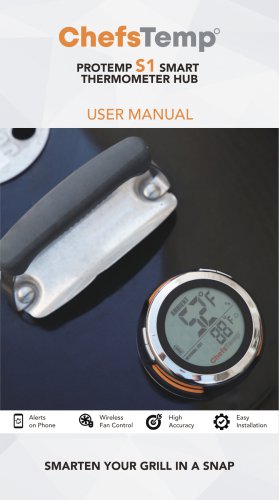
PROTEMP S1 SMART THERMOMETER HUB
The ProTemp S1 Smart Thermometer Hub provides wireless fan control, high accuracy, and easy installation. It supports iOS and Android devices via the ChefsTemp App, enabling unlimited range monitoring through Wi-Fi or Bluetooth. It can connect up to four wire-free probes and is compatible with the Breezo Fan. The temperature range is 32-1022°F (0-550°C), and the battery lasts up to 40 hours on Wi-Fi and 300 hours on Bluetooth.
The package includes the ProTemp S1 main and base units, a user manual, a 5V/2A DC adapter, and a Type-C charging cable. It features buttons for pairing, Wi-Fi, power, and temperature unit switching, and has a built-in rechargeable lithium battery.
Replace the original analog thermometer on the grill lid with the ProTemp S1. Install close to the food and away from the air outlet for accuracy. Specific procedures exist for different bases (Universal and BGE).
Download the ChefsTemp App, register, and log in. Pair the device via Bluetooth and Wi-Fi following app instructions. The device has buttons for power, channel cycling, Wi-Fi, and pairing.
The app allows setting alarms for ambient temperature, adjusting temperature compensation, and updating firmware. Use temperature compensation cautiously to maintain accuracy.
The optional wireless probe, made of stainless steel and zirconia ceramic, measures internal and ambient temperatures. Follow specific insertion guidelines to avoid damage. The 2nd-Gen Probe offers a slimmer design and higher temperature resistance.
Connect the Breezo Fan to the ProTemp S1 for enhanced cooking control. Instructions for pausing and resuming the fan during cooking are provided.
Regular cleaning and maintenance are recommended. Troubleshooting guides and warranty information are available. Contact customer support or visit the online Help Center for assistance.
- Allow the probe to cool before handling and use heat-resistant gloves.
- Avoid using the probe in microwaves, pressure cookers, or steam ovens.
- Do not drop the probe or use abrasive cleaning products.
- Charge the probe using the 4-in-1 Charger until the blue light turns off.
- Use the app to add probes by selecting them from the nearby list.
- Connect the probe, set up the cook using custom or preset temperatures, and start cooking.
- The app will alert when the target temperature is reached.
- Connect the Breezo Fan to the ProTemp S1 for precise temperature control in charcoal grills and smokers.
- Use the app to pause or resume the fan during cooking.
- Keep the ProTemp S1 in a cool, dry place and clean with a damp cloth.
- Charge the device every two months if not in use to maintain battery health.
- Resolve Wi-Fi and Bluetooth connection issues by checking permissions, resetting the device, and ensuring proper settings.
- For charging issues, use the original adapter and cable, and ensure firmware is updated.
- The product is warranted for one year against defects in materials and workmanship under normal use.
- Exclusions include damage from improper use, commercial use, and natural disasters.
- The device complies with FCC regulations and should be used with a minimum distance of 20 cm from the antenna.
- Contact customer service for any issues or join social media groups for additional support and information.
Catalog excerpts

PROTEMP S1 SMART THERMOMETER HUB SMARTEN YOUR GRILL IN A SNAP
Open the catalog to page 1
Scan the following QR code to download and install ChefsTemp App based on your phone operating system.
Open the catalog to page 2
Before using your product, please visit our Help Center or YouTube Tutorial Channel first! https://help.chefstemp.com https://www.youtube.com/ (or scan the QR code below) @ChefsTemp/playlists (or scan the QR code below) Our online Help Center and YouTube channel is more up-to-date and detailed than the printed manual. You'll find: • Must-watch tutorial videos • Comprehensive FAQs • Step-by-step troubleshooting guides We continuously update these resources based on real customer feedback to ensure you have the best experience possible. Your success in the kitchen is our priority! Questions? Phone:...
Open the catalog to page 3
TABLE OF CONTENTS 1. FEATURES ····································································02 2. KNOW YOUR DEVICE ····················································· 02 2.1 Your ProTemp S1························································ 02 2.2 How To Charge Your ProTemp S1·································· 03 3. HOW TO INSTALL ··························································05 3.1 Remove The Original Analog Thermometer ······················05 3.2 Install The Protemp S1 3.3 About The ProTemp S1 Base ········································ 06 3.4 Installation Location...
Open the catalog to page 4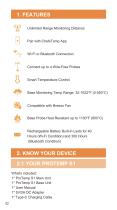
1. FEATURES Unlimited Range Monitoring Distance Pair with ChefsTemp App Wi-Fi or Bluetooth Connection Connect up to 4 Wire-Free Probes Smart Temperature Control Base Monitoring Temp Range: 32-1022°F (0-550°C) Compatible with Breezo Fan Base Probe Heat Resistant up to 1100°F (600°C) 1112°F Rechargeable Battery Built-in Lasts for 40 Hours (Wi-Fi Condition) and 300 Hours (Bluetooth Condition) 2. KNOW YOUR DEVICE 2.1 YOUR PROTEMP S1 What's included: 1* ProTemp S1 Main Unit 1* ProTemp S1 Base Unit 1* User Manual 1* 5V/2A DC Adapter 1* Type-C Charging Cable
Open the catalog to page 5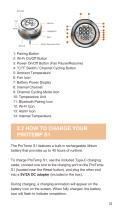
1: Pairing Button 2: Wi-Fi On/Off Button 3: Power On/Off Button (Fan Pause/Resume) 4: °C/°F Switch / Channel Cycling Button 5: Ambient Temperature 6: Fan Icon 7: Battery Power Display 8: Internal Channel 9: Channel Cycling Mode Icon 10: Temperature Unit 11: Bluetooth Pairing Icon 12: Wi-Fi Icon 13: Alarm Icon 14: Internal Temperature 2.2 HOW TO CHARGE YOUR PROTEMP S1 The ProTemp S1 features a built-in rechargeable lithium battery that provides up to 40 hours of runtime. To charge ProTemp S1, use the included Type-C charging cable, connect one end to the charging port on the ProTemp S1 (located...
Open the catalog to page 6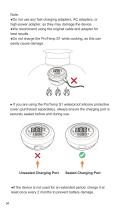
• Do not use any fast charging adapters, AC adapters, or high-power adapter, as they may damage the device. •We recommend using the original cable and adapter for best results. • Do not charge the ProTemp S1 while cooking, as this can easily cause damage. • If you are using the ProTemp S1 waterproof silicone protective cover (purchased separately), always ensure the charging port is securely sealed before and during use. Unsealed Charging Port Sealed Charging Port • If the device is not used for an extended period, charge it at least once every 2 months to prevent battery damage.
Open the catalog to page 7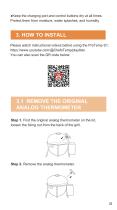
●Keep the charging port and control buttons dry at all times. Protect them from moisture, water splashes, and humidity. 3. HOW TO INSTALL Please watch instructional videos before using the ProTemp S1: https://www.youtube.com/@ChefsTemp/playlists You can also scan the QR code below: 3.1 REMOVE THE ORIGINAL ANALOG THERMOMETER Step 1. Find the original analog thermometer on the lid, loosen the fixing nut from the back of the grill. Step 2. Remove the analog thermometer.
Open the catalog to page 8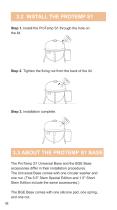
3.2 INSTALL THE PROTEMP S1 Step 1. Install the ProTemp S1 through the hole on the lid. Step 2. Tighten the fixing nut from the back of the lid. Step 3. Installation complete. 3.3 ABOUT THE PROTEMP S1 BASE The ProTemp S1 Universal Base and the BGE Base accessories differ in their installation procedures. The Universal Base comes with one circular washer and one nut. (The 5.5" Stem Special Edition and 1.5" Short Stem Edition include the same accessories.) The BGE Base comes with one silicone pad, one spring, and one nut. 06
Open the catalog to page 9All ChefsTemp (Leadtek Inc.) catalogs and technical brochures
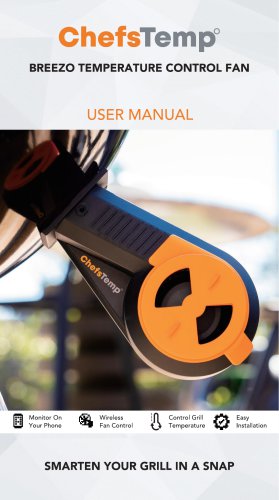 BREEZO TEMPERATURE CONTROL FAN
20 Pages


- Propeller fan
- Air circulation fan
- Digital pyrometer
- Electrically-powered fan
- °C thermometer
- Waterproof thermometer
- Portable pyrometer
- °F thermometer
- Resistance thermometer
- Food thermometer
- Mobile fan
- DC fan
- Outdoor fan
- Multi-channel thermometer
- High-temperature fan
- Platinum resistive thermometer
- Bluetooth thermometer
- IP54 thermometer
- Thermally-controlled fan
- 4-channel thermometer
 鄂公网安备42018502009509号 -