
- Catalogs
- ChefsTemp (Leadtek Inc.)
- PROTEMP PLUS OPERATION INSTRUCTIONS

PROTEMP PLUS OPERATION INSTRUCTIONS
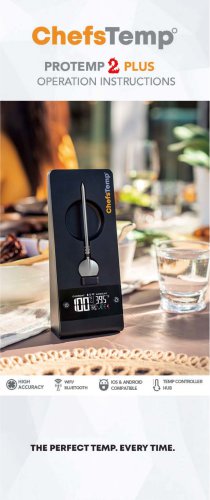
PROTEMP PLUS OPERATION INSTRUCTIONS
The ProTemp 2 Plus includes a needle size probe, temperature controller hub, and smart temperature multisensor. It offers unlimited range via Wi-Fi or Bluetooth, multiple probe options, and real-time cooking monitoring. The probe is accurate within ±1°F (0.5°C), waterproof, and can withstand temperatures up to 1000°F (537°C). It has built-in 10000mAh rechargeable batteries.
Users should watch instructional videos and read the manual to avoid damage or injury. Safety instructions include proper probe insertion, avoiding high temperatures, and wearing protective gear. The device should not be used in microwaves or exposed to moisture and is not for bodily temperature measurement.
The internal sensor withstands up to 212°F (100°C), while the ambient tip can handle up to 1000°F (537°C). The ChefsTemp App alerts users when limits are approached.
The device includes a power switch, display screen, probe, charger, channel switch, power ports, and a stand with a magnet and reset button. The probe is made of stainless steel and zirconia ceramic.
Charge the stand and probe using a Type-C cable. Download the ChefsTemp App, register, and set up the device following instructions.
Activate the stand and probe, connect to Bluetooth and Wi-Fi, and add new probes through the app. Keep the stand close to the probe during cooking.
Ensure the stand and probe are charged, preheat the appliance, and place the stand near the probe. Set the desired temperature via the app, insert the probe into the food, and monitor progress on your smartphone.
Store the stand in a cool, dry place and clean the probe with soapy water. The stand is not dishwasher-safe and should not be immersed in water. Charge the device every 1-2 months if not in use.
The ProTemp 2 Plus has a one-year warranty against defects in material and workmanship. Contact Customer Support for claims with photos or videos of the issue.
The ProTemp 2 Plus uses rechargeable lithium batteries, measuring internal temperatures from 32°F to 212°F (0°C to 100°C) and ambient temperatures from 122°F to 1000°F (50°C to 537°C) with ±1°F (±0.5°C) accuracy.
For pairing issues, ensure the Stand and probe are charged, remove the probe during pairing, and delete existing connections. Use a 2.4GHz network for Wi-Fi and enable necessary permissions.
Use a high-power socket for charging, keeping the port dry. Charge the Stand before the probe and clean grease from the probe before charging.
The probe is waterproof and dishwasher safe; the Stand has an IP55 water resistance rating. Avoid exposing the Stand to temperatures above 140°F (60°C). Insert the probe past the safety notch for accurate readings.
Contact customer service via phone or email for persistent issues. Additional support and discounts are available through social media groups.
Catalog excerpts
TEMP CONTROLLER THE perfect TEMP. EVERY TIME.
Open the catalog to page 1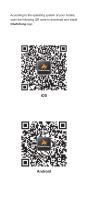
According to the operating system of your mobile, scan the following QR code to download and install ChefsTemp App.
Open the catalog to page 2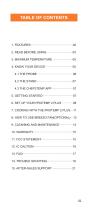
TABLE OF CONTENTS 1. FEATURES………………………………………02 2. READ BEFORE USING…………………………03 3. MAXIMUM TEMPERATURE……………………05 1. FEATURES···········································02 4. KNOW YOUR DEVICE…………………………06 2. READ BEFORE USING···························03 4.1 THE PROBE…………………………………07 3. MAXIMUM TEMPERATURE ····················05 4.2 THE STAND…………………………………07 4. KNOW YOUR DEVICE····························05 4.3 THE CHEFSTEMP APP…… … … … … … …07 5. GETTING STARTED……………………………08 4.1 THE PROBE ····································06 6. SET UP YOUR P r····································07 o T e m p 2 P...
Open the catalog to page 3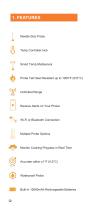
Needle Size Probe Smart Temp Multisensor Probe Tail Heat Resistant up to 1000°F (537°C) 1000°F Unlimited Range Receive Alerts on Your Phone Wi-Fi or Bluetooth Connection Multiple Probe Options Monitor Cooking Progress in Real Time Waterproof Probe Built-in 10000mAh Rechargeable Batteries
Open the catalog to page 4
Please watch instructional videos before using the ProTemp 2 Plus: Please read this entire manual before using your ProTemp 2 Plus. Failure to follow these instructions could result in property damage or bodily injury. If you are assembling this product for someone else, provide this manual for the owner to read and keep for future reference. Failure to follow the instructions below may cause the probe to explode and lead to serious injury or burns: •Always insert the probe past the safety notch (the minimum insertion point) to avoid product damage and personal injury. • DO NOT let the probe...
Open the catalog to page 5
• DO NOT drop the probe onto hard surfaces. • DO NOT use cleaning products containing alcohol, ammonium, benzene, or abrasives. • DO NOT submerge the probe in water for long periods. • DO NOT submerge the Stand in water or other liquids. • DO NOT run the probe under cold water immediately after cooking. Let the probe cool down before washing. • DO NOT exceed the probe's internal sensor limit of 212°F (100°C) or the ambient sensor limit of 1000°F (537°C). Temperatures above these maximums may damage the probe. • DO NOT apply excessive pressure and avoid extreme changes in direction when removing...
Open the catalog to page 6
using it and wait for the device to naturally cool down. Always keep the probe pointed away from fingers and body. Contact may result in injury. Keep out of reach of children. Consuming raw or undercooked meats, poultry, or seafood may increase your risk of foodborne illness. Always cook your food to USDA safe temperatures. If you encounter any abnormal conditions (such as fever, odor, etc.) during use, please immediately stop using and seek professional repair services. 3. MAXIMUM TEMPERATURE The internal sensor of the probe can withstand a maximum temperature of 212°F (100°C). The ambient tip...
Open the catalog to page 7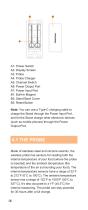
A1: Power Switch A2: Display Screen A3: Probe A4: Probe Charger A5: Channel Switch A6: Power Output Port A7: Power Input Port B1: Built-in Magnet B2: Stand Back Cover B3: Reset Button Note: You can use a Type-C charging cable to charge the Stand through the Power Input Port, and let the Stand charge other electronic devices (such as mobile phones) through the Power Output Port. 4.1 THE PROBE Made of stainless steel and zirconia ceramic, the wireless probe has sensors for reading both the internal temperature of your food (where the probe is inserted) and the ambient temperature (the temperature...
Open the catalog to page 8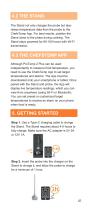
4.2 THE STAND The Stand not only charges the probe but also relays temperature data from the probe to the ChefsTemp App. For best results, position the Stand close to the probe during cooking. The Stand stays powered for 80-100 hours with Wi-Fi transmission. 4.3 THE CHEFSTEMP APP Although ProTemp 2 Plus can be used independently to measure food temperature, you need to use the ChefsTemp App to set target temperatures and alarms. The App must be downloaded onto your smartphone or tablet. Once paired with the Stand and probe, the App will display live temperature readings, which you can view from...
Open the catalog to page 9All ChefsTemp (Leadtek Inc.) catalogs and technical brochures
 PROTEMP S1 SMART THERMOMETER HUB
32 Pages
 BREEZO TEMPERATURE CONTROL FAN
20 Pages

- Propeller fan
- Air circulation fan
- Digital pyrometer
- Electrically-powered fan
- °C thermometer
- Waterproof thermometer
- Portable pyrometer
- °F thermometer
- Resistance thermometer
- Food thermometer
- Mobile fan
- DC fan
- Outdoor fan
- Multi-channel thermometer
- High-temperature fan
- Platinum resistive thermometer
- Bluetooth thermometer
- IP54 thermometer
- Thermally-controlled fan
- 4-channel thermometer
 鄂公网安备42018502009509号 -