
- Catalogs
- CHAUVIN ARNOUX
- DOX2025B, DOX2070B & DOX2100B


- Products
- Catalogs
- News & Trends
- Exhibitions
DOX2025B, DOX2070B & DOX2100B

DOX2025B, DOX2070B & DOX2100B
Catalog excerpts
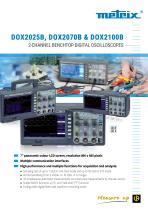
2-CHANNEL BENCHTOP DIGITAL OSCILLOSCOPES 7" panoramic colour LCD screen, resolution 800 x 480 pixels Multiple communication interfaces High performance and multiple functions for acquisition and analysis: • Sampling rate of up to 1 GS/s in one-shot mode and up to 50 GS/s in ETS mode • Vertical sensitivity from 2 mV/div. to 10 V/div. in 12 ranges • 32 simultaneous automatic measurements on screen plus measurements by manual cursors • Simple MATH functions +/-/*/÷ and “real-time” FFT function • Configurable digital filters and waveform re
Open the catalog to page 1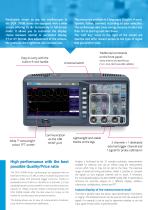
Particularly simple to use, the oscilloscopes in the DOX 2000B series are equipped with a wide screen offering 16 div horizontally in full-screen mode. It allows you to customize the display: choice between normal or persistent display, YT or XY format, plus adjustment of the colours, the graticule, the brightness, the contrast, etc. Easy to carry with the built-in 9-inch handle Wide 7" extra-bright colour TFT screen The menus are available in 5 languages (English, French, Spanish, Italian, German) according to your selection. The oscilloscope also saves energy because it takes less than 10 s...
Open the catalog to page 2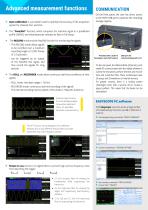
Advanced measurement functions XX Auto-calibration is a procedure used to optimize the accuracy of the acquisition On the front panel, the user has direct access to the HOST USB port to optimize the recording storage capacity. XX The "Pass/Fail" function, which compares the real-time signal to a predefined profile (MASK) and instantaneously indicates its Pass or Fail status. XX The RECORD mode and the Pass/Fail function for monitoring the signals. −− The RECORD mode allows signals to be recorded over a maximum recording length of 2,500 frames of 2.5 kpts each. −− can be triggered by an output...
Open the catalog to page 3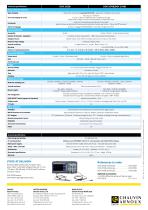
Technical specifications Human-Machine Interface Type of display 7" WGA colour LCD screen (resolution 800 X 480) – Adjustment of brightness and contrast Trace area, 8 x 16 divisions 2 curves + reference + Maths function - Full graticule or edges Display mode: Samples or Vectors with interpolation, or Persistence mode Usual direct commands by buttons/knobs on front panel System of menus on right side of the screen with selection by 5 buttons next to them – "Menus On/Off" command On-screen display of curves Commands Choice of language By menu, 5 languages (FR/EN/DE/IT/ES), online help in English...
Open the catalog to page 4All CHAUVIN ARNOUX catalogs and technical brochures
 ULYS FLEX Modbus
2 Pages
 ULYS MD45 & ULYS MD100
4 Pages
 MEMO RANGE
4 Pages
 TC CLIP
2 Pages
 PROBIX
4 Pages
 OX9302-BUS
4 Pages
 C.A 6255
4 Pages
 CA 6165
4 Pages
 CBF01
CBF012 Pages
 AX501, AX502, AX503, AX503F
2 Pages
 MX 5006, MX 5060
3 Pages
 MX 604
2 Pages
 MX 409
4 Pages
 CA 6528
4 Pages
 VX 0003 , VX 0100
4 Pages
 MX 535
4 Pages
 CA 6011
4 Pages
 C.A 6418
2 Pages
 CA 6422 & CA 6424
4 Pages
 PAC Series
4 Pages
 GX 305 GX 310 GX 320
4 Pages
 ASYC IV
8 Pages
 SCOPIX IV
8 Pages
 CA 922 - CA 942
4 Pages
 THYRITOP 700 SERIES
6 Pages
 OX 5022B – OX 5042B
3 Pages
 MEMO P200
2 Pages
 GRIDWATCH
6 Pages
 ULYS MCM
4 Pages
 MEMO & ULYS MEMO & ULYS
8 Pages
 C.A 7028
3 Pages
 Power and Harmonics
2 Pages
 HypeReal
4 Pages
 THYRITOP 600
4 Pages
 THYRITOP 500
3 Pages
 THYRITOP 200
2 Pages
 THYRITOP 100
2 Pages
 CA 8345
12 Pages
 CA 8220
4 Pages
 C.A 1725 , C.A 1727
4 Pages
 C.A 847
1 Page
 C.A 895
2 Pages
 CA 1864 & CA 1866
2 Pages
 C.A 1950
4 Pages
 CA 1954
4 Pages
 CA 1860 & CA 1862
2 Pages
 CA 1310
2 Pages
 CA 1900
2 Pages
 C.A 5277, C.A 5275, C.A 5273
4 Pages
 C.A 5011
2 Pages
 C.A 5000 Series
4 Pages
 F65
F654 Pages
 MA400D ,MA4000D
2 Pages
 F200 - F400 - F600 Series
8 Pages
 CA 6292
4 Pages
 C.A 6240
2 Pages
 C.A 6630
2 Pages
 C.A 6121
4 Pages
 AL 834 , ML 914
2 Pages
 L452 DATA LOGGER
2 Pages
 CA 1550
2 Pages
 SIMPLE LOGGER® II
20 Pages
 C.A 1510
4 Pages
 CA 1227
2 Pages
 C.A 1110
2 Pages
 C.A 1246
2 Pages
 PEL 100 SERIES
8 Pages
 C.A 6541 C.A 6543
4 Pages
 C.A40
C.A402 Pages
 CA 10141
4 Pages
 C.A 10101
4 Pages
 C.A 10001
2 Pages
 CA 10002
2 Pages
 VASD 40
2 Pages
 ANALOGUE RANGE
2 Pages
 DIGITAL RANGE
4 Pages
 Laboratory Selection
4 Pages
 Electrodes range
8 Pages
 CA 755 - CA 757
4 Pages
 C.A 732 C.A 703 C.A 702
2 Pages
 C.A 745N
2 Pages
 CA 6651
2 Pages
 MX 531
2 Pages
 C.A 6608 C.A 6609
2 Pages
 CA 6117 – CA 6116N – CA 6113
8 Pages
 C.A 6131 - C.A 6133
4 Pages
 C.A 6460 C.A 6462
4 Pages
 C.A 6472 C.A 6474
4 Pages
 Earth/ground measurement guide
36 Pages
 C.A 6470N
4 Pages
 C.A 6416 C.A 6417
8 Pages
 E Series
8 Pages
 E25 & E27
2 Pages
 B100 series
4 Pages
 MiniFlex® SERIES
17 Pages
 MH SERIES
5 Pages
 DN SERIES
15 Pages
 K SERIES
4 Pages
 C100 series
18 Pages
 YN SERIES
9 Pages
 MN SERIES
16 Pages
 MINI series
12 Pages
 AmpFlex® series
13 Pages
 CHAUVIN ARNOUX 2021
16 Pages
 C.A 1621 C.A 1623 C.A 1631
4 Pages







Archived catalogs
 C.A 6681 LOCAT-N
4 Pages
 Catalogue Multimetrix 2021
12 Pages
 Temperature Sensors Catalogue
336 Pages
 Current Clamps Catalogue
154 Pages
 Handscope
4 Pages
 ELINK 61850
2 Pages
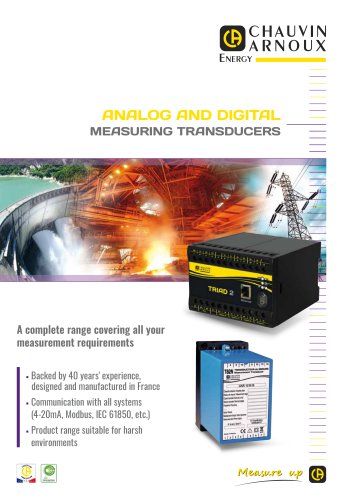 ANALOG AND DIGITAL
4 Pages
 T82N
T82N12 Pages
 PANEL METERS
4 Pages
 ENERIUM RANGE
8 Pages
 MAP COMPACT NETWORK ANALYZER
2 Pages
 2016 Spring promotion
4 Pages
 Temperature sensor
64 Pages



- Digital imager
- Visible imager
- Concentration analyzer
- Monitoring analyzer
- CHAUVIN ARNOUX data-logger
- Analysis software solution
- Liquids analyzer
- Infrared imager
- Process software
- Full-color camera system
- Windows software
- Calibration system
- USB camera module
- Switching relay
- Solids analyser
- Spectrometer
- CHAUVIN ARNOUX digital thermometer
- CHAUVIN ARNOUX portable tester
- Process analyzer
- Portable analyzer