
- Catalogs
- Buckleys (UVRAL) Limited
- User Manual: Wet Roof Pro2


- Company
- Products
- Catalogs
- News & Trends
- Exhibitions
User Manual: Wet Roof Pro2
User Manual: Wet Roof Pro2
The Wet Roof Pro2 leak detector is designed for detecting leaks in roofing systems with insulating membrane overlays. It includes a generator unit that emits low-frequency pulses and a neck-worn detector connected to survey poles for probing. It can also test upstands and painted surfaces using a wet sponge detector.
The generator outputs 32V DC in Wet Roof Mode and various voltages in Wet Sponge Mode, with a power output of less than 10 Watts. It operates between +4˚ to +40˚C and is sealed to IP65 standards. The detector shares similar environmental specifications and is also IP65 rated.
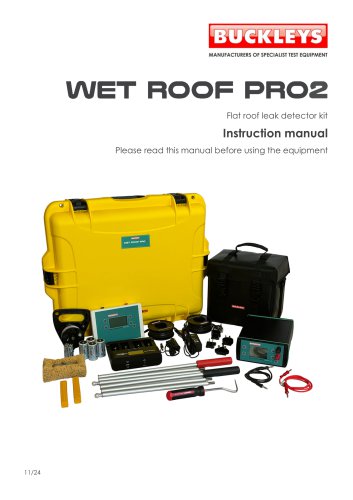
The kit includes a generator, detector, battery charger, various leads, survey poles, and other accessories, all housed in a robust transit case. Users should check for any damage or missing items upon unpacking.
Important safety information is highlighted with symbols. Users must adhere to guidelines to ensure safe operation.
Generator (Wet Roof Mode): The generator is housed in a waterproof case with front panel controls. It provides a live output when turned on, with adjustable voltage and alarm current settings. Proper connection of trace and ground wires is crucial to avoid short circuits.
Detector: The detector is worn around the neck and uses poles to detect leaks. It features a menu-driven interface for customization and displays a direction bar to guide the operator towards leaks.
The generator and detector work together to identify leaks by measuring electrical currents. The system is sensitive to environmental noise, which may affect readings. Operators should familiarize themselves with the equipment by conducting systematic surveys.
Regular maintenance is required to ensure optimal performance. Disposal of the equipment should comply with local regulations.
The product complies with EC and UKCA standards.
Contact details for support and product registration information are provided.
The instrument allows tuning to eliminate mains hum, which varies by region (50Hz in much of the world, 60Hz in the Americas and parts of Asia). Adjustments can be made for stable readings. The scale menu offers 'Decibels' or 'Linear B' options, with manual magnification unavailable in 'Decibels'.
To operate the generator, press the On/Off button. The user menu is accessed by holding the 'Menu/Yes' button. Preset tests can be selected, or custom voltage (9-90V) and alarm threshold current (100-1200 uA) can be set. Ensure the sponge is wet and connections are correct for testing. The detector is not used in this mode.
This method uses an electric field to detect faults in a waterproof layer. The Wet Roof Generator creates a field where faults have the highest potential. The detector measures voltage differences to locate faults. The technique involves using survey poles to find the direction of leaks, with the poles kept at a consistent distance apart.
Preparation involves fitting batteries, laying trace wire, and ensuring a good earth connection. During verification, ensure the generator current is below 100mA. Testing involves methodically using survey poles to detect leaks, marking faults for repair, and ensuring the roof is wet.
Safety instructions emphasize using only NiMH cells, avoiding water exposure, and supervising children. The charger supports various battery sizes and offers multiple charging programs. It is suitable for worldwide use with specific voltage requirements.
The document outlines the specifications of a battery charger, which includes features such as capacity measurement in mAh/Ah, microprocessor-controlled charging, individual monitoring of parameters like voltage, capacity, time, and current, and multiple overcharging protection. It also includes faulty cell detection and accidental alkaline battery insertion detection.
The charger can be used with a mains power outlet or in a vehicle. For mains use, the input plug must be securely connected to the power supply and then to the mains. For vehicle use, the DC charging cable connects to a 12V DC car socket. The charger supports various battery types and has specific instructions for inserting and charging them.
The charger offers several modes: Charge, Discharge, Refresh, and Test. Each mode has specific functions, such as minimizing memory effect or refreshing old batteries. The charger automatically starts with selected parameters after 8 seconds.
The LCD display provides information on charging/discharging current, voltage, capacity, and time. It also indicates errors like internal short-circuits or high resistance in batteries.
The charger operates with an input voltage of 100-240V AC or 12V DC, with charging currents ranging from 400mA to 1800mA for round cells and 15mA for 9V batteries.
Annual servicing is recommended to ensure optimal performance. The exterior should be cleaned regularly, and batteries should be removed if not used for prolonged periods.
The product must be disposed of according to UK WEEE regulations.
The product conforms to various EU and UK directives and regulations, as authorized by the managing director of Buckleys (UVRAL) Ltd.
Contact details for Buckleys (UVRAL) Ltd. are provided, along with instructions for product registration to receive benefits like service reminders and industry news.
Catalog excerpts

Flat roof leak detector kit Instruction manual Please read this manual before using the equipment
Open the catalog to page 1
General Description The Wet Roof Pro2 leak detector compliments the Buckleys Dry Roof Pro2 test instrument to provide a complete roof test system for all occasions. The Wet Roof Pro2 has been designed to assist the user to detect the presence and source of leaks on roofing technologies that incorporate insulating membrane overlays. With large easy to read graphics displays and user-friendly icons enabling fast accurate roof surveys to be undertaken. The Wet Roof Pro2 leak detector kit comprises two main elements: A ‘Generator unit’ provides stabilised low frequency pulses. The positive output...
Open the catalog to page 3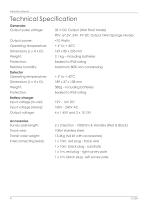
Instruction Manual Technical Specification Generator Output pulse voltage: 32 V DC Output (Wet Roof Mode) 90V, 67.5V, 24V, 9V DC Output (Wet Sponge Mode) Output power: Operating temperature: Relative humidity: Detector Operating temperature: Battery charger Input voltage (In-car): Input voltage (Mains): Output voltage: Accessories Survey pole length: 2 x 3 Section - 1000mm & Handles (Red & Black) Trace wire: Transit case weight: 13.4Kg (full kit with accessories) Interconnecting leads: 1 x 10m, red plug - trace wire 1 x 10m, black plug - substrate 1 x 1m, red plug - right survey pole 1 x 1m,...
Open the catalog to page 4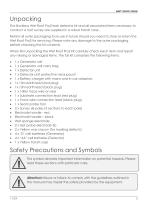
Unpacking The Buckleys Wet Roof Pro2 leak detector kit and all associated items necessary to conduct a roof survey are supplied in a robust transit case. Retain all outer packaging to re-use in future should you need to store or return the Wet Roof Pro2 for servicing. Please note any damage to the outer packaging before checking the kit contents. When first unpacking the Wet Roof Pro2 kit carefully check each item and report any missing or damaged items. The full kit comprises the following items: 1 x Generator unit 1 x Generator unit carry bag 1 x Detector...
Open the catalog to page 5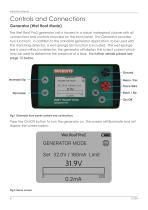
Instruction Manual Controls and Connections Generator (Wet Roof Mode) The Wet Roof Pro2 generator unit is housed in a robust waterproof closure with all connections and controls mounted on the front panel. The Generator provides two functions: in addition to the standard generator application, to be used with the matching detector, a wet-sponge test function is included. The wet-sponge test is used without a detector, the generator will display the output current which may be used to determine the presence of a leak. For further details please see page 15 below. Ground Increase/Up Menu /Yes Trace...
Open the catalog to page 6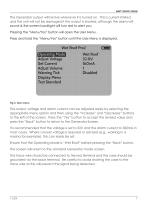
The Generator output will be live whenever it is turned on. This is current-limited, and the unit will not be damaged if the output is shorted, although the alarm will sound & the screen backlight will turn red to alert you. Pressing the “Menu/Yes” button will open the User Menu. Press and hold the “Menu/Yes” button until the User Menu is displayed. The output voltage and alarm current can be adjusted easily by selecting the appropriate menu option and then using the “Increase” and “Decrease” buttons to the left of the screen. Press the “Yes” button to accept the revised value and press the “Back”...
Open the catalog to page 7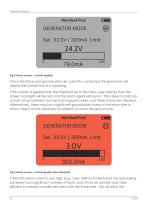
Instruction Manual Fig.4 Home screen – current applied Once the trace and ground wires are correctly connected the generator will display the current that it is supplying. If this current is greater than the threshold set in the menu (see above) then the screen backlight will be red, and the alarm signal will sound. This is likely to indicate a short circuit between the trace and ground wires, and these should be checked. Alternatively, there may be a significant ground point close to the trace wire, in which case it will be necessary to isolate it or move the ground wire. Fig.5 Home screen –...
Open the catalog to page 8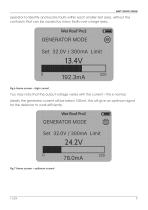
operator to identify and locate faults within each smaller test area, without the confusion that can be caused by many faults over a large area. Fig.6 Home screen – high current You may note that the output voltage varies with the current – this is normal. Ideally the generator current will be below 100mA, this will give an optimum signal for the detector to work efficiently. Fig.7 Home screen – optimum current
Open the catalog to page 9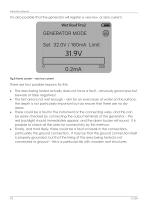
Instruction Manual It is also possible that the generator will register a very low, or zero current. Fig.8 Home screen – very low current There are four possible reasons for this: The area being tested actually does not have a fault – obviously good news but beware of false negatives! The test area is not wet enough – aim for an even layer of water on the surface, the depth is not particularly important but do ensure that there are no dry areas. There could be a fault in the instrument or the connecting wires, and this can be easily checked by connecting the output terminals of the generator...
Open the catalog to page 10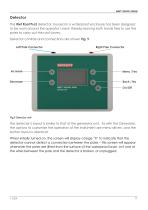
Detector The Wet Roof Pro2 detector, housed in a waterproof enclosure has been designed to be worn around the operator’s neck thereby leaving both hands free to use the poles to carry out the roof survey. Detector controls and connections are shown Fig. 9. Left Pole Connector Right Pole Connector The detector’s layout is similar to that of the generator unit. As with the Generator, the options to customise the operation of the instrument are menu-driven, and the button layout is identical. When initially turned on, the screen will display a large “X” to indicate that the detector cannot detect...
Open the catalog to page 11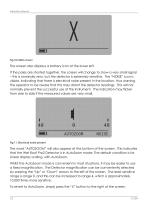
Instruction Manual The screen also displays a battery icon at the lower left. If the poles are shorted together, the screen will change to show a very small signal – this is nominally zero, but the detector is extremely sensitive. The “NOISE” icon is visible, indicating that there is electrical noise present in the location, thus warning the operator to be aware that this may distort the detector readings. This will not normally prevent the successful use of the instrument. The indication may flicker from side to side if the measured values are very small. Fig 11. Electrical noise present The...
Open the catalog to page 12All Buckleys (UVRAL) Limited catalogs and technical brochures
 Datasheet: Wet Roof Pro2
1 Page
 Brochure: DCCT Pro2
4 Pages
 Quick start guide: Lab Pro2
12 Pages
 Quick start guide: PHD Pro2
12 Pages
 Quick start guide: Geo Pro2
12 Pages
 Quick start guide: Dry Roof Pro2
12 Pages
 AC Spark testers
4 Pages
 Subsea product range
4 Pages
 Geomembrane tester
4 Pages


- Calibration system
- Portable tester
- Voltage testing system
- Manual test equipment
- Real-time monitoring module
- Measurement monitoring module
- Installation tester
- Portable test equipment
- Cabling tester
- Electrical installation tester
- Continuous monitoring module
- Environmental monitoring system
- Continuity tester
- Electrochemical electrode
- Battery testing system
- Digital monitoring module
- Remote monitoring module
- Portable leak detector
- Liquid leak detector