
- Catalogs
- Buckleys (UVRAL) Limited
- Quick start guide: PHD Pro2


- Company
- Products
- Catalogs
- News & Trends
- Exhibitions
Quick start guide: PHD Pro2

Quick start guide: PHD Pro2
- Individuals with pacemakers or electronic implants should avoid using this equipment.
- Do not operate in combustible atmospheres or ATEX Hazardous Areas.
- Only trained personnel should operate the equipment.
- Ensure the instrument is grounded before use.
- Ozone is produced during use; ensure adequate ventilation.
- Do not use if the equipment has been immersed in water.
- EC and UKCA declarations confirm compliance with relevant directives and regulations.
- Output voltage ranges from 500V to 40kV depending on the model.
- Max output current is less than 1mA.
- Alarm sensitivity is factory-set to 200μA.
- Complies with various NACE and ASTM standards.
- Battery life varies by model, ranging from 8 to 16 hours.
- Regular cleaning is recommended; avoid letting fluids enter the unit.
- Annual calibration is required.
- Registering the product provides service reminders and updates.
- Sensitivity settings should be adjusted based on testing conditions.
- Alarm suppression settings can be adjusted to reduce multiple alerts.
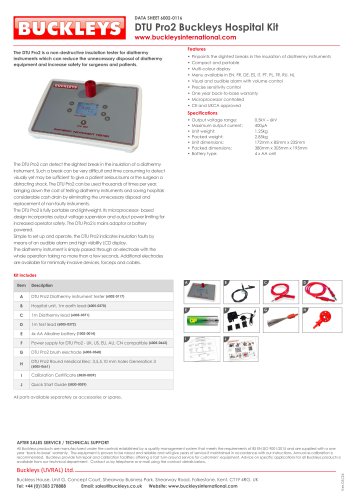
- Includes main detector unit, test probe handle, calibration certificate, and other accessories depending on the kit type.
- Ensure all users are trained and aware of the risks.
- Check for explosive atmospheres and ensure proper grounding.
- Default settings include a 10kV output voltage and 200μA sensitivity.
- Instructions for setting up the instrument and adjusting settings are provided.
- Setting Interface Language: Access the main settings menu, navigate to 'Set Language', select the desired language, and return to the main display.
- Setting Output Voltage: Access the main settings menu, navigate to 'Adjust Voltage', select the desired voltage, and return to the main display.
- Setting Sensitivity Threshold: Access the main settings menu, navigate to 'Adjust Sensitivity', select the desired threshold, and return to the main display.
- Setting Alarm Suppression: Access the main settings menu, navigate to 'Alarm Suppression', select the desired level, and return to the main display.
- Setting Test Thickness via a Standard: Access the main settings menu, navigate to 'Test Standard', select the desired standard, input the test material thickness, and observe the calculated test voltage.
Catalog excerpts

High-voltage DC pinhole/porosity detector kit Quick Start Guide Please read this manual before using the equipment
Open the catalog to page 1
Quick Start Guide
Open the catalog to page 2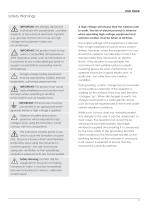
Safety Warnings IMPORTANT: We strongly advise that individuals with pacemakers, cochlear implants, or trans-dermal electronic implants e.g., glucose monitors do not use our highvoltage test equipment under any circumstances. IMPORTANT: This product must not be used in combustible atmospheres or ATEX Hazardous Areas, such as fuel stations or in proximity to any combustible gas (and/ or oxygen concentrations exceeding normal atmosphere). All high-voltage testing equipment must be operated by suitably trained, responsible, authorised personnel only. IMPORTANT: This product can cause radio interference...
Open the catalog to page 3
Quick Start Guide EC Declaration of Conformity We, Buckleys (UVRAL) Ltd., as sole manufacturer of the apparatus listed below, declare that the product PHD Pro2 is manufactured in conformity with the following directives: 2014/30/EU, 2014/35/EU, 2015/863/EU and 2011/65/EU (RoHS). Date: 01/07/2021 Authorised by: J P Hoveman CEO, Buckleys (UVRAL) Ltd. UKCA Declaration of Conformity We, Buckleys (UVRAL) Ltd., as sole manufacturer of the apparatus listed below, declare that the product PHD Pro2 Pro2 is manufactured in conformity with the following UK legislation: Electronic Compatibility Regulations...
Open the catalog to page 4
Maintenance The PHD Pro2 is designed for minimum maintenance by the user, however the following periodic checks/actions are recommended: The exterior of the unit should be cleaned regularly. Stubborn dirt may be removed with a moistened cloth (99% water +1% mild detergent). Mild solutions may be used to remove greasy dirt. Do not allow cleaning fluid to enter the unit. The use of other cleaning agents may lead to damage to the detector’s surface areas. Our service team will ensure your detector’s performance is within our strict tolerances and carry out a thorough inspection of the entire kit;...
Open the catalog to page 5
Quick Start Guide Kit Contents Upon delivery of your PHD Pro2, please take the time to ensure that the kit is complete, and all components shown below are present and undamaged: Main detector unit Test probe handle and nosecone Interconnecting lead Electrostatic discharge wristband Calibration certificate 150mm stainless steel drum brush electrode 5m earth cable on reel Trailing earth lead D-cell batteries D-cell rechargeable batteries Battery charger with mains power adaptors and in-car charger* Straight phosphor-bronze brush electrode Pair of knurled locknuts Rolling spring electrode claw Pointed...
Open the catalog to page 6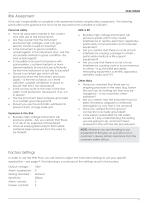
Risk Assessment It the user’s responsibility to complete a risk assessment before using Buckleys equipment. The following points offer some guidance but must not be assumed to be complete or sufficient. Personal safety • Have all users been trained in the correct and safe use of the instruments? • Are they aware that the instrument produces high voltages, and can give electric shocks if used incorrectly? • Is the instrument in good condition, undamaged? Is the instrument dry? Are the accessories similarly in good condition, dry and undamaged? • Is it possible to ensure that persons with pacemakers,...
Open the catalog to page 7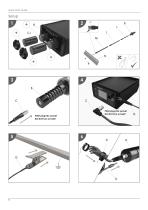
Quick Start Guide
Open the catalog to page 8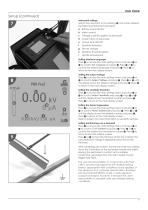
Setup (continued) Instrument settings Switch the instrument on by pressing a. The screen displays the following information (see fig.8): a Battery level indicator b Menu symbol c Voltage currently applied to electrode d Current draw at electrode e Output lock ON/OFF f Sensitivity threshold g Set test voltage h Sensitivity threshold graph i Handle temperature Setting interface language Press b to access the main settings menu and press d or e to scroll to Set Language and press b. Press d or e to scroll to the desired language and press b. Press c to return to the main display screen. Setting...
Open the catalog to page 9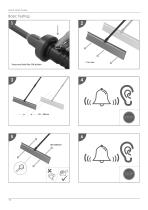
Quick Start Guide Basic Testing Press and hold the ON button
Open the catalog to page 10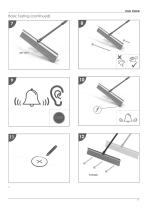
Basic Testing (continued)
Open the catalog to page 11
Contact Details Manufacturer Address Buckleys House Unit G, Concept Court, Shearway Business Park, Shearway Road Folkestone, Kent CT19 4RG, UK Tel: +44 (0)1303 278888 Email: [email protected] www.buckleysinternational.com
Open the catalog to page 12All Buckleys (UVRAL) Limited catalogs and technical brochures
 User Manual: Wet Roof Pro2
36 Pages
 Datasheet: Wet Roof Pro2
1 Page
 Brochure: DCCT Pro2
4 Pages
 Quick start guide: Lab Pro2
12 Pages
 Quick start guide: Geo Pro2
12 Pages
 Quick start guide: Dry Roof Pro2
12 Pages
 AC Spark testers
4 Pages
 Subsea product range
4 Pages
 Geomembrane tester
4 Pages


- Calibration system
- Portable tester
- Leak monitor
- Voltage testing system
- Manual test equipment
- Real-time monitoring module
- Measurement monitoring module
- Installation tester
- Portable test equipment
- Cabling tester
- Electrical installation tester
- Continuous monitoring module
- Environmental monitoring system
- Continuity tester
- Electrochemical electrode
- Battery testing system
- Digital monitoring module
- Remote monitoring module
- Portable leak detector
- Liquid leak detector