- Catalogs
- Bruker AXS
- SPECTRA.ELEMENTS - Performance now comes with Ease-of-Use


SPECTRA.ELEMENTS - Performance now comes with Ease-of-Use

SPECTRA.ELEMENTS - Performance now comes with Ease-of-Use
The document introduces SPECTRA.ELEMENTS, a software suite designed for the S2 PUMA instrument, emphasizing ease-of-use and high performance. It integrates all spectrometer functionalities into a single interface, enhancing user experience and efficiency.
Software Features
- Integrated Control: All functions are accessible from one main window, eliminating clutter and simplifying navigation.
- Standardless Analysis: The SMART-QUANT FP tool allows for quick analysis of unknown samples without the need for reference samples.
- Precision Calibration: The Wizard tool facilitates easy setup of standard-based calibrations with step-by-step guidance.
- TouchControl: Enables operation without a peripheral PC, supporting routine analysis in Island Mode.
Functionality Highlights
- Loader: Manages sample placement, measurement, and result viewing.
- Results Manager: Organizes, formats, and exports analysis results with ease.
- Joblist: Manages sample queues and prioritizes tasks.
- LiveSpectrum and Commander: Allow real-time observation and control of spectra.
Technical Features
The document outlines various modules such as the Loader, Results Manager, Wizard, and others, detailing their functions like measurement editing, results handling, calibration setup, and database management.
Advantages
- Tab-based organization for easy access and control.
- Intuitive interface suitable for users of all skill levels.
- Powerful calibration tools and customizable results management.
- Seamless integration with standardless software and communication interfaces.
- Future-proof design for extensions and new plug-ins.
Conclusion
SPECTRA.ELEMENTS offers a comprehensive, user-friendly solution for spectrometer control, combining advanced functionality with ergonomic design to enhance laboratory efficiency.
Catalog excerpts

SPECTRA.ELEMENTS Performance now comes with Ease-of-Use Innovation with Integrity
Open the catalog to page 1
SPECTRA.ELEMENTS – Recalibrate your expectations! TouchControlTM with SPECTRA.ELEMENTS Performance now comes with Ease-of-Use The new S2 PUMA comes with the powerful SPECTRA.ELEMENTS software suite for instrument control. It was developed with the user in mind to make usability and performance the highest priorities. The recipe was: Take proven tools, upgrade them, extend their functionality with the newest technology and combine it with a fresh design for best user-friendliness. The result is a high-performing combination of functionality and unrivaled operator ergonomics. SPECTRA.ELEMENTS is...
Open the catalog to page 2
The functionality you need – at your fingertips The Wizard within SPECTRA.ELEMENTS: Creating your solution does not get easier than this – no floating windows, just one well-organized main window, with an on-the-fly update of the calibration curve and with powerful calibration options. The Loader covers the essential analysis functionality: Name, place & measure your samples and view analysis results. All within one tool! You have long lists of sample queues? No problem, the Joblist functionality helps you to stay in control of your samples at any time. Joblist lets you easily manage and adjust...
Open the catalog to page 3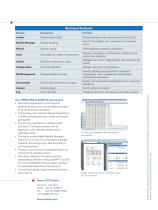
Technical Features Description Measurement editor Declare sample name, measurement method, etc. Results Manager Results handling Find, format, display, print, and export the analysis results Solution set-up Define application-specific calibrations Information on state of components Provides information on instrument components for malfunction diagnosis Schedule measurement jobs Manage and monitor measurement jobs started in the Loader Firmware definition Manage instrument configurations Manage database entries Provides database functionality on instrument configuration, user management, and database...
Open the catalog to page 4All Bruker AXS catalogs and technical brochures
 XRF SPECTRA ELEMENTS
4 Pages
 D8 DISCOVER Plus
4 Pages
 S2 LION - Spectrometry Solutions
12 Pages
 S2 PUMA - Spectroscopy Solutions
20 Pages