

S-7300A
S-7300A
This document serves as the instruction manual for the Brother S-7300A sewing machine, emphasizing the importance of reading the manual before use and keeping it accessible for reference.
- Indications and Symbols: Terms like 'DANGER', 'WARNING', and 'CAUTION' indicate hazard severity. Symbols denote actions to be taken or avoided.
- General Safety: Wait five minutes after turning off the power before opening the control box to avoid high voltage injuries. Keep liquids away from the machine.
- Environmental Requirements: Use in environments free from strong electrical noise, with stable power supply voltage, and within specified temperature and humidity ranges.
- Installation: Qualified technicians should perform installation. The machine weighs approximately 34.5 kg and requires careful handling.
- Sewing Safety: Only trained operators should use the machine. Protective goggles are recommended.
- Maintenance and Inspection: Conducted by qualified personnel using genuine Brother parts.
Warning labels guide safe operation, and users should follow them to prevent injury.
Details the S-7300A's components and capabilities, designed for medium to heavy-weight materials with a microprocessor control circuit and a new lubrication-type rotary hook.
- Table Processing and Installation: Instructions for preparing the table and installing the machine.
- Lubrication and Cord Connection: Proper lubrication and connection of cords are essential.
- Test Operation: Guidelines for testing the machine's operation and adjusting the treadle.
Steps for installing the needle, winding the lower thread, threading the upper thread, and using the knee lifter.
- Panel Functions: Describes the operation panel's functions, including the home screen and menu navigation.
- Program Settings: Instructions for setting up sewing programs.
- Production and Thread Counters: Explains the use of counters to monitor production and thread usage.
Covers advanced operations such as adding and deleting steps and editing steps.
Outlines specifications for sewing operations, including stitch speed and pitch specifications.
Allows for programming individual functions such as needle up/down positions, thread trimming, and automatic sewing modes.
Details nine types of functions that can be set as program individual or common functions.
Instructions for switching to start and end backtack setting modes.
Tracks the number of items sewn and estimates the remaining lower thread.
The counter function can be toggled on and off, with settings for the lower thread counter value.
Decreases by 0.1 each time the stitch count reaches 0.1 meters, with warnings when the counter drops below zero.
Users can switch between detailed and simple home screens.
Adjustable from 1 to 9, accessible from the home or menu screen.
- Adding/Deleting Steps: Programs can include up to 20 steps.
- Editing Steps: Modify stitch numbers and pitch for each step.
- Sewing Start Step Setting: Allows resuming sewing from a specific step after an interruption.
- Program Copy: Programs can be duplicated for minor adjustments.
- Shortcut Key Assignment: Functions can be assigned to four shortcut keys.
- Design Stitch Registration: Up to five design stitches can be registered.
- Working Pace Setting: Tracks work progress with a target counter.
The presser foot can be raised or lowered using a switch when thread trimming is stopped.
Configure hand switches for specific functions like correction sewing.
Adjust the pitch ratio from 10% to 250% using the hand switch setting screen.
Programs and memory switch data can be transferred using USB media.
Initializing stored data may restore normal operation if the machine malfunctions.
Safety precautions include attaching all safety devices and turning off the power when not in use.
- Best PFM Mode: Reduces bird's nests and shortens thread trailing length.
- X-over Seam Assist Mode: Reduces tangled threads and broken needles.
- Feed Dog Locus: Improves responsiveness to heavy materials.
- Hand Switch Settings: Assign functions to hand switches.
Proper thread tension is crucial for even stitches.
Adjust the presser foot pressure to achieve good even stitches.
Adjust the trailing length by modifying the pretension.
Increase the thread take-up amount for heavy materials.
Daily cleaning is essential for machine performance and longevity.
Check and adjust the lubrication amount.
Includes adjusting the thread tension spring, arm thread guide, presser foot height, and feed dog height and angle.
- Needle Bar Height Adjustment: Align the reference line on the needle bar.
- Needle and Feed Mechanism Timing: Set feed pitch and adjust timing.
- Needle and Rotary Hook Timing: Align the rotary hook tip with the needle center.
- Presser Foot Floating Amount: Adjust for sewing stretch materials.
- Thread Trimming: Adjust the upper and lower knife positions.
- Switch-related Errors: Includes machine head tilt detection and touch key issues.
- Sewing Machine Motor-related Errors: Covers motor overheating and abnormal operation.
- Feed Mechanism-related Errors: Involves feed motor origin detection and overheating.
- Communication and Memory-related Errors: Includes panel connection and USB media errors.
- Data Backup Errors: E451 indicates a failure to write data backup to machine head memory.
- P.C. Board-Related Errors: Includes abnormal power supply voltage and motor currents.
- Version Updating Errors: Relate to issues during version updates.
- General Precautions: Ensure the power is off and the machine is disconnected before troubleshooting.
- Common Sewing Problems:
- Thread Tension Issues: Adjust upper and lower thread tensions.
- Skipped Stitches: Check for bent or blunt needles and adjust presser foot pressure.
- Bird's Nests and Puckering: Adjust thread tensions and sewing speed.
- Thread Breakage: Ensure proper needle installation and threading.
- Thread Trimming Issues: Check and replace knives if necessary.
- Consult a qualified technician for unresolved issues.
- Use only specified parts and accessories.
- Ensure material is not being pushed or pulled excessively.
- Verify correct installation of the needle.
- Check and adjust the timing between the needle and rotary hook.
- Check if the oil tank is empty and refill as necessary.
- Ensure thread trimming is enabled when using the knee lifter.
- Adjust the tension release switching plate.
- Ensure power supply connectors are securely inserted.
- Ensure all connectors are securely inserted.
- Apply grease when "Grease up" notification appears.
Catalog excerpts

INSTRUCTION MANUAL Please read this manual before using the machine. Please keep this manual within easy reach for quick reference. SINGLE NEEDLE DIRECT DRIVE LOCK STITCHER WITH ELECTRONIC FEEDING SYSTEM AND THREAD TRIMMER
Open the catalog to page 1
Thank you very much for buying a BROTHER sewing machine. Before using your new machine, please read the safety instructions and the explanations given in the instruction manual. With industrial sewing machines, it is normal to carry out work while positioned directly in front of moving parts such as the needle and thread take-up, and consequently there is always a danger of injury that can be caused by these parts. Follow the instructions from training personnel and instructors regarding safe and correct operation before operating the machine so that you will know how to use it correctly.
Open the catalog to page 2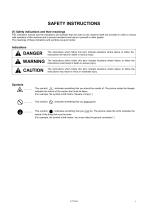
SAFETY INSTRUCTIONS [1] Safety indications and their meanings This instruction manual and the indications and symbols that are used on the machine itself are provided in order to ensure safe operation of this machine and to prevent accidents and injury to yourself or other people. The meanings of these indications and symbols are given below. The instructions which follow this term indicate situations where failure to follow the instructions will result in death or serious injury. The instructions which follow this term indicate situations where failure to follow the instructions could result...
Open the catalog to page 3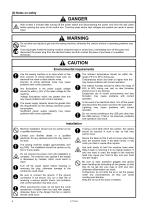
A DANGER Wait at least 5 minutes after turning off the power switch and disconnecting the power cord from the wall outlet before opening the cover of the control box. Touching areas where high voltages are present can result in severe injury. Do not allow any liquids to get onto this sewing machine, otherwise fire, electric shocks or operating problems may occur. If any liquid gets inside the sewing machine (machine head or control box), immediately turn off the power and disconnect the power plug from the electrical outlet, and then contact the place of purchase or a qualified technician. I...
Open the catalog to page 4
This sewing machine should only be used by operators who have received the necessary training in safe use beforehand. The sewing machine should not be used for any applications other than sewing. Be sure to wear protective goggles when using the machine. If goggles are not worn, there is the danger that if a needle breaks, parts of the broken needle may enter your eyes and injury may result. Turn off the power switch at the following times. The machine may operate if the treadle is depressed by mistake, which could result in injury. • When threading the needle • When replacing the bobbin and...
Open the catalog to page 5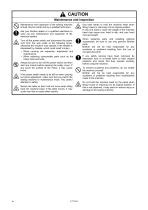
Maintenance and inspection of the sewing machine V v should only be carried out by a qualified technician. Ask your Brother dealer or a qualified electrician to carry out any maintenance and inspection of the electrical system. Turn off the power switch and disconnect the power cord from the wall outlet at the following times, otherwise the machine may operate if the treadle is depressed by mistake, which could result in injury. • When carrying out inspection, adjustment and maintenance • When replacing consumable parts such as the rotary hook and knife Always be sure to turn off the power switch...
Open the catalog to page 6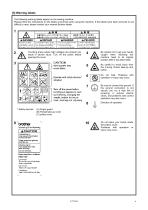
The following warning labels appear on the sewing machine. Please follow the instructions on the labels at all times when using the machine. If the difficult to read, please contact your nearest Brother dealer. labels have been removed or are Touching areas where high voltages are present can result in severe injury. Turn off the power before opening the cover. CAUTION Moving parts may cause injury. Operate with safety devices* installed. Turn off the power before carrying out operations such - as threading, changing the needle, bobbin, knives or hook, cleaning and adjusting Be careful not to...
Open the catalog to page 7
Transformer box (100 V/400 V system only)
Open the catalog to page 8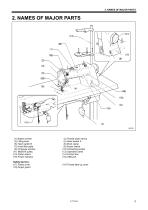
2. NAMES OF MAJOR PARTS (1) Bobbin winder (3) Lifting lever (5) Hand switch B (7) Knee lifter plate (9) Oil gauge window (11) Machine pulley (13) Cotton stand (15) Power indicator (2) Thread wiper device (4) Hand switch A (6) Work clamp (8) Power switch (10) Oil feeding pocket (12) Operation panel (14) Control box Safety devices: (17) Pulley cover (18) Thread take-up cover
Open the catalog to page 13
3. INSTALLATION CAUTION Machine installation should only be carried out by a qualified technician. Contact your Brother dealer or a qualified electrician for any electrical work that may need to be done. The sewing machine weighs approximately 34.5 kg (76lb). The installation should be carried out by two or more people. Do not connect the power cord until installation is complete. The machine may operate if the treadle is depressed by mistake, which could result in injury. Secure the table so that it will not move when tilting back the machine head. If the table moves, it may crush your feet...
Open the catalog to page 14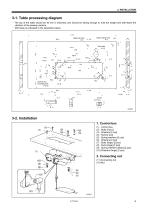
3-1. Table processing diagram • The top of the table should be 40 mm in thickness and should be strong enough to hold the weight and with-stand the vibration of the sewing machine. • Drill holes as indicated in the illustration below. Cotton stand hole *i7 ’ ix:u Head rest hole (9) Spring washers (large) [2 pcs]
Open the catalog to page 15
3. Rubber cushions (1) Rubber cushions [2 pcs] 4. Machine head (1) Hinges [2 pcs] (2) Machine head (3) Head rest NOTE: ・Bind the cords together and pass them through the cord hole. ・Tap the head rest (3) securely into the table hole. If the head rest (3) is not pushed in as far as it will go, the machine head will not be sufficiently stable when it is tilted back. 5. Machine head seal 1. Tilt back the machine head, and then peel off the sticker (1). 2. Peel off the protective sheet (3) from the operation panel (2).
Open the catalog to page 16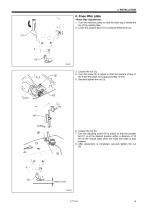
6. Knee lifter plate 1. Turn the machine pulley so that the feed dog is below the top of the needle plate. 2. Lower the presser foot (1) by using the lifting lever (2). 3. Loosen the nut (3). 4. Turn the screw (5) to adjust so that the amount of play in the knee lifter plate (4) is approximately 10 mm. 5. Securely tighten the nut (3). 6. Loosen the nut (6). 7. Turn the adjusting screw (8) to adjust so that the presser foot (7) is at the desired position within a distance of 16 mm of the needle plate when the knee liter plate is fully pressed. 8. After adjustment is completed, securely tighten...
Open the catalog to page 17All Brother catalogs and technical brochures
 WF1
WF14 Pages
 T-8421C,T-8422C
12 Pages
 SL-777B
2 Pages
 RH-9820
4 Pages
 S-7300A DigiFlex Feed
8 Pages
 S-7250A
4 Pages
 BE-438HX/HS
4 Pages
 BAS-370H / BAS-375H
8 Pages
 HE-800C
2 Pages
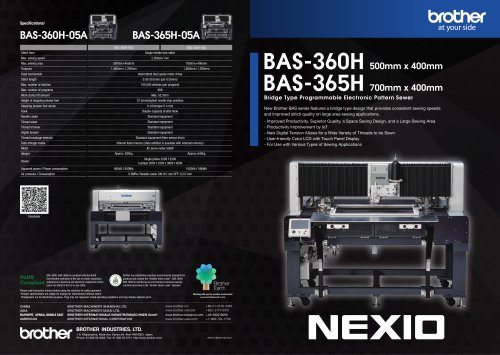 BAS-360H / BAS-365H
2 Pages
 BAS-311HN_326H
71 Pages
 BAS-300Series
8 Pages
 GT-3
GT-32 Pages
 S-7220C
63 Pages
 S-7100A
53 Pages
 KE-430FX / BE-438FX
6 Pages
 KE-430HX/HS
4 Pages
 S-1000A
2 Pages
 KE-430FS
2 Pages
 HE-800B
4 Pages
 BAS-311HN/-326H/-341H/-342H
8 Pages
 BE-438FX
6 Pages
 BAS-342G
6 Pages
 BAS-326G
6 Pages
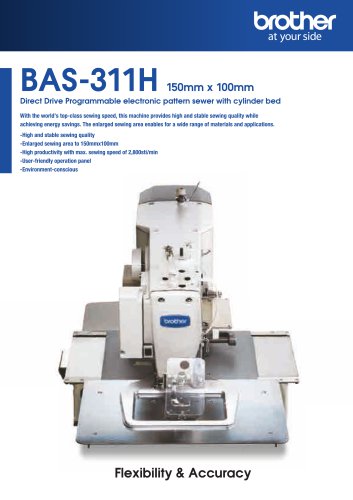 BAS-311H
6 Pages
 BAS-300G-484/484SF
2 Pages

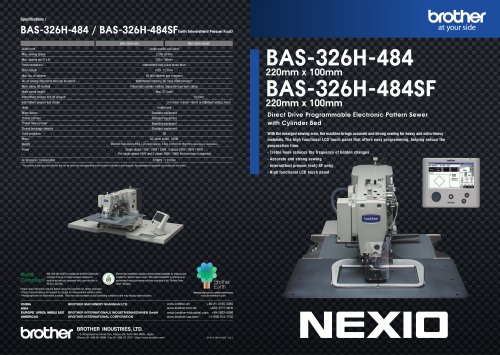
- Brother fixed sewing machine
- Industrial printer
- Brother fabric sewing machine
- Brother single-needle sewing machine
- Brother lockstitch sewing machine
- Brother single-thread sewing machine
- Ink
- Color printer
- Thermal transfer printer
- High-speed sewing machine
- Brother twin-needle sewing machine
- Brother direct-drive sewing machine
- Brother sewing machine with thread trimmer
- USB interface printer
- High-speed printer
- Brother electronic sewing machine
- Floor-standing printer
- High-quality printer
- Chain stitch sewing machine
- Brother programmable sewing machine