
- Catalogs
- Bosch Rexroth Components for Mobile Robotics
- Creating Shelf Rotation Interaction


Creating Shelf Rotation Interaction

Creating Shelf Rotation Interaction
- Navigate to the Workflow Management and select Interaction Configuration.
- Initiate a new lift by clicking 'New lift'.
- Name the interaction and configure the settings as specified.
- Use the 'Add component' button to select 'Components rotated by angle' and specify the desired rotation angle for the shelf.
- Save the interaction to integrate it into workflows.
Catalog excerpts
Creating Shelf Rotation Interaction USA00058 | 12/2022 © Bosch Rexroth Corporation 2022. All rights reserved, also regarding any disposal, exploitation, reproduction, editing, distribution, as well as in the event of applications for industrial property rights.
Open the catalog to page 1
Creating Shelf Rotation Interaction Table of Contents 1. Instruction DCUS/MKT3 | 06/10/2022 © Bosch Rexroth Corporation 2022. All rights reserved, also regarding any disposal, exploitation, reproduction, editing, distribution, as well as in the event of applications for industrial property rights.
Open the catalog to page 2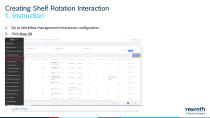
Creating Shelf Rotation Interaction 1. Instruction 1. Go to Workflow management>Interaction configuration 2. Click New lift DCUS/MKT3 | 06/10/2022 © Bosch Rexroth Corporation 2022. All rights reserved, also regarding any disposal, exploitation, reproduction, editing, distribution, as well as in the event of applications for industrial property rights.
Open the catalog to page 3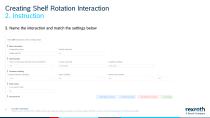
Creating Shelf Rotation Interaction 2. Instruction 3. Name the interaction and match the settings below DCUS/MKT3 | 06/10/2022 © Bosch Rexroth Corporation 2022. All rights reserved, also regarding any disposal, exploitation, reproduction, editing, distribution, as well as in the event of applications for industrial property rights.
Open the catalog to page 4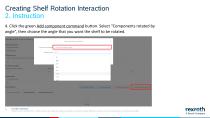
Creating Shelf Rotation Interaction 2. Instruction 4. Click the green Add component command button. Select “Components rotated by angle”, then choose the angle that you want the shelf to be rotated. DCUS/MKT3 | 06/10/2022 © Bosch Rexroth Corporation 2022. All rights reserved, also regarding any disposal, exploitation, reproduction, editing, distribution, as well as in the event of applications for industrial property right
Open the catalog to page 5
Creating Shelf Rotation Interaction 2. Instruction 5. Save the interaction. You will now be able to add this interaction into workflows DCUS/MKT3 | 06/10/2022 © Bosch Rexroth Corporation 2022. All rights reserved, also regarding any disposal, exploitation, reproduction, editing, distribution, as well as in the event of applications for industrial property rights.
Open the catalog to page 6
Bosch Rexroth Corporation Corporate Headquarters 14001 South Lakes Drive Charlotte, NC 28273 Telephone (800) REXROTH (800) 739-7684 [email protected] www.boschrexroth-us.com Find your local contact person here: www.boschrexroth-us.com/contactus USA00089/2023-6 © Bosch Rexroth Corporation 2023 Subject to modifications Printed in USA 7 DCUS/MKT3 | 06/10/2022 © Bosch Rexroth Corporation 2022. All rights reserved, also regarding any disposal, exploitation, reproduction, editing, distribution, as well as in the event of applications for industrial property rights.
Open the catalog to page 7All Bosch Rexroth Components for Mobile Robotics catalogs and technical brochures
 Press module for die cushion
24 Pages
 Accumulator modules
16 Pages
 BODAS Inertial sensor MM7.10
14 Pages
 BODAS Pressure sensor PR4
32 Pages
 Filtermatte
2 Pages


