


BinMaster SmartBob MUCM Brochure

BinMaster SmartBob MUCM Brochure
- Proven technology with reliable and repeatable measurements.
- Unaffected by material characteristics, dust, temperature, dielectric constant, humidity, or angle of repose.
- Minimal contact with material and no field calibration required.
- Cost-effective solution for inventory management.
- Dimensions: 4.9” x 5.6” x 1.6” (124 x 142 x 41 mm).
- Power Requirements: 9-30 VAC or VDC; 5 Watts max.
- RS-232 Port: Supports Modbus RTU or ASCII with various baud rates and parity options.
- RS-485 Port: 2 Wire RS-485 Multidrop with SmartBob II protocol.
- Indicators: LED indicators for each serial port, program, power, and readiness.
- Operating Conditions: 25 to 120 degrees F, up to 90% non-condensing humidity.
Catalog excerpts

SmartBob II Momentum Universal Communication Module (MUCM) . The standard model allows Modbus serial masters to gather data from BinMaster SmartBob II remotes. ♦ > MUCM ModBus Master Power RS-232 Serial Cable RS-485 Cable Division of Garner Industries 7201 N. 98th Street Lincoln, NE 68507 Fax (402) 434-9133 (402) 434-9102 www.binmaster.com > Brand and product names mentioned in this document are trademarks or registered trademarks of their respective companies. SmartBob II Remotes Figure 1.1 size="-2">
Open the catalog to page 1
Figure 2.1 HyperTerminal Setup Device Screen Figure 2.2 Zapreg32 of Slave 1 Screen The set-up parameters may be reviewed and modified by connecting a terminal or emulator such as a HyperTerminal to MUCM port 1. The setup device screen will bring up prompts (figure 2.1) for the Modbus slave address and SmartBob Slave address. The MUCM will answer Modbus RTU requests on its RS-232 port that are directed to a Modbus slave address. The setup device screen allows you to add, edit, remove, and perform a test measurement on all the SmartBob II remotes in the system. The program Zapreg32.exe (figure...
Open the catalog to page 2All BinMaster catalogs and technical brochures
 Capacitance Probe Brochure
12 Pages
 FeedView brochure
4 Pages
 CNCR-400 Brochure
2 Pages
 BMRX-300 Brochure
4 Pages
 Full Line Brochure
24 Pages
 NCR-86 Full Line Brochure
8 Pages
 SmartSonic Brochure
8 Pages
 Mini Rotary Brochure
2 Pages
 DPM-100 Display Brochure
2 Pages
 DPM-200 Display Brochure
2 Pages
 FVL-200 Brochure
4 Pages
 SPL-200 Brochure
4 Pages
 Tilt Switch Brochure
2 Pages
 C-100 Display Brochure
2 Pages
 BMRX-100 Basic Rotary
2 Pages
 BMRX-200 Brochure
2 Pages
 GWR-3000 brochure
2 Pages
 Vibrating Rod - 90
2 Pages
 Vibrating Fork brochure
2 Pages
 Airbrator
2 Pages
 GWR-2000 Guided Wave Radar
4 Pages
 Flow Detect 2000
2 Pages
 Rotary Product Line Brochure
8 Pages
 Vibrating Rod 90
2 Pages
 ProCap HD Brochure
1 Page
 Capacitance 101
2 Pages
 BinMaster DPM-300
8 Pages
 Adjustable Rotary
1 Page
 MultiBob System Brochure
8 Pages
 CVR-600 Mini Vibrating Rod
2 Pages









Archived catalogs
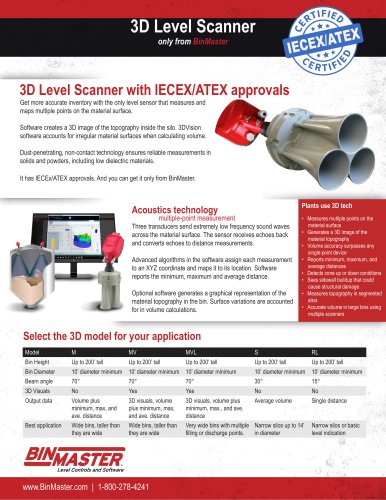
 3DLevelScanner
8 Pages
 Airpad
2 Pages
 Diaphragm Switch Brochure
2 Pages
 Full Line Product Catalog
24 Pages
 WL 19
WL 193 Pages
 WT 19
WT 193 Pages
 3D Technical Data Brochure
4 Pages
 COMPACTPRO Brochure
2 Pages
 SmartBob2 MUCM Brochure
2 Pages
 Mini-Rotary Brochure
2 Pages
 3D Angled Mounting Adaptor
2 Pages
 Get the Point
7 Pages
 DPM-100
8 Pages
 BinMaster DPM-200
6 Pages
 Digital Panel Meter Display
8 Pages
 Mini Vibrating Rod
2 Pages
 SmartBobII MUCM Brochure
2 Pages
 DPM-200 Digital Panel Meter
6 Pages
 Vibrating Fork 95
2 Pages
 Binventory Software Brochure
4 Pages
 NCR-84
4 Pages
 NCR-25 & NCR-30 Brochure
4 Pages
 NCR-80 Accessories Brochure
3 Pages
 Dust Detect 1000 Brochure
2 Pages
 VR-0515-NPC
4 Pages
 Full Line Catalog
24 Pages
 CNCR Non-Contact Radar
12 Pages
 MND Modbus Network Display
3 Pages
 3D MultiVision Software
4 Pages
 BinMaster Rotary Brochure
8 Pages
 NCR-80 Options Brochure
3 Pages
 Mercury_Free Tilt Switch
2 Pages
 BinMaster Air Pad Brochure
2 Pages
 NCR-80 Non-Contact Radar
4 Pages
 BinMaster Rotary brochure
8 Pages
 Diffuser Air Pad Brochure
2 Pages

















- Measuring device
- Automation software solution
- Management software solution
- Level limit switch
- Windows software
- Real-time software
- Cloud-based software
- Liquid level detector
- Control software
- Level probe
- Liquid level sensor
- Digital indicator
- Monitoring software solution
- 3D software solution
- Measurement software
- Interface software
- Analog level sensor
- Automated software
- Digital gauge
- Stainless steel level detector