


- Company
- Products
- Catalogs
- News & Trends
- Exhibitions
White Paper- Successfully Executing a System Integration Project

White Paper- Successfully Executing a System Integration Project
For process manufacturers, having a reliable and seamlessly integrated set of IT systems is crucial for business efficiency, profitability, and growth. Maintenance management, especially in asset-intensive industries, is critical to avoid costly production stoppages. Implementing computerized maintenance management systems (CMMS) can save time and money.
Calibration Management
Calibration of process instrumentation is a vital part of asset management. Ensuring that instruments like temperature sensors and pressure transducers perform within specified tolerances is essential to avoid production downtime and safety issues. Beamex's calibration management software, Beamex® CMX, is widely used across various industries.
Seamless Communication
Most manufacturers use CMMS alongside calibration management systems. Beamex® CMX software can integrate with systems like Maximo, SAP, or in-house software, allowing for automated calibration procedures and reducing paperwork and human error.
Integration Project
Successful integration involves Beamex, the customer, and the CMM system software partner. Key roles and responsibilities must be defined, and a project organization established. The project is divided into four phases: Scope of Work, Development and Implementation, Testing, and Installation, Verification, and Training.
Project Phases
- Scope of Work: Define project description, services, roles, responsibilities, and outcomes. Establish limitations and change management procedures.
- Development and Implementation: Develop and implement project deliverables.
- Testing: Conduct testing during and at the end of the project, with defined approval procedures.
- Installation, Verification, and Training: Install and test the system at the customer's facility, with training provided if required.
Benefits of Integration
Integration saves time, reduces costs, and increases productivity by eliminating double effort and manual data entry errors. It enables automation with smart calibrators, improving system quality. Integrating CMM systems with calibration management software is a step towards Enterprise Asset Management (EAM), which offers benefits like reduced equipment breakdowns, increased asset utilization, and optimized maintenance scheduling.
Catalog excerpts

mep_exe_cata table.main {} tr.row {} td.cell {} div.block {} div.paragraph {} .font0 { font:4.00pt "Arial", sans-serif; } .font1 { font:7.00pt "Arial", sans-serif; } .font2 { font:17.00pt "Arial", sans-serif; } .font3 { font:27.00pt "Arial", sans-serif; } .font4 { font:32.00pt "Arial", sans-serif; } .font5 { font:36.00pt "Arial", sans-serif; } Beamex Calibration White Pape [email protected] Successfully Executing a System intgration Project beamex world-class calibration solutions
Open the catalog to page 1
mep_exe_cata table.main {} tr.row {} td.cell {} div.block {} div.paragraph {} .font0 { font:8.00pt "Arial", sans-serif; } .font1 { font:9.00pt "Arial", sans-serif; } .font2 { font:10.00pt "Arial", sans-serif; } .font3 { font:11.00pt "Arial", sans-serif; } .font4 { font:13.00pt "Arial", sans-serif; } .font5 { font:28.00pt "Arial", sans-serif; } .font6 { font:42.00pt "Arial", sans-serif; } .font7 { font:8.00pt "Palatino Linotype", serif; } BEAMEX Calibration White Paper Successfully Executing a System intgration Project F or process manufacturers today, having a reliable, seamlessly integrated...
Open the catalog to page 2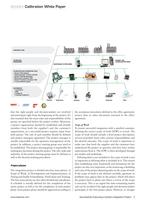
mep_exe_cata table.main {} tr.row {} td.cell {} div.block {} div.paragraph {} .font0 { font:4.00pt "Arial", sans-serif; } .font1 { font:8.00pt "Arial", sans-serif; } .font2 { font:9.00pt "Arial", sans-serif; } .font3 { font:11.00pt "Arial", sans-serif; } .font4 { font:13.00pt "Arial", sans-serif; } .font5 { font:8.00pt "Palatino Linotype", serif; } .font6 { font:9.00pt "Palatino Linotype", serif; } BEAMEX Calibration White Paper CQRPQRATE-LEVEL CALIBRATION MANAGEMENT CALIBRATION AND DQCUMENTING TOOLS Beamex® MC5 Calibrator Օ Temperature bath / pressure controller Beamex® MCS100 workstation...
Open the catalog to page 3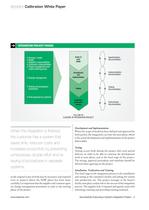
mep_exe_cata table.main {} tr.row {} td.cell {} div.block {} div.paragraph {} .font0 { font:7.00pt "Arial", sans-serif; } .font1 { font:8.00pt "Arial", sans-serif; } .font2 { font:9.00pt "Arial", sans-serif; } .font3 { font:11.00pt "Arial", sans-serif; } .font4 { font:13.00pt "Arial", sans-serif; } .font5 { font:8.00pt "Palatino Linotype", serif; } .font6 { font:9.00pt "Palatino Linotype", serif; } BEAMEX Calibration White Paper iiON PROJECT PHASES r Specifications documentation ■ Purpose / needs ■ Target ■ Supplier's responsibilities ■ Customer's responsibilities ■ Project management and project...
Open the catalog to page 4
mep_exe_cata table.main {} tr.row {} td.cell {} div.block {} div.paragraph {} .font0 { font:8.00pt "Arial", sans-serif; } .font1 { font:11.00pt "Arial", sans-serif; } .font2 { font:13.00pt "Arial", sans-serif; } .font3 { font:8.00pt "Palatino Linotype", serif; } BEAMEX Calibration White Paper When the intgration is finished, the customer has a system that saves time, reduces costs and increases productivity by preventing unnecessary double effort and re-keying of procedures in separate systems. When there is no need to manually re-key the data, typing errors are eliminated. A CMMS integration...
Open the catalog to page 5All Beamex catalogs and technical brochures
 Brochure - Software and services
44 Pages
 MC6-Ex
16 Pages
 Beamex smart reference p
2 Pages
 Beamex MC2-IS
12 Pages
 MCS200
18 Pages
 Calibration World spring 2016
36 Pages
 Brochure - Workshop Equipment
54 Pages
 Brochure - Field Equipment
116 Pages
 Brochure - Calibration Solutions
36 Pages






Archived catalogs
 Calibration World 2-2007
24 Pages
 Calibration World Issue 1-2007
24 Pages
 Calibration World Issue 1-2006
24 Pages


- Resistance temperature sensor
- Analysis software solution
- Test stand
- Process software
- Cloud-based software
- Measurement software
- Pt100 temperature transducer
- Visualization software solution
- Automated test bench
- Stainless steel temperature transducer
- Portable calibrator
- Reporting software
- Temperature calibration system
- Creation software
- Industrial test bench
- Precision calibration bench
- Precision temperature transducer