
- Catalogs
- Beagleboard.org
- BeagleV-Fire

BeagleV-Fire
BeagleV-Fire
The BeagleV-Fire is a single-board computer designed for exploring RISC-V architecture and FPGA technology. It features a Microchip PolarFire MPFS025T RISC-V SoC with FPGA fabric and supports BeagleBone capes via P8 & P9 header pins.
Pinout diagrams for P8 and P9 cape headers are provided, compatible with BeagleBone Black capes.
The board includes a MPFS025T-FCVG484E processor, 2GB LPDDR4 memory, 16GB eMMC storage, and supports wireless connectivity via an M.2 Key E slot. It features a Realtek RTL8211F Gigabit Ethernet PHY and USB-C for power and connectivity.
Front Components: Power LED, JTAG debug port, Ethernet PHY, expansion headers, RAM, eMMC storage, camera connectors, M.2 Key E connector, UART debug header, reset and user buttons, user LEDs, Ethernet port, barrel jack, and USB-C port.
Includes box contents, unboxing instructions, PC tethering, eMMC flashing, accessing the UART debug console, and available demos and tutorials.
Details on the SoC, power management, connectivity options, memory and storage, multimedia I/O, and debug ports are provided.
Details on cape headers P8 and P9 for expanding the board's capabilities.
Instructions for upgrading gateware, flashing images, installing FPGA tools, and customizing gateware using Verilog.
Information on production board boot media, certifications, export control, additional documentation, and support forums.
Methods include Cockpit, SSH, and Serial Port for accessing the Linux command prompt.
Requires internet connection and involves installing the bbb.io-gateware package and using a script to reprogram the FPGA.
Involves using FlashPro Express and specific hardware for flashing the gateware and Linux image.
Instructions for installing Libero and SoftConsole, configuring the licensing daemon, and setting up the environment.
Details on the gateware architecture, version retrieval, and full build flow.
Instructions for editing Verilog source code and using CI infrastructure to generate programming bitstreams.
Involves device tree overlays, Hart Software Services, and executing TCL scripts in the Libero project.
Instructions for adding custom HDL and verifying design changes using ModelSim.
Details on GPIO and header pin configurations, including signal control and descriptions for P8 and P9 headers.
Explanation of ARM AMBA protocols and accessing peripherals using MMIO in Linux.
Step-by-step instructions for building and flashing a Linux image using Buildroot.
Support is available through the BeagleBoard.org community, with additional resources and change history provided.
Catalog excerpts
Upgrade BeagleV-Fire Gateware . . . . . . . . . . . . . . . . . 5.1.1 Required Equipment . . . . . . . . . . . . . . . . . . . 5.1.2 Connect to BeagleV-Fire Linux Command Line Interface 5.1.3 Gateware Upgrade Linux Commands . . . . . . . . . . Flashing gateware and Linux image . . . . . . . . . . . . . . . 5.2.1 Programming & Debug tools installation . . . . . . . . . 5.2.2 Flashing gateware image . . . . . . . . . . . . . . . . . 5.2.3 Flashing eMMC . . . . . . . . . . . . . . . . . . . . . . Microchip FPGA Tools Installation Guide . . . . . . . . . . . . . 5.3.1 Install Libero . . . . . . ....
Open the catalog to page 3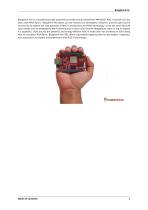
BeagleV®-Fire is a revolutionary SBC powered by the Microchip’s PolarFire® MPFS025T RISC-V System on Chip (SoC) with FPGA fabric. BeagleV®-Fire opens up new horizons for developers, tinkerers, and the open-source community to explore the vast potential of RISC-V architecture and FPGA technology. It has the same P8 & P9 cape header pins as BeagleBone Black allowing you to stack your favorite BeagleBone cape on top to expand it’s capability. Built around the powerful and energy-efficient RISC-V instruction set architecture (ISA) along with its versatile FPGA fabric, BeagleV®-Fire SBC offers unparalleled...
Open the catalog to page 6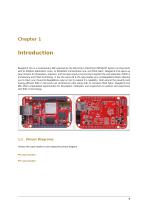
Introduction BeagleV®-Fire is a revolutionary SBC powered by the Microchip’s PolarFire® MPFS025T System on Chip (SoC) with 4x RV64GC Application cores, 1x RV64IMAC monitor/boot core, and FPGA fabric. BeagleV®-Fire opens up new horizons for developers, tinkerers, and the open-source community to explore the vast potential of RISC-V architecture and FPGA technology. It has the same P8 & P9 cape header pins as BeagleBone Black allowing you to stack your favourite BeagleBone cape on top to expand it’s capability. Built around the powerful and energy-efficient RISC-V instruction set architecture (ISA)...
Open the catalog to page 8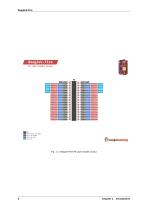
Fig. 1.1: BeagleV-Fire P8 cape header pinout
Open the catalog to page 9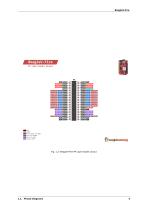
Fig. 1.2: BeagleV-Fire P9 cape header pinout
Open the catalog to page 10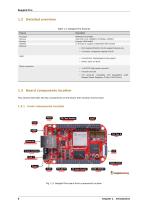
1x M.2 Key E, support 2.4GHz/5GHz WiFi module • PHY: Realtek RTL8211F-VD-CG Gigabit Ethernet phy • Connector: integrated magnetics RJ-45 • Connectivity: Flash/programming support Other connectors • 1x SYZYGY High speed connector • microSD card slot • CSI connector compatible with BeagleBone AI-64, BeagleV-Ahead, Raspberry Pi Zero / CM4 (22-pin) 1.3.1 Front components location
Open the catalog to page 11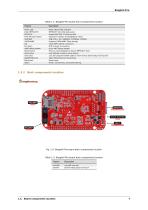
P8 & P9 cape header 2GB RAM 16GB eMMC CSI UART debug header Reset button User button User LEDs GigaBit Ethernet Barrel jack USB C Description Power (Board ON) indicator MPFS025T SoC JTAG debug port Gigabit IEEE 802.11 Ethernet PHY Expansion headers for BeagleBone capes. 2GB (1Gb x 16)- 1866MHz 3733Mbps, LPDDR4 Kingston 16GB eMMC Flash storage 22pin MIPI Camera connectors PCIE M.2 Key E connector 6 pin UART debug header Press to reset BeagleV-Fire board (MPFS025T SoC) User defined (custom) action button 12x user programmabkle LEDs to show various board status during boot. 1Gb/s Wired internet...
Open the catalog to page 12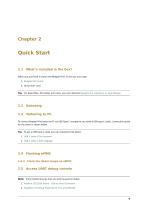
When you purchase a brand new BeagleV-Fire, In the box you'll get: Tip: For board files, 3D model, and more, you can checkout BeagleV-Fire repository on OpenBeagle. To connect BeagleV-Fire board to PC via USB Type C receptacle you need a USB type C cable. Connection guide for the same is shown below: Tip: To get a USB type C cable you can checkout links below: 2.4.1 Flash the latest image on eMMC Note: Some tested devices that are working good includes: 1. Adafruit CP2102N Friend - USB to Serial Converter 2. Raspberry Pi Debug Probe Kit for Pico and RP2040
Open the catalog to page 14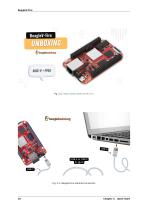
Fig. 2.2: BeagleV-Fire tethered connection Chapter 2. Quick Start
Open the catalog to page 15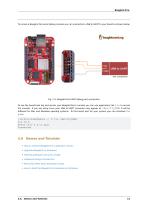
To access a BeagleV-Fire serial debug console you can connected a USB to UART to your board as shown below: Fig. 2.3: BeagleV-Fire UART debug port connection To see the board boot log and access your BeagleV-Fire’s console you can use application like tio to access the console. If you are using Linux your USB to UART converter may appear as /dev/ttyUSB. It will be different for Mac and Windows operatig systems. To find serial port for your system you can checkout this guide. [lorforlinux@fedora ~] $ tio /dev/ttyUSB0 tio v2.5 Press ctrl-t q to quit Connected 2.6 Demos and Tutorials • How to retrieve...
Open the catalog to page 16
Chapter 2. Quick Start
Open the catalog to page 17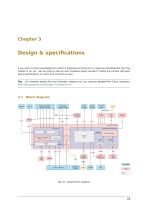
Design & specifications If you want to know how BeagleV-Fire board is designed and what are it’s high-level specifications then this chapter is for you. We are going to discuss each hardware design element in detail and provide high-level device specifications in a short and crisp form as well. Tip: For hardware design files and schematic diagram you can checkout BeagleV-Fire GitLab repository: https://git.beagleboard.org/beaglev-fire/beaglev-fire Fig. 3.1: System block diagram
Open the catalog to page 18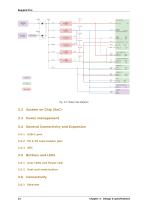
3.2 System on Chip (SoC)3.3 Power management3.4 General Connectivity and Expansion 3.4.1 USB-C port 3.4.2 P8 & P9 cape header pins 3.5.1 User LEDs and Power LED 3.5.2 User and reset button 14 Chapter 3. Design & specifications
Open the catalog to page 19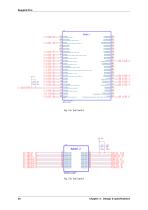
USBO DATA! I2C1_SCL | I2C1_SDA ’UART0_RXD U ART0_TXD ADC_SCK ADC_CSn | ADC_MOSl ADC_MBO 16 Chapter 3. Design & specifications
Open the catalog to page 21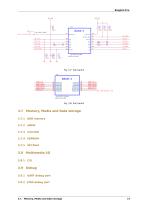
3.9.1 UART debug port 3.9.2 JTAG debug port 3.7. Memory, Media and Data storage 17
Open the catalog to page 22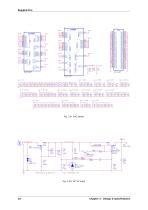
Reverse polarity protection Fig. 3.10: DC 5V input 18 Chapter 3. Design & specifications
Open the catalog to page 23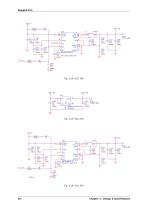
Fig. 3.16: VCC 3V3 20 Chapter 3. Design & specifications
Open the catalog to page 25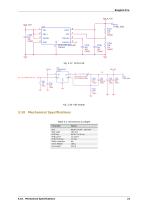
Table 3.1: Dimensions & weight Parameter Values
Open the catalog to page 26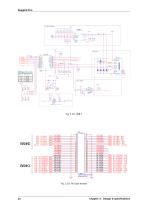
Power Switch 22 Chapter 3. Design & specifications
Open the catalog to page 27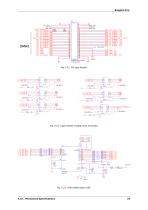
Fig. 3.22: Cape header voltage level translator Cl 19
Open the catalog to page 28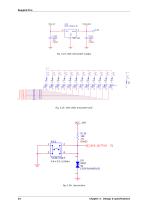
Tactile Switch 24 Chapter 3. Design & specifications
Open the catalog to page 29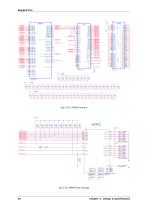
VDDQllS VDDQ 16 VDDQ 17 Fig. 3.30: EMMC flash storage 26 Chapter 3. Design & specifications
Open the catalog to page 31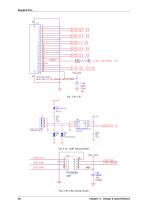
Fig. 3.35: UART debug header Fig. 3.36: JTAG debug header 28 Chapter 3. Design & specifications
Open the catalog to page 33
Expansion 4.1 Cape Headers The expansion interface on the board is comprised of two headers P8 (46 pin) & P9 (46 pin). All signals on the expansion headers are 3.3V unless otherwise indicated. Note: Do not connect 5V logic level signals to these pins or the board will be damaged. Note: DO NOT APPLY VOLTAGE TO ANY I/O PIN WHEN POWER IS NOT SUPPLIED TO THE BOARD. IT WILL DAMAGE THE PROCESSOR AND VOID THE WARRANTY. NO PINS ARE TO BE DRIVEN UNTIL AFTER THE SYS_RESET LINE GOES HIGH. The following tables show the pinout of the P8 expansion header. The gateware image is responsible for setting the function...
Open the catalog to page 34All Beagleboard.org catalogs and technical brochures
 BeagleY-AI
133 Pages
 BeagleBone Blue
27 Pages
 BeagleBone Black
109 Pages
 BeagleV-Ahead
57 Pages
 PocketBeagle
63 Pages
 BeagleBone AI-64
132 Pages
 BeagleConnect Freedom
37 Pages