
- Catalogs
- Beagleboard.org
- BeagleConnect Freedom

BeagleConnect Freedom
BeagleConnect Freedom
BeagleConnect™ Freedom is an open-hardware wireless platform by BeagleBoard.org, featuring the TI CC1352P7 microcontroller. It supports both 2.4-GHz and Sub-1 GHz wireless protocols, enabling rapid IoT prototyping with compatibility for over 1,000 mikroBUS add-ons. The platform includes sensors, a battery charger, and JTAG connections.
- Plug & Play: Uses the Linux kernel for device communication, removing the need for specific microcontroller code.
- Software Updates: Centralized code maintenance with contributions to the Zephyr Project.
- Prototyping: Supports the mikroBUS standard for flexible sensor integration.
- Wireless Capabilities: Built around the TI CC1352P7 MCU with OTA capabilities.
- Customizable Design: Open source hardware and software for tailored solutions.
The package includes the BeagleConnect Freedom board, an antenna, a USB cable, and a quick-start card. To attach the antenna, align and rotate it clockwise.
- Interface Components: LEDs, buttons, and a buzzer.
- Sensors: Light and humidity/temperature sensors.
- Ports: mikroBUS ports for add-ons and a USB-C port for power and programming.
- Battery Management: LiPo battery charger and input protection.
Details on expanding capabilities through additional modules and interfaces. Tutorials include using MicroPython with pre-flashed firmware.
Information on boot media for production boards, export designations, and compliance. Links to additional documentation and support forums are provided.
Details on connection profiles, device status, and network interfaces, including GPIO, UART, I2C, and SPI interfaces.
- MicroPython Usage: Instructions for sensor data retrieval and file management.
- Zephyr Setup: Steps for installing and configuring the Zephyr SDK.
- Arduino Zephyr Template: Guidelines for setting up an Arduino workspace using Zephyr.
- Recommended extraction locations for the Zephyr SDK bundle.
- Use of BeaglePlay as a common development environment.
- Guidance on using BeagleConnect Greybus for wireless communication.
- Device readiness and requirements for various interfaces.
- IPv6 addresses and multicast configurations.
- Sensor data measurements for light and humidity.
Instructions for updating firmware and contributing to the BeagleConnect project, with links to repositories and resources.
The document serves as a comprehensive guide for setting up and using BeagleConnect Freedom with Zephyr and MicroPython, providing detailed instructions for developers and early adopters.
Instructions for setting up the BeagleConnect Freedom board using Arduino, including code examples like "Hello World" and "Blink". Build and flash instructions are provided, along with support resources.
Catalog excerpts

BeagleConnect Freedom
Open the catalog to page 1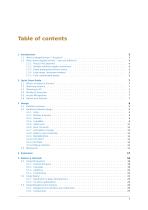
2 Quick Start Guide 7
Open the catalog to page 2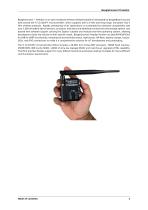
BeagleConnect Freedom BeagleConnect™ Freedom is an open-hardware wireless hardware platform developed by BeagleBoard.org and built around the TI CC1352P7 microcontroller, which supports both 2.4-GHz and long-range, low-power Sub-1 GHz wireless protocols. Rapidly prototyping of IoT applications is accelerated by hardware compatibility with over 1,000 mikroBUS add-on sensors, acutators, indicators and additional connectivity and storage options, and backed with software support utilizing the Zephyr scalable and modular real-time operating system, allowing developers to tailor the solution to their...
Open the catalog to page 4
BeagleConnect Freedom
Open the catalog to page 5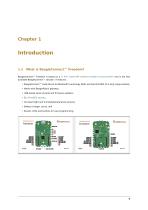
BeagleConnect™ Freedom is based on a TI Arm Cortex-M4 wireless-enabled microcontroller and is the first available BeagleConnect™ solution. It features: • BeagleConnect™ node device for Bluetooth Low-Energy (BLE) and Sub-GHz 802.15.4 long range wireless, • Works with BeaglePlay® gateway, • USB-based serial console and firmware updates, • On-board light and humidity/temperature sensors, • Buzzer, LEDs and buttons for user programming.
Open the catalog to page 6
BeagleConnect Freedom 1.2 What makes BeagleConnect™ new and different? 1.2.1 Plug & Play approach BeagleConnect™ uses the collaboratively developed Linux kernel to contain the intelligence required to speak to these devices (sensors, actuators, and indicators), rather than relying on writing code on a microcontroller specific to these devices. Some existing solutions rely on large libraries of microcontroller code, but the integration of communications, maintenance of the library with a limited set of developer resources and other constraints to be explained later make those other solutions less...
Open the catalog to page 7
BeagleConnect Freedom the software and provide mechanisms for updating firmware on BeagleConnect™ hardware. With a single, relatively small firmware load, the potential for bugs is kept low. With large user base, the potential for discovering and resolving bugs is high. BeagleConnect™ utilizes the mikroBUS standard. The mikroBUS standard interface is flexible enough for almost any typical sensor or indicator with hundreds of devices available. Note: Currently, we have support in the Linux kernel for a bit over 100 Click mikroBUS add-on boards from Mikroelektronika and are working with Mikroelektronika...
Open the catalog to page 8
BeagleConnect Freedom
Open the catalog to page 9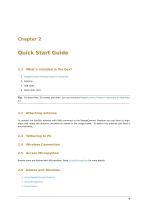
1. BeagleConnect Freedom board in enclosure Tip: For board files, 3D model, and more, you can checkout BeagleConnect Freedom repository on OpenBea-gle. To connect the SubGHz antenna with SMA connector to the BeagleConnect Freedom you just have to align, place and rotate the antenna clockwise as shown in the image below. To detach the antenna just twist it anti-clockwise. Boards come pre-flashed with Micropython. Read Using Micropython for more details. • Using BeagleConnect Greybus • Using Micropython • Using Zephyr
Open the catalog to page 10
BeagleConnect Freedom Fig. 2.2: Aattaching antenna to BeagleConnect Freedom Chapter 2. Quick Start Guide
Open the catalog to page 11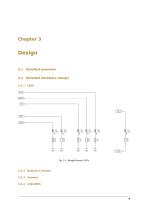
3.2 Detailed hardware design
Open the catalog to page 12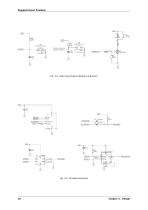
Fig. 3.2: User Input Output (Buttons & Buzzer) ^7 Fig. 3.3: On-board sesnsors 10 Chapter 3. Design
Open the catalog to page 13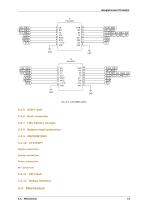
BeagleConnect Freedom BeagleConnect Freedom 3.2.7 LiPo battery charger 3.2.8 Battery input protection Digital subsection Analog subsection Power subsection
Open the catalog to page 14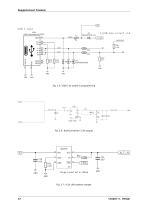
BeagleConnect Freedom Fig. 3.5: USB-C for power & programming Fig. 3.7: 4.2V LiPo battery charger
Open the catalog to page 15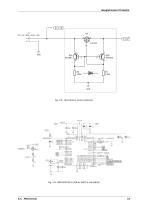
BeagleConnect Freedom Fig. 3.8: LiPo battery input protection
Open the catalog to page 16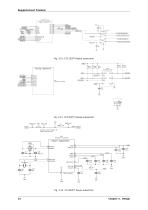
BeagleConnect Freedom Optional sense resistor for power measurement
Open the catalog to page 17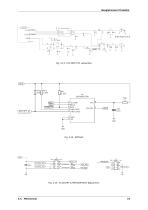
BeagleConnect Freedom
Open the catalog to page 18
BeagleConnect Freedom
Open the catalog to page 19
BeagleConnect Freedom
Open the catalog to page 21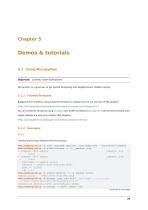
Demos & tutorials 5.1 Using Micropython Important: Currently under development Micropython is a great way to get started developing with BeagleConnect Freedom quickly. Flashed firmware BeagleConnect Freedom initial production firmware is release 0.0.3 of our own fork of Micropython. https://git.beagleboard.org/beagleconnect/zephyr/micropython/-/releases/0.0.3 You can verify this version by using mcumgr over a UDP connection or mcuboot over the serial console shell. Latest releases are part of our Zephyr SDK releases. https://git.beagleboard.org/beagleconnect/zephyr/zephyr/-/releases 0.0.3 The...
Open the catalog to page 22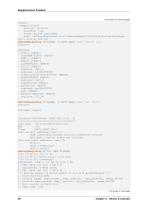
BeagleConnect Freedom (continued from previous page) version: hu.hu.hu bootable: true flags: active confirmed hash: 3697bcef05a6becda7dc14150d46c05dbed5fa78633657b20cf34e1418affee9 Split status: N/A (0) debian@BeaglePlay:~$ mcumgr -c bcf0 shell exec "device list” status=0 - I2C_0S (READY) requires: GPIO_0 requires: i2c@40002000 - leds (READY) debian@BeaglePlay:~$ mcumgr -c bcf0 shell exec ”net iface” status=0 Hostname: zephyr fe80::3265:842a:4b:1200 autoconf preferred infinite 2001:db8::1 manual preferred infinite IPv6 multicast addresses (max 4): ff02::1 debian@BeaglePlay:~$ tio /dev/ttyACM0...
Open the catalog to page 23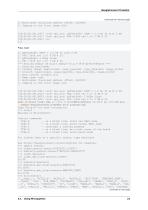
BeagleConnect Freedom (continued from previous page) I: Bootloader chainload address offset: 0x20000 I: Jumping to the first image slot [00:00:00.001,647] <inf> spi_nor: gd25q16c@0: SFDP v 1.0 AP ff with 2 PH [00:00:00.001,647] <inf> spi_nor: PH0: ff00 rev 1.0: 9 DW @ 30 [00:00:00.001,983] <in >>> Press reset I: gd25q16c@0: SFDP v 1.0 AP ff with 2 PH I: PH0: ff00 rev 1.0: 9 DW @ 30 I: gd25q16c@0: 2 MiBy flash I: PH1: ffc8 rev 1.0: 3 DW @ 60 *** Booting Zephyr OS build zephyr-v3.2.0-3470-g14e193081b1f *** I: Primary image: magic=unset, swap_type=0x1, copy_done=0x3, image_ok=0x3 I: Scratch: magic=unset,...
Open the catalog to page 24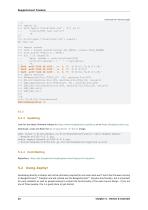
BeagleConnect Freedom (continued from previous page) ... f.write(”My test.txt\n”) Look for the latest firmware release on https://www.beagleboard.org/distros or on https://beagleconnect.org. Download, unzip and flash the micropython-w-boot image. Repository: https://git.beagleboard.org/beagleconnect/zephyr/micropython Developing directly in Zephyr will not be ultimately required for end-users who won't touch the firmware running on BeagleConnect™ Freedom and will instead use the BeagleConnect™ Greybus functionality, but is important for early adopters as well as people looking to extend the functionality...
Open the catalog to page 25All Beagleboard.org catalogs and technical brochures
 BeagleY-AI
133 Pages
 BeagleV-Fire
99 Pages
 BeagleBone Blue
27 Pages
 BeagleBone Black
109 Pages
 BeagleV-Ahead
57 Pages
 PocketBeagle
63 Pages
 BeagleBone AI-64
132 Pages
- Single-board computer
- Embedded single-board computer
- USB single-board computer
- Intel® Core™ single-board computer
- Compact single-board computer
- ARM architecture single-board computer
- LPDDR4 single-board computer
- Dual-core single-board computer
- Single-board computer for IoT applications
- Robotic single-board computer