
- Catalogs
- Beagleboard.org
- BeagleBone Blue

BeagleBone Blue

BeagleBone Blue
BeagleBone Blue is an educational platform designed for robotics and machine control, facilitating learning in programming and control theory. It is a collaborative product involving UCSD Flow Control and Coordinated Robotics Lab, Strawson Design, among others.
Pinouts
The document details pinout configurations, including UART and GPS connections, with specific commands for pin configuration.
SSH Setup
Instructions are provided for setting up SSH, including changing passwords and using simple passwords as a superuser.
WiFi Setup
Guidance on enabling and configuring WiFi is included, with commands for scanning and connecting to networks.
IP Settings
Instructions for setting a fixed IP address for robotics applications are provided, including manual network configuration.
Flashing Firmware
The process for updating the BeagleBone Blue's eMMC with the latest OS version is outlined, with steps for Windows and Linux/Mac PCs using the Etcher utility.
Code and Testing
Built-in code for testing functions like battery monitoring and motor testing is included, with instructions for running these tests.
Accessories
A list of compatible accessories is provided, including chassis, cases, cables, motors, and more.
Frequently Asked Questions (FAQs)
Common questions about boot media, firmware, WiFi connections, programming examples, and troubleshooting are addressed.
Sensor Activation
Commands for activating the TSL2561 digital light sensor and the TH02 temperature and humidity sensor on the I2C bus are provided.
Motor Testing
The 'rc_test_motors' command is mentioned for testing motors.
Accessories Details
- Chassis and Kits: EduMIP, Pololu Romi Chassis, and Sprout Runt Rover.
- Cable Assemblies: JST connector bundles for motors, encoders, and power connections.
- Power Supplies: Recommendations for 12V power supplies.
- Motors and Servos: Specifications for DC motors and servo motors.
- GPS and Radio Remotes: Options for GPS receivers and radio remotes.
- USB Devices: USB cameras like Logitech C270 and C920.
FAQs Highlights
- Boot Media: Instructions for downloading and installing firmware.
- WiFi Connection: Steps for connecting to WiFi via command line.
- Programming Resources: Links for programming in C, Python, and Simulink.
- Firmware Issues: Solutions for booting and firmware update issues.
- Mechanical Models: Availability of community-contributed models.
- Operating Temperature: 0 to 70 degrees Celsius.
- DC Motor Drive: Voltage and current specifications for motor drivers.
Catalog excerpts

BeagleBone Blue
Open the catalog to page 1
1 BeagleBone Blue Pinouts 3 6 Play with the code 13 7 BeagleBone Blue tests 15
Open the catalog to page 2
8.15 USB devices . . . . . 8.15.1 USB cameras . 8.16 SPI devices . . . . . . 8.16.1 SPI TFT displays 8.17 I2C devices . . . . . . 8.18 UART devices . . . . . 8.18.1 Computer serial 8.19 Bluetooth devices . . 9 Frequently Asked Questions (FAQs) 9.1 Production board boot media . . . . . . . . . . . . . . . . . . . . . . . . . . . . . . . . . . . . 9.2 Are there any books to help me get started? . . . . . . . . . . . . . . . . . . . . . . . . . . . . 9.3 What system firmware should I use for starting to explore my BeagleBone Blue? . . . . . . . . . 9.4 What is the name of the access point SSID and...
Open the catalog to page 3
BeagleBone Blue To optimize BeagleBone for education, BeagleBone Blue was created that integrates many components for robotics and machine control, including connectors for off-the-shelf robotic components. For education, this means you can quickly start talking about topics such as programming and control theory, without needing to spend so much time on electronics. The goal is to still be very hackable for learning electronics as well, including being fully open hardware. BeagleBone Blue’s legacy is primarily from contributions to BeagleBone Black robotics by UCSD Flow Control and Coordinated...
Open the catalog to page 4
BeagleBone Blue
Open the catalog to page 5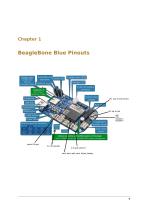
pUSB Client ■ Darometer gSD slot ^ ; Power LED 4 battery level LEDs Charger LED Tl WiLink™ 8 802.11 b/g/n Bluetooth 4.1/BLE 2 cell LiPo battery connector 8 servo motor outputs #8 Sig, 6V Grd (brown) USB host Reset button #1 sig, 6v grd 2 user buttons 6 user LEDs encoder a GPIO and serial JST connectors 4 DC motor drivers 1-GHz Tl ARM® 0ortex®-A8 adcO, add, adc2, adc4, DCJack, Battery
Open the catalog to page 6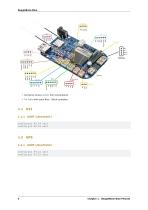
• Connector pinout details from schematic(s) • Pin Table with some Blue : Black corelation. BeagleBone Blue config-pin P9.24 uart config-pin P9.26 uart config-pin P9.21 uart config-pin P9.22 uart 4 Chapter 1. BeagleBone Blue Pinouts
Open the catalog to page 7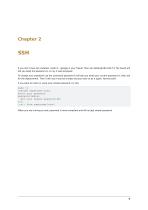
SSH If you don’t have ssh installed, install it. (google is your friend) Then ssh [email protected] The board will tell you what the password is, on my it was temppwd. To change your password use the command password it will ask you what your current password is, then ask for the replacement. Then it will say it was too simple and you have to do it again. Normal stuff. If you want to insist on using your simple password, try this. sudo -s (become superuser/root) enter your password password debian (put your simple password in) exit (exit from superuser/root) When you are running as root, password...
Open the catalog to page 8
BeagleBone Blue
Open the catalog to page 9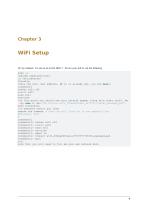
WiFi Setup On my network, I’m set up as ip 192.168.1.*. To turn your wifi on, do the following. sudo -s (become superuser/root) cd /etc/network/ ifconfig (Note the wifi inet address, if it is already set, you are done!) connmanctl tether wifi off enable wifi scan wifi services (at this point you should see your network appear along with other stuff, in␣ ,→my case it was ”AR Crystal wifi_f45eab2f1ee1_6372797774616c_managed_psk”) nano interfaces (or whatever editor you like) remove the comment # from the wifi lines so it now appears like ##connman: WiFi # connmanctl connmanctl> tether wifi off...
Open the catalog to page 10
BeagleBone Blue Chapter 3. WiFi Setup
Open the catalog to page 11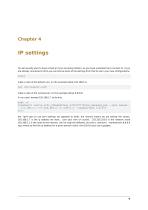
IP settings You will usually want to have a fixed ip if you are doing robotics, so you have a standard ip to connect to. If you are already connected in dhcp you can borrow some of the settings from that to use in your new configurations. route make a note of the default one, (in the example below 192.168.1.1) cat /etc/resolv.conf make a note of the nameserver, (in the example below 8.8.8.8) In my case I wanted 192.168.1.7 to do this, sudo -s connmanctl config wifi_f45eab2f1ee1_6372797774616c_managed_psk --ipv4 manual␣ ,→192.168.1.7 255.255.255.0 192.168.1.1 --nameservers 8.8.8.8 exit the –ipv4...
Open the catalog to page 12
BeagleBone Blue
Open the catalog to page 13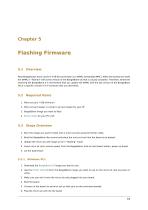
Most Beaglebones have a built in 4 GB SD card known as a eMMC (embedded MMC). When the boards are made the eMMC is "flashed” with some version of the BeagleBone OS that is usually outdated. Therefore, whenever receiving the BeagleBone it is recommend that you update the eMMC with the last version of the BeagleBone OS or a specific version of it if someone tells you otherwise. 1. Micro sd card. 4 GB minimum 2. Micro sd card reader or a built in sd card reader for your PC 3. BeagleBone image you want to flash. 4. Etcher utility for your PC's OS. 1. Burn the image you want to flash onto a micro...
Open the catalog to page 14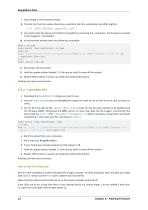
7. Type dmesg in the terminal window 8. The last line from the output should say something like (the numbering may differ slightly): 9. You want to take the above and combine it together by removing the : and space. For the above example it will change to "mmcblk0p1'' 10. In the terminal window enter the following commands: mkdir sd_tmp sudo mount /dev/mmcblk0p1 sd_tmp sudo su echo "cmdline=init=/opt/scripts/tools/eMMC/init-eMMC-flasher-v3.sh" >> sd_ ■^tmp/boot/uEnv.txt exit sudo umount sd_tmp 11. Now power off your board 12. Hold the update button labeled SD (the one by itself) to boot off the...
Open the catalog to page 15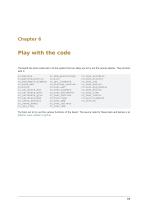
Play with the code The board has some code built in to the system that can allow you to try out the various options. They all start with rc rc_balance rc_battery_monitor rc_benchmark_algebra rc_bind_dsm rc_blink rc_calibrate_dsm rc_calibrate_escs rc_calibrate_gyro rc_calibrate_mag rc_check_battery rc_check_model rc_cpu_freq rc_dsm_passthrough rc_kill rc_spi_loopback rc_startup_routine rc_test_adc rc_test_algebra rc_test_barometer rc_test_buttons rc_test_cape rc_test_dmp rc_test_drivers rc_test_dsm rc_test_encoders rc_test_filters rc_test_imu rc_test_motors rc_test_polynomial rc_test_servos rc_test_time...
Open the catalog to page 16
BeagleBone Blue Chapter 6. Play with the code
Open the catalog to page 17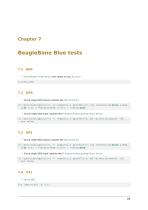
BeagleBone Blue tests 7.1 ADC • Grove Rotary Angle Sensor See output on adc_1 source 7.2 GP0 • Grove single GPIO output modules like LED Socket Kit cd /sys/class/gpio;echo 49 >export;cd gpio49;echo out >direction;while sleep␣ ,→1;do echo 0 >value;sleep 1;echo 1 >value;done • Grove single GPIO input modules like IR Distance Interrupter or Touch Sensor cd /sys/class/gpio;echo 49 >export;cd gpio49;echo in >direction;watch -n0␣ ,→cat value 7.3 GP1 • Grove single GPIO output modules like LED Socket Kit cd /sys/class/gpio;echo 97 >export;cd gpio97;echo out >direction;while sleep␣ ,→1;do echo 0 >value;sleep...
Open the catalog to page 18All Beagleboard.org catalogs and technical brochures
 BeagleY-AI
133 Pages
 BeagleV-Fire
99 Pages
 BeagleBone Black
109 Pages
 BeagleV-Ahead
57 Pages
 PocketBeagle
63 Pages
 BeagleBone AI-64
132 Pages
 BeagleConnect Freedom
37 Pages
- Single-board computer
- Embedded single-board computer
- USB single-board computer
- Intel® Core™ single-board computer
- Compact single-board computer
- ARM architecture single-board computer
- LPDDR4 single-board computer
- Dual-core single-board computer
- Single-board computer for IoT applications
- Robotic single-board computer