
- Catalogs
- Beagleboard.org
- BeagleBone Black

BeagleBone Black

BeagleBone Black
The BeagleBone Black is a cost-effective development platform for developers and hobbyists, enabling quick Linux boot and development. This System Reference Manual provides detailed information on the board's use and design.
This section documents changes across various board revisions, highlighting updates to components like the processor and eMMC to enhance functionality and address issues.
Instructions for connecting the board to a PC or setting it up as a standalone desktop are provided, detailing necessary accessories and procedures.
The board is a low-cost ARM Cortex-A8 based processor platform, designed for users to explore processor capabilities, with some features not accessible via onboard support.
Includes a block diagram and specifications for the processor, memory, power management, and interfaces like HDMI and USB.
Explores the power section, processor details, memory design, and other critical hardware components, providing insights into the board's architecture.
Information on various connectors, including expansion connectors, power jack, USB, serial header, HDMI, microSD, Ethernet, and JTAG.
Discusses compatibility with capes, pin usage considerations, and power management for cape boards.
Details on the dimensions, weight, and component locations on the board.
Includes hardware design support, software updates, production board boot media, RMA support, and troubleshooting for HDMI issues.
The processor interfaces with the TPS65217C via I2C0 for control and PMIC_POWR_EN for power sequencing, with various signals for power management functions.
The board can be powered via USB, a 5VDC power supply, or expansion connectors, with a reset button, power button, and indicators for power and Ethernet status.
Describes three power down modes: RTC Only, RTC Plus DDR, and Voltage Scaling, each offering different levels of power conservation.
The board supports booting from eMMC or microSD, with options to override via expansion headers, and includes a default boot sequence prioritizing eMMC.
Details on the configurations for expansion headers, including single, stacking, and stacking with signal stealing, with guidelines for mechanical design and power considerations.
Encourages collaboration on enclosure designs while maintaining platform openness, with specific mechanical specifications provided.
Support is provided through the BeagleBoard.org community, with hardware design documentation available on the board's eMMC and software updates accessible via provided links.
Catalog excerpts

BeagleBone Black
Open the catalog to page 1
3 Connecting Up Your BeagleBone Black 9 4 BeagleBone Black Overview 19 5 BeagleBone Black High Level Specification 25
Open the catalog to page 2
5.4.9 HDMI Interface . . . . . . . . . . . . . . . . . . . . . . . . . . . . . . . . . . . . . . . . 5.4.10 Cape Board Support . . . . . . . . . . . . . . . . . . . . . . . . . . . . . . . . . . . . . 6 Detailed Hardware Design 6.1 Power Section . . . . . . . . . . . . . . . . . 6.1.1 TPS65217C PMIC . . . . . . . . . . . . 6.1.2 DC Input . . . . . . . . . . . . . . . . . 6.1.3 USB Power . . . . . . . . . . . . . . . 6.1.4 Power Selection . . . . . . . . . . . . . 6.1.5 Power Button . . . . . . . . . . . . . . 6.1.6 Battery Access Pads . . . . . . . . . . 6.1.7 Power Consumption . . . . . . ....
Open the catalog to page 3
8 Cape Board Support 77 9 BeagleBone Black Mechanical 93
Open the catalog to page 4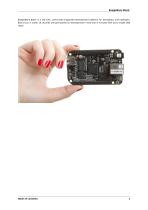
BeagleBone Black BeagleBone Black is a low-cost, community-supported development platform for developers and hobbyists. Boot Linux in under 10 seconds and get started on development in less than 5 minutes with just a single USB cable.
Open the catalog to page 6
BeagleBone Black
Open the catalog to page 7
Introduction This document is the System Reference Manual for the BeagleBone Black and covers its use and design. The board will primarily be referred to in the remainder of this document simply as the board, although it may also be referred to as the BeagleBone Black as a reminder. There are also references to the original BeagleBone as well, and will be referenced as simply BeagleBone. This design is subject to change without notice as we will work to keep improving the design as the product matures based on feedback and experience. Software updates will be frequent and will be independent...
Open the catalog to page 8
BeagleBone Black
Open the catalog to page 9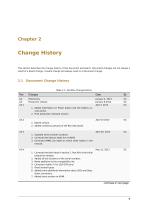
This section describes the change history of this document and board. Document changes are not always a result of a board change. A board change will always result in a document change. Table 2.1: AsciiDoc Change History A5 Production release January 8.2013 GC 1. Added information on Power button and the battery access points. 2. Final production released version. 2. Added numerous pictures of the Rev A5A board. 1. Updated serial number locations. 2. Corrected the feature table for 4 UARTS 3. Corrected eMMC pin table to match other tables in the manual. 1. Corrected revision listed in section...
Open the catalog to page 10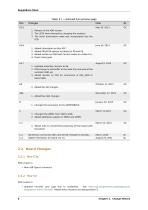
BeagleBone Black Table 2.1 - continued from previous page 2. The LEDS were dimmed by changing the resistors. 3. The serial termination mode was incorporated into the PCB. 2. Added PRU/ICSS options to tables for P8 and P9. 3. Added section on USB Host Correct modes on «table-15». 1. Updated assembly revision to A6. 2. PCB change to add buffer to the reset line and ground the oscillator GND pin. 3. Added resistor on PCB for connection of OSC_GND to board GND. 1. Changed the eMMC from 2GB to 4GB. 2. Added additional supplier to DDR2 and eMMC. 1. Added note to recommend powering off the board with...
Open the catalog to page 11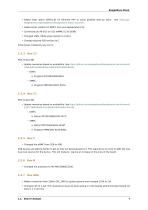
BeagleBone Black • Added reset option (GPIO1_8) for Ethernet PHY to avoid possible start-up issue. See https://git. beagleboard.org/beagleboard/beaglebone-black/-/issues/4. • Added series resistors to MMC1 lines and depopulated C24. • Connected pin A6 of J5 on U13 (eMMC IC) to DGND. • Changed USB1_VBUS series resistor to 0 ohm. • Change required PCB revision to C. Initial boxes mistakenly say rev C1. • Update memories based on availability. See https://github.com/beagleboard/beaglebone-black/commit/ 74914bd01efeb61376ec3dda4bf9143ad2bb635c. • Update memories based on availability. See https://github.com/beagleboard/beaglebone-black/commit/...
Open the catalog to page 12
BeagleBone Black • Change required PCB revision to B6. • In random instances there could be a glitch in the SYS_RESETn signal from the processor where the SYS_RESETn signal was taken high for a momentary amount of time before it was supposed to. To prevent this, the signal was ORed with the PORZn (Power On reset). • Noise issues were observed in other design where the clock oscillator was getting hit due to a suspected issue in ground bounce. A zero ohm resistor was added to connect the OSC_GND to the system ground. There are no new features added as a result of these changes. We were seeing...
Open the catalog to page 13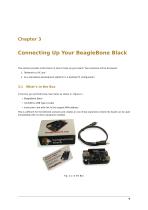
This section provides instructions on how to hook up your board. Two scenarios will be discussed: 2. As a standalone development platform in a desktop PC configuration. In the box you will find three main items as shown in «figure-1». • BeagleBone Black • miniUSB to USB Type A Cable • Instruction card with link to the support WIKI address. This is sufficient for the tethered scenario and creates an out of box experience where the board can be used immediately with no other equipment needed.
Open the catalog to page 14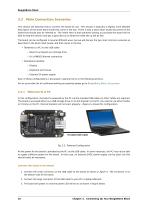
BeagleBone Black 3.2 Main Connection Scenarios This section will describe how to connect the board for use. This section is basically a slightly more detailed description of the Quick Start Guide that came in the box. There is also a Quick Start Guide document on the board that should also be referred to. The intent here is that someone looking to purchase the board will be able to read this section and get a good idea as to what the initial set up will be like. The board can be configured in several different ways, but we will discuss the two most common scenarios as described in the Quick Start...
Open the catalog to page 15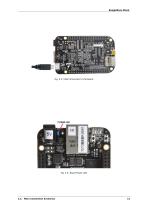
BeagleBone Black 3.2. Main Connection Scenarios
Open the catalog to page 16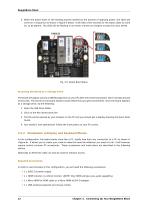
BeagleBone Black 4. When the board starts to the booting process started by the process of applying power, the LEDs will come on in sequence as shown in figure-5 below. It will take a few seconds for the status LEDs to come on, so be patient. The LEDs will be flashing in an erratic manner as it begins to boot the Linux kernel. Fig. 3.5: Board Boot Status Accessing the Board as a Storage Drive The board will appear around a USB Storage drive on your PC after the kernel has booted, which will take around 10 seconds. The kernel on the board needs to boot before the port gets enumerated. Once the...
Open the catalog to page 17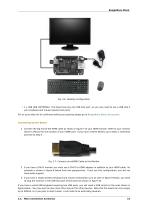
BeagleBone Black • 1 x USB HUB (OPTIONAL). The board has only one USB host port, so you may need to use a USB Hub if your keyboard and mouse requires two ports. For an up-to-date list of confirmed working accessories please go to BeagleBone_Black_Accessories Connecting Up the Board 1. Connect the big end of the HDMI cable as shown in figure-7 to your HDMI monitor. Refer to your monitor Owner’s Manual for the location of your HDMI port. If you have a DVI-D Monitor go to Step 3, otherwise proceed to Step 4 . Fig. 3.7: Connect microHDMI Cable to the Monitor 2. If you have a DVI-D monitor you must...
Open the catalog to page 18All Beagleboard.org catalogs and technical brochures
 BeagleY-AI
133 Pages
 BeagleV-Fire
99 Pages
 BeagleBone Blue
27 Pages
 BeagleV-Ahead
57 Pages
 PocketBeagle
63 Pages
 BeagleBone AI-64
132 Pages
 BeagleConnect Freedom
37 Pages
- Single-board computer
- Embedded single-board computer
- USB single-board computer
- Intel® Core™ single-board computer
- Compact single-board computer
- ARM architecture single-board computer
- LPDDR4 single-board computer
- Dual-core single-board computer
- Single-board computer for IoT applications
- Robotic single-board computer