
- Catalogs
- Beagleboard.org
- BeagleBone AI-64

BeagleBone AI-64
BeagleBone AI-64
The BeagleBone AI-64 is a single board computer designed for AI and machine learning development. It features a 64-bit Dual Arm Cortex-A72 processor and is compatible with BeagleBone Black expansion headers, intended for experimentation and learning.
The AI-64 offers enhanced functionality compared to previous models, with significant design and feature differences.
Key components include a Texas Instruments TDA4VM processor, PowerVR Series8XE GE8430 graphics engine, 4GB LPDDR4 SDRAM, and 16GB eMMC flash. It supports USB-C and DC power sources, with connectivity options like Gigabit Ethernet and USB 3.0 ports.
Includes user and power LEDs, UART debug ports, USB-C and barrel jack power inputs, mini-DisplayPort, dual USB-A ports, Gigabit Ethernet, and expansion headers.
Instructions for setup require a 5V > 3A power supply. A USB-C to USB-C cable is recommended for immediate use.
Details include the board's block diagram, system on chip, power management, connectivity, and expansion options.
Supports various expansion options through pinout diagrams and cape header connectors.
Covers Edge AI demos, including setup, running demos, and using a Docker environment.
Includes certifications, hardware design, software updates, RMA support, troubleshooting, and change history.
The board can operate tethered to a PC or as a standalone desktop, requiring additional peripherals for standalone use.
Instructions for tethered and standalone operation, including necessary connections and optional accessories.
Commands for updating software, including specific updates and cleanup instructions.
Features a TI J721E-family TDA4VM SoC with high performance and low power consumption, integrating multiple subsystems.
Includes general connectivity peripherals, high-speed interfaces, and power management components.
Details on power mux and load switch components for efficient power management.
USB Type C, USB3 Host Ports, Cape Headers, and MicroSD Connector for connectivity and expansion.
Voltage and current ratings, component details, and additional features like PCIe Key E and Fan Header.
Pin configurations, EEPROM requirements, and guidelines for designing compatible expansion boards.
Requirements for selecting connectors, retention force, pin length, and signal usage.
Hardware requirements for running demos and instructions for setting up the software environment.
Baud rate configuration, Linux systemd script, and remote access instructions.
Instructions for Python and C++ demos, deep learning models, and demo configuration files.
Instructions for configuring connector ID and video/image sinks.
Details on input, output, and compute pipelines for AI applications.
Setup for Edge AI applications, performance visualization tools, and SDK components.
Specifications for DNN models, repositories, performance measurements, and test reports.
Summary of test cases for video and image processing capabilities, with most tests passing successfully.
Includes certifications, hardware design, software updates, RMA support, troubleshooting, and change history.
Catalog excerpts
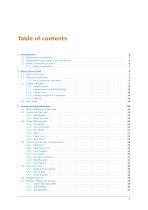
2 Quick Start Guide 7
Open the catalog to page 2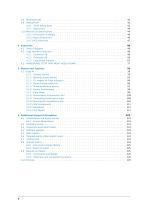
6 Additional Support Information 123
Open the catalog to page 3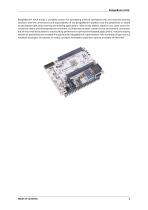
BeagleBone® AI-64 brings a complete system for developing artificial intelligence (AI) and machine learning solutions with the convenience and expandability of the BeagleBone® platform and the peripherals on board to get started right away learning and building applications. With locally hosted, ready-to-use, open-source focused tool chains and development environment, a simple web browser, power source and network connection are all that need to be added to start building performance-optimized embedded applications. Industry-leading expansion possibilities are enabled through familiar BeagleBone®...
Open the catalog to page 4
Introduction BeagleBone AI-64 like its predecessor bbai-home, is designed to address the open-source community, early adopters, and anyone interested in a low cost 64-bit Dual Arm® Cortex®-A72 processor based Single Board Computer (SBC). It also offers access to many of the interfaces and allows for the use of add-on boards called capes, to add many different combinations of features. A user may also develop their own board or add their own circuitry. Note: AI-64 has been equipped with a minimum set of features to allow the user to experience the power of the processor and is not intended as...
Open the catalog to page 6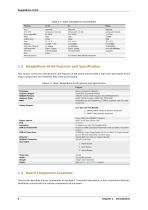
eMMC flash USB host (Type-A) USB dual-role Ethernet M.2 WiFi/ Bluetooth Table 1.1: Table: BeagleBone Compatibility AI-64 AI TDA4VM AM5729 1.2 BeagleBone AI-64 Features and Specification This section covers the specifications and features of the board and provides a high level description of the major components and interfaces that make up the board. Processor Graphics Engine SDRAM Memory Onboard Flash PMIC Table 1.2: Table: BeagleBone AI-64 Features and SpecificationFeature Texas Instruments TDA4VM PowerVR® Series8XE GE8430 LPDDR4 3.2GHz (4GB) Kingston Q3222PM1WDGTK-U eMMC (16GB) Kingston EMMC16G-TB29-PZ90...
Open the catalog to page 7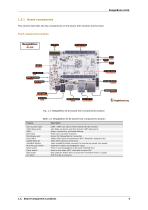
Board components This section describes the key components on the board, their location and function. Front components location Fig. 1.1: BeagleBone AI-64 board front components location Table 1.3: BeagleBone AI-64 board front components location Feature User & power LEDs UART debug ports USB C Barrel jack Mini-Display port Dual USB-A GigaBit Ethernet mikroBUS Shuttle P8 & P9 cape header Reset button Power button Boot button M.2 Key E USR0 - USR4 user LEDs & Power (Board ON) LED indicator 3pin Wake-up domain and Main domain UART debug ports Power, connectivity, and board flashing. Power input...
Open the catalog to page 8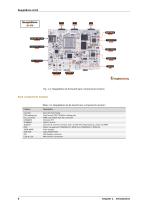
Fig. 1.2: BeagleBone AI-64 board back components location Back components location Table 1.4: BeagleBone AI-64 board back components location microSD JTAG debug port Fan connector DP83867E TUSB8041 TDA4VM PMIC 16GB eMMC 4GB RAM DSI CSI0 & CSI1 Micro SD Card holder Tag-Connect JTAG (TDA4Vm) debug port PWM controllable 4pin fan connector Ethernet PHY USB 3.0 hub IC Dual Arm® Cortex®-A72 SoC and C7x DSP with deep-learning, vision and MMA Power management TPS65941213 (PMIC-A) & TPS65941111 (PMIC-B) Flash storage 4GB LPDDR4 RAM MIPI Display connector MIPI Camera connectors
Open the catalog to page 9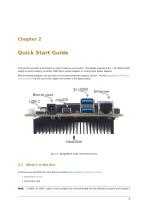
Quick Start Guide This section provides instructions on how to hook up your board. This Beagle requires a 5V > 3A (15W) power supply to work properly via either USB Type-C power adapter or a barrel jack power adapter. Recommended adapters can be found at accessories-power-supplies section. All the BeagleBone AI-64 connections ports we will use in this chapter are shown in the figure below. Fig. 2.1: BeagleBone AI-64 connections ports 2.1 What’s In the Box In the box you will find two main items as shown in BeagleBone AI-64 box content. • BeagleBone AI-64 • Instruction card A USB-C to USB-C cable...
Open the catalog to page 10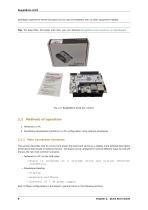
BeagleBone AI-64 developer experience where the board can be used immediately with no other equipment needed. Tip: For board files, 3D model, and more, you can checkout BeagleBona AI-64 repository on OpenBeagle. 2. Standalone development platform in a PC configuration using external peripherals This section describes how to connect and power the board and serves as a slightly more detailed description of the Quick Start Guide included in the box. The board can be configured in several different ways, but we will discuss the two most common scenarios. - Board is accessed as a storage drive and...
Open the catalog to page 11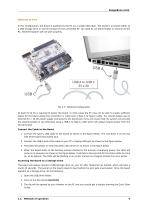
Tethered To A PC In this configuration, the board is powered by the PC via a single USB cable. The board is accessed either as a USB storage drive or via the browser on the connected PC. You need to use either Firefox or Chrome on the PC, Internet Explorer will not work properly. Fig. 2.3: Tethered Configuration At least 5V @ 3A is required to power the board, In most cases the PC may not be able to supply sufficient power for the board unless the connection is made over a Type-C to Type-C cable. You should always use an external 5V > 3A DC power supply connected to the barrel jack if you are...
Open the catalog to page 12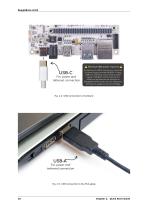
For power ond tethered connection A Minimum 15W power required A If powering via USB-C, ensure your computer or power supply provides 3A @ 5V. If using USB-C for tethering only, include a power supply of 3A @ 5V vio the barrel jock. If additional peripherals are attached to BeagleBone AI-64, such as on the USB ports, increase the supply current accordingly. 10 Chapter 2. Quick Start Guide
Open the catalog to page 13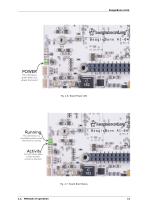
Runnin This LED blinks in a HeartBeat pottern when Activit This LED blinks when a data transfer activity is detected. Fig. 2.7: Board Boot Status
Open the catalog to page 14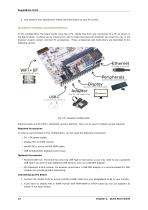
4. Your board is now operational! Follow the instructions on your PC screen. In this configuration, the board works more like a PC, totally free from any connection to a PC as shown in the figure below. It allows you to create your code to make the board do whatever you need it to do. It will however require certain common PC accessories. These accessories and instructions are described in the following section. Connect Mouse 8. Keyboard Use Mini DP to HDMI Coble For data transfer & totheri Ethernet cable and M.2 WiFi + Bluetooth card are optional. They can be used if network access required....
Open the catalog to page 15All Beagleboard.org catalogs and technical brochures
 BeagleY-AI
133 Pages
 BeagleV-Fire
99 Pages
 BeagleBone Blue
27 Pages
 BeagleBone Black
109 Pages
 BeagleV-Ahead
57 Pages
 PocketBeagle
63 Pages
 BeagleConnect Freedom
37 Pages
- Single-board computer
- Embedded single-board computer
- USB single-board computer
- Intel® Core™ single-board computer
- Compact single-board computer
- ARM architecture single-board computer
- LPDDR4 single-board computer
- Dual-core single-board computer
- Single-board computer for IoT applications
- Robotic single-board computer