
- Catalogs
- Anlidar Industrial - MyTorq
- MYBT-IM50 MYBT-IM100


MYBT-IM50 MYBT-IM100
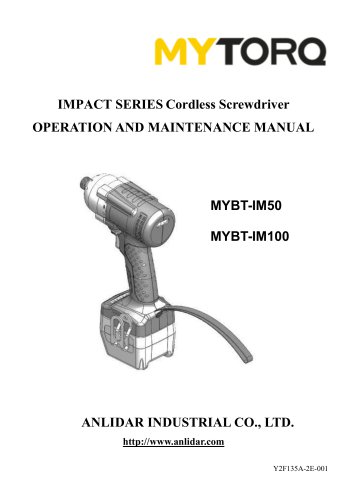
MYBT-IM50 MYBT-IM100
This manual provides operation and maintenance instructions for the IMPACT SERIES Cordless Screwdriver by ANLIDAR INDUSTRIAL CO., LTD. It is crucial to read the manual thoroughly before using the device to prevent electric shock, fire, or serious injury.
Icon Instructions
1. Read the instruction manual.
2. Observe caution and safety notes.
3. Recyclable.
4. For indoor use only.
5. Do not expose to wet or rain conditions.
6. Do not operate in an explosive atmosphere.
7. Do not disassemble.
8. Forbid throwing.
9. CE Certificate.
Accessories
The package includes a manual, guarantee card, waist hook, screw, socket extension, and bits.
Safety Warnings
1. Keep the working area clean and well-lit.
2. Avoid using the device in explosive environments.
3. Store the device safely when not in use.
4. Use the appropriate device for the task.
5. Dress properly to avoid trapping.
6. Hold the device firmly with two hands.
7. Disconnect the plug after charging.
8. Use only recommended accessories.
9. Regularly check the device's condition.
Function of Cordless Protection
The device includes protections such as over electric current, thermal, stall, slow rotation, reverse control, battery identification, and sleeping mode.
Operation Cautions
1. Charge the battery before first use.
2. Follow the correct process for installing and removing the battery.
3. Do not switch directions during operation.
4. Regularly check torque settings.
Specifications
Model MYBT-IM100 and MYBT-IM50 have different torque settings and weights. Both models use the SKC-LB1820B battery and MYCS-ID80-D charger.
Other Cautions
1. Limit usage to 8 hours a day.
2. Do not modify the tool.
3. Follow all instructions in the manual.
4. Use genuine ANLIDAR batteries and chargers.
Conclusion
Proper use and maintenance of the cordless screwdriver are essential for safety and performance. Follow all guidelines and use only recommended accessories and parts.
Catalog excerpts
IMPACT SERIES Cordless Screwdriver OPERATION AND MAINTENANCE MANUAL ANLIDAR INDUSTRIAL CO., LTD. http://www.anlidar.com Y2F135A-2E-001
Open the catalog to page 1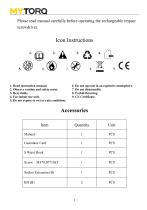
Please read manual carefully before operating the rechargeable impact screwdriver. 2. Observe caution and safety notes. 5. Do not expose to wet or rain conditions. 6. Do not operate in an explosive atmosphere.
Open the catalog to page 2
Read all instructions and make sure the appearance of the device has no damage before you use it. Failure to follow all instructions listed below may result in electric shock fire and/or serious injury. 1. Keep the working area nice and clean. 1.1 Mess and dark areas may cause of accidents. 1.2 Keep the device away from rain or moisture to decrease the risk of electric shock or short-circuiting occurred. 2. Be alert to workplace safety 2.1 Use the device under a well lit and clean environment. 2.2 Keep children and other people away unless the person has been assigned for the task to avoid the...
Open the catalog to page 3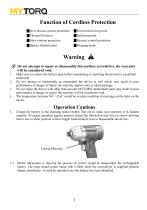
| Over electric current protection | Prevent from low power | Thermal Protector | Stall protection | Slow rotation protection | Reverse control protection | Battery Identification | Sleeping mode Do not attempt to repair or disassemble this cordless screwdriver, the warranty will be considered void. 1. Make sure to remove the battery pack before maintaining or repairing the device by a qualified technician. 2. Do not attempt to disassemble or reassemble the device at will which may result in poor performance or danger of injury, the warranty applies only to initial package. 3. Do not repair the...
Open the catalog to page 4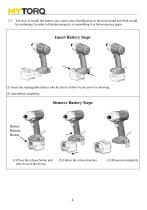
2.2. Too slow to install the battery may cause error identification so the beep sound and flash would be continuing. In order to function properly, re-assembling it as below process again. (1) Insert the rechargeable battery into the device follow by the arrow as showing. (1) Press the release button and (2) Follow the arrow direction. (3) Removed completely
Open the catalog to page 5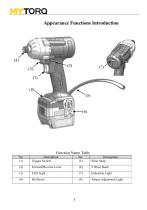
Appearance Functions Introduction (3)
Open the catalog to page 6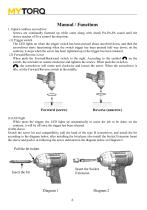
Manual / Functions 1. Impact cordless screwdriver Screws are continually fastened up while come along with clutch PA-PA-PA sound until the device reaches of Five control the stop time. (1) Trigger switch The LED lights on when the trigger switch has been pressed about one-third down, and then the screwdriver starts functioning when the switch trigger has been pressed half way down; on the contrary, it stops when the screw has been tightened up or the trigger has been released. (2) Forward/Reverse Lever When push the Forward/Backward switch to the right. According to the symbol on the switch,...
Open the catalog to page 7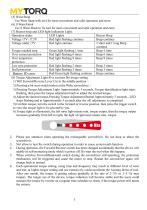
Use Wrist Strap with tool for more convenient and safer operation and store. Use S Waist Hook to fix tool for more convenient and safer operation and carry. (7) Buzzer beep and LED light Indication Light:__ (8) Torque Adjustment Light:Five sections Bit torque setting 1) .Will Forward/Reverse Lever Cut to the middle position « 2) .Pressing a bit start switch button at the Wake screwdriver « 3) .Pressing Torque Adjustment Light Approximately 5 seconds, Torque identification light starts flashing, then press the torque adjustment knob to adjust the desired torque. 4) .Adjust the desired torque,Pressing...
Open the catalog to page 8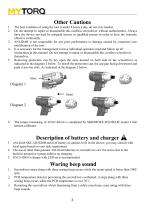
The best condition of using the tool is under 8 hours a day, do not over loaded. Do not attempt to repair or disassemble this cordless screwdriver without authorization. Always have the device serviced by assigned factory or qualified person in order to have the warranty effective continually. ANLIDAR is not responsible for any poor performance or damage caused by customers own modification of the tool. It is necessary for the management to have individual operators read and follow up all instructions in this manual. Do not attempt to repair or disassemble this cordless screwdriver themselves....
Open the catalog to page 9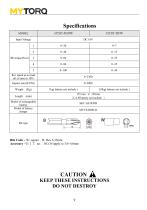
Input Voltage Rev speed at no load n0: (r/min) )±10% Model of rechargeable battery Model of battery charger Bits Code ~ W: square B: Hex 6.35mm Accessory ~BIT no.:NO.3# apply to 3.0~4.0mm CAUTION KEEP THESE INSTRUCTIONS DO
Open the catalog to page 10All Anlidar Industrial - MyTorq catalogs and technical brochures
 BSP-C32HL
16 Pages
 MYCS-ID120
10 Pages
 OPERATION AND MAINTENANCE MANUAL
14 Pages
 MYP40-500N
7 Pages
 MYP40-500
10 Pages
 MYP32-300
8 Pages
 MYP32-60
8 Pages
 Torque Display User Manual
18 Pages
 OPERATION AND MAINTENANCE MANUAL
11 Pages
 OPERATION AND MAINTENANCE MANUAL
10 Pages
 MY-SAVER User Manual
21 Pages
 MY-SIRIUS User Manual
49 Pages
 MY-EVO-mini User Manual
29 Pages
 Smart tools
8 Pages

Archived catalogs
 ACCESSORIES
2 Pages
 Power Shark
18 Pages
 MYTORQ High Torque
35 Pages
 MYTORQ Low Torque
32 Pages

- Electrical cable
- Feeder
- Electric screwdriver
- Impact wrench
- Lithium battery
- 12 V battery
- Brushless electric screwdriver
- Corded electric screwdriver
- Straight electric screwdriver
- Automated feeder
- CE battery
- Pistol impact wrench
- Signal conditioner
- Charging post
- DC electric screwdriver
- Lithium battery charger
- Torque meter
- Pistol electric screwdriver
- Cordless electric screwdriver