
- Catalogs
- Anlidar Industrial - MyTorq
- MY-SAVER User Manual


MY-SAVER User Manual
MY-SAVER User Manual
The MY-SAVER and MY-SAVER MEGA models operate with an input voltage of AC 115V/230V and a frequency of 50-60Hz. They provide a maximum output power of 360W and are compatible with various DC screwdriver models. The devices are designed for a duty cycle of 1 second ON and 3 seconds OFF, with a weight of 3.4Kg.
- Panel: Equipped with multiple signal LEDs, a four-digit display for torque value, and navigation buttons.
- Bottom: Includes ports for micro SD card, external wireless module, and software updates.
- Upper Case: Contains a DC fuse station and grounding station.
Users can access settings by pressing the ESC button for 3 seconds and entering a password. Navigation is done using hotkeys.
Includes configuration of operation mode (STD/ADV), device ID, tool start mode, and LED mode. Users can also set job sequences and reverse button settings.
Allows configuration of tightening steps, RPM, direction, delay time, and target torque. Up to 250 steps can be set with specific parameters.
Users can define screw parameters, including tightening program, screw name, and sequence steps. Settings for OKALL and NG stop functions are available.
Includes exporting settings to an SD card and tool calibration.
Describes codes such as C1 for external confirmation and E3 for voltage-drop protection.
Details on external output and input control functions, data transmission, and flow control suggestions.
Provides detailed diagrams and parts lists for maintenance and repair.
Calibration is required when the End of Calibration (EOC) is displayed after one million tightening operations. The ELS alert indicates low SD card capacity, halting operation until resolved. EPC ADV MODE indicates communication abnormalities.
Describes the function of connectors (CN1 to CN14) for controlling operations like starting and reversing. Each connector pair has specific functions when shorted or opened.
Details how external signals can control operations, including starting, reversing, and clearing sequences, activated by shorting specific connector pairs.
The MY-SAVER controller communicates with external devices using specific data formats, sending status updates and receiving synchronization commands. The document outlines the structure and purpose of each data format.
Specifies communication settings for RS-232C, including baud rate, data bits, and parity, noting that protocols may vary with controller version updates.
Catalog excerpts

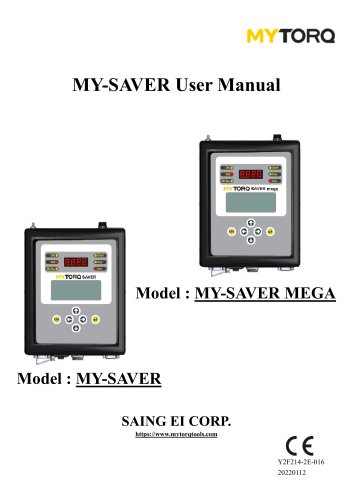
MY-SAVER User Manual Model : MY-SAVER MEGA Model : MY-SAVER SAING EI CORP. https://www.mytorqtools.com
Open the catalog to page 1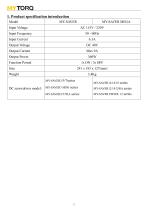
TORQ1. Product specification introduction 2
Open the catalog to page 4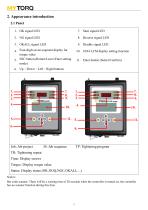
4 Four-digit-seven-segment display for torque value 5 ESC button (Return/Leave/Enter setting mode) 6. Up ' Down ' Left ' Right buttons 10. 16X4 LCM display setting function 11. Enter button (S elect/Confirm) 10. 11. Job: Job project JS: Job sequence TP: Tightening program TR: Tightening repeat Time: Display screws Torque: Display torque value Bar code scanner: There will be a waiting time of 20 seconds when the controller is turned on, the controller has no scanner function during this time
Open the catalog to page 5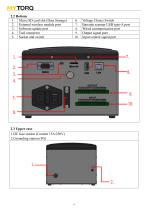
2.2 Bottom 1. Micro SD card slot (Data Storage) 2. External wireless module port 3. Software update port 4. Tool connector 5. Socket and switch Voltage Choice Switch Barcode scanner USB type-A port Wired communication port Output signal port Input control signal port 2.3 Upper case 1.DC fuse station (Content 15A/250V) 2.Grounding station (FG)
Open the catalog to page 6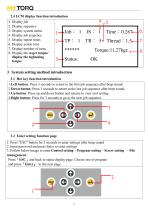
3. Display system status 5. Display repeat times 6. Display action time 7. Display number of turns 8. Display the target torque/ display the tightening torque 3 System setting method introduction 1 .Left button: Press 3 seconds to return to the first job sequence after beep sound. 2. Down button: Press 3 seconds to return to the last job sequence after beep sound. 3. Up button: Press up and down button and release to view tool setting. 4. Right button: Press for 3 seconds to go to the next job sequence. 3.2 Enter setting function page
Open the catalog to page 7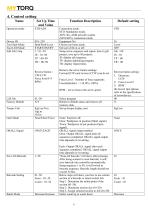
4. Control setting Name
Open the catalog to page 8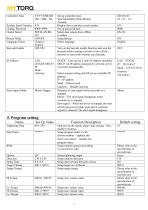
Controller Time 5. Program setting Name
Open the catalog to page 9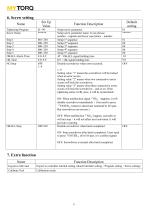
6. Screw setting Name 7. Extra function Name
Open the catalog to page 10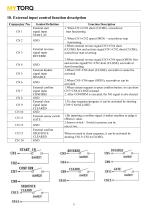
10. External input control function description Connector No
Open the catalog to page 13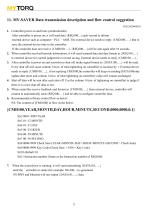
11. MY-SAVER Data transmission description and flow control suggestion VER:2020060201
Open the catalog to page 14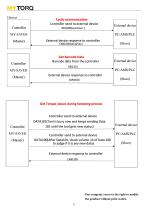
Cyclic communication Controller send to external device REQ100(send/sec.) MY-SAVER (Master) Controller MY-SAVER (Master) External device External device response to controller CMD100(send/sec.) Get Barcode Data Barcode data from the controller REQ101 External device PC/AMS/PLC External device response to controller CMD100 Get Torque values during fastening process Controller send to external device Controller MY-SAVER (Master) DATA101(Tool is busy now and keeps sending Data 101 until the tool gets new status) Controller send to external device DATA100(After Data101, check column 14 of Data 100...
Open the catalog to page 15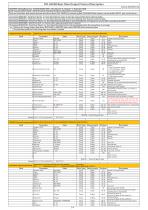
15 Device Operation Mode 16 Sequence Control Mode Remark Item 1 to 29 are separated by (ASCII 0x2c) Data Type String String Length / Byte 4 Byte 2 Byte 2 Byte 2 Byte 2 Byte 2 Byte 4 Byte 4 Byte 1 Byte 1 Byte 2 Byte 1 Byte 1 Byte Field Parameter 1 Header-CMD {REQ101 Remark Item 1 to 14 are separated by "," (ASCII 0x2c) Value Data Type String String Length / Byte 4 Byte 2 Byte 2 Byte 2 Byte 2 Byte 2 Byte 4 Byte 4 Byte 54 Byte 20 Byte 20 Byte Description Header-Command code Device index number arranged in the same assembly line (or workstation) 0 : Sequence control mode 1 : Skip sequence mode Selected...
Open the catalog to page 16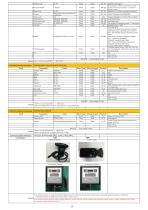
■Please refer tothe specification of ■screwdrivers 1 Byte 9 Byte 9 Byte 5 Byte 1 Byte 27 Tool Stop Status Remark item 1 to 28 are separated by "," (ASCII 0x2c) Data Type String Length 7 Byte 4 Byte 2 Byte 2 Byte 2 Byte 2 Byte : Selected Unit Program Setup program name, it can choose number • capitals and lower case letters • number for program name. ■Selected Tool (Current activated screwdriver) ■Shutoff troque(example:0000.0000) ■Torque unit(0: kgf.cm, 1: N.m, 2: lbf.in, 3: kgf.m) Fastening time(ms) Fastening thread The numbers of remaining screws / Total screws Fastening status OK:Each time...
Open the catalog to page 17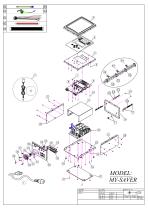
MODEL:MY-SAVER CUSTOMER DWG NAME
Open the catalog to page 18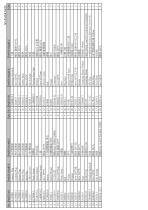
Srew M3*6 Side housing PCB Washer Srew M4*38L Srew M3*6 Fuse PARTS NAME-E America Plug Australia Plug Europe Plug British Plug India Plug USB Converter Plastic frame Sticker-Model Housung-Upside Srew TP3*6 Button Button Fixture P.C.B-LCD Srew M3*5mm Plastic frame Bolt Washer PARTS NAME-C 美式電源線 澳式電源線 歐式電源線 英式電源線 印式電源線 USB 轉換器 塑膠框 麥拉貼紙 上蓋 螺絲 TP3*6 手按鍵開關鈕 黑色 按鍵開關蓋 黑色 機板成品 控制LCD面板 螺絲 圓頭 M3*5 防護蓋 螺帽 華司 外齒型華司 螺絲 M4*38L 螺絲 M3*6 保險絲座 保險絲 (15A) 後蓋 螺絲 M3*6 側蓋 機板成品 AO1K15M-40S2-1500W PARTS NAME-E Housing-Underside Srew M3*5L Srew M3*6 Rubber Shim Srew M3*6 Side housing Housing-Front Side PCB-IO Srew M3*5mm...
Open the catalog to page 19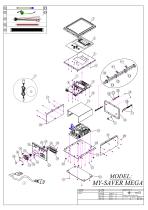
—<45 MODEL: MY-SAVER MEGA CUSTOMER DWG NAME
Open the catalog to page 20
Srew M3*6 Side housing Washer Srew M4*38L Srew M3*6 Fuse PARTS NAME-E America Plug Australia Plug Europe Plug British Plug India Plug USB Converter Plastic frame Sticker-Model Housung-Upside Srew TP3*6 Button Button Fixture P.C.B-LCD Srew M3*5mm Plastic frame Bolt Washer PARTS NAME-C 美式電源線 澳式電源線 歐式電源線 英式電源線 印式電源線 USB 轉換器 塑膠框 麥拉貼紙 上蓋 螺絲 TP3*6 手按鍵開關鈕 黑色 按鍵開關蓋 黑色 機板成品 控制LCD面板 螺絲 圓頭 M3*5 防護蓋 螺帽 華司 外齒型華司 螺絲 M4*38L 螺絲 M3*6 保險絲座 保險絲 (15A) 後蓋 螺絲 M3*6 側蓋 PARTS NAME-E PCB Housing-Underside Srew M3*5L Srew M3*6 Rubber Shim Srew M3*6 Side housing Housing-Front Side PCB-IO Srew M3*5mm Selector switch Connector...
Open the catalog to page 21All Anlidar Industrial - MyTorq catalogs and technical brochures
 BSP-C32HL
16 Pages
 MYCS-ID120
10 Pages
 MYBT-IM50 MYBT-IM100
10 Pages
 OPERATION AND MAINTENANCE MANUAL
14 Pages
 MYP40-500N
7 Pages
 MYP40-500
10 Pages
 MYP32-300
8 Pages
 MYP32-60
8 Pages
 Torque Display User Manual
18 Pages
 OPERATION AND MAINTENANCE MANUAL
11 Pages
 OPERATION AND MAINTENANCE MANUAL
10 Pages
 MY-SIRIUS User Manual
49 Pages
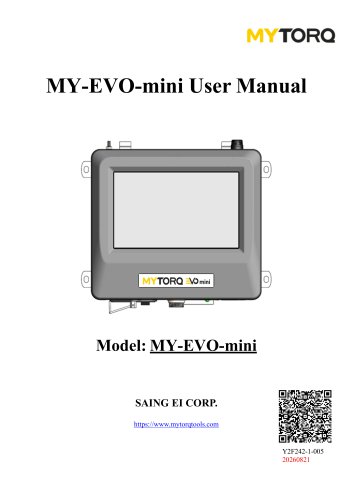 MY-EVO-mini User Manual
29 Pages
 Smart tools
8 Pages

Archived catalogs
 ACCESSORIES
2 Pages
 Power Shark
18 Pages
 MYTORQ High Torque
35 Pages
 MYTORQ Low Torque
32 Pages

- Electrical cable
- Feeder
- Battery charger
- Electric screwdriver
- Impact wrench
- Lithium battery
- 12 V battery
- Brushless electric screwdriver
- Corded electric screwdriver
- Straight electric screwdriver
- Automated feeder
- CE battery
- Pistol impact wrench
- Signal conditioner
- Charging post
- DC electric screwdriver
- Lithium battery charger
- Torque meter
- Pistol electric screwdriver
- Cordless electric screwdriver