
- Catalogs
- Ametek Calibration
- XP2i Digital Pressure Gauge Manual-/media/ametekcalibration/download_links/pressure/xp2i/digital-pressure-gauge-xp2i-manual-us.pdf?la=en&revision=fabff825-5118-470c-a991-3a43723b60d6

- Products
- Catalogs
- News & Trends
- Exhibitions
XP2i Digital Pressure Gauge Manual-/media/ametekcalibration/download_links/pressure/xp2i/digital-pressure-gauge-xp2i-manual-us.pdf?la=en&revision=fabff825-5118-470c-a991-3a43723b60d6
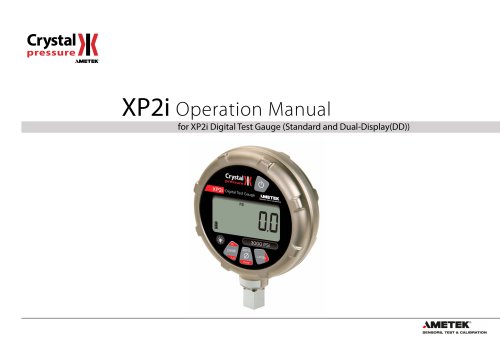
XP2i Digital Pressure Gauge Manual-/media/ametekcalibration/download_links/pressure/xp2i/digital-pressure-gauge-xp2i-manual-us.pdf?la=en&revision=fabff825-5118-470c-a991-3a43723b60d6
The XP2i Digital Test Gauge, developed by Crystal Engineering Corporation, is a highly accurate and temperature-compensated device designed to replace multiple gauges. It features a durable aluminum alloy case, is dust and water-resistant, and operates on 3 AA batteries for up to 1500 hours. Key functionalities include peak and valley pressure capture, user-defined units, and intrinsic safety.
The gauge is ready for use with pre-installed batteries and resumes in the last used mode. Users should handle it carefully, using a wrench for installation and avoiding inserting objects into the pressure connection. It measures gauge pressure and can be zeroed at any pressure up to its full scale.
The XP2i offers several functions via buttons: cycling through pressure units, displaying live and recorded pressure values, resetting peak values, zeroing the gauge, and more. Additional features for dual-line displays include tare, rate, and differential mode.
Instructions for using DataLoggerXP software for data logging are provided, including installation and operation details.
Includes power requirements, pressure ranges, display scales, resolution, safety certifications, and hazardous location guidelines.
Covers troubleshooting, calibration, software updates, replacement parts, and accessories, with contact information for factory service.
Includes warranty information and trademark acknowledgments.
The XP2i requires a standard RS232 cable and null modem adapter for direct connection. ConfigXP software is needed for differential mode. Firmware version requirements are specified, and the gauge can measure moderate vacuum with certain certified ranges.
Features include automatic shut-off, adjustable backlight, and calibration reminders. The gauge can display pressure in inches of water with selectable density settings.
Uses 3 AA batteries and is intrinsically safe with specific types. Battery replacement should not occur in hazardous locations. The gauge can operate with an external power supply, but not in hazardous areas.
Supports recording up to 32,000 pressure measurements with Ultra Low Power mode. Data can be downloaded and viewed on a computer, saved in Excel or text formats, and protected with passwords.
Designed for testing pressure safety valves and rupture discs, capturing peak and reseat pressures. ConfigXP activates this mode, increasing measurement rate.
Resetting involves removing the battery for at least one minute. Supports remote control via a query-based command language.
Configurable via computer or device, with logging intervals from 1 second to 18 hours. Various logging types are available, offering different data recording methods.
Data can be downloaded and saved in various formats. The software allows selection of specific data runs and exclusion of non-data events.
Stores up to 32,000 data points. Data logging is initiated by button combinations, with visual feedback during logging.
Button combinations allow setting logging parameters, starting/stopping logging, and clearing memory. Ultra Low Power Mode extends battery life.
DataLoggerXP interfaces with Excel to create reports and graphs using templates, which can be customized and password-protected.
Features a diecast, nickel-plated aluminum housing with an IP67 rating, ensuring reliable performance across various conditions.
Outlines safety instructions for hazardous environments, emphasizing proper battery use and installation precautions.
Intrinsically safe with specific battery types, operating between -20 to 50°C with specific markings.
Addresses common issues like noisy readings and error codes, with solutions involving vacuum pumps or factory assistance.
Annual calibration is recommended, with adjustments by qualified personnel using high-accuracy standards.
ConfigXP software allows configuration changes. Accessories include an AC adapter kit, carrying case, and RS232 cables.
Provides contact details for support and service, requiring a Return Material Authorization form for service requests.
Offers a one-year warranty against defects, excluding batteries and damage from misuse.
Catalog excerpts
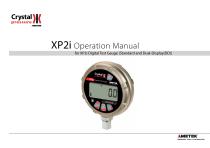
for XP2i Digital Test Gauge (Standard and Dual-Display(DD))
Open the catalog to page 1
Contents Overview . . . . . . . . . . . . . . . . . . . . . . . . . . . . . . . . . . . . . . . . . . . . . . . . . . . . . . . . . . . . . Introduction . . . . . . . . . . . . . . . . . . . . . . . . . . . . . . . . . . . . . . . . . . . . . . . . . . . . . . . . . . . 1 Operating Instructions . . . . . . . . . . . . . . . . . . . . . . . . . . . . . . . . . . . . . . . . . . . . . . . . . 2 Troubleshooting . . . . . . . . . . . . . . . . . . . . . . . . . . . . . . . . . . . . . . . . . . . . . . . . . . . . . . Calibration . . . . . . . . . . . . . . . . . . . . . . . . . . . . . . . . . ....
Open the catalog to page 2
Overview| INTRODUCTION Thank you for choosing theXP2i Digital Test Gauge from Crystal Engineering Corporation. Your XP2i is a combination of leading edge technology and rugged industrial design. Accuracy is 0.1 %"of reading", 0.02%"of Full Scale"or 0.05%"of Full Scale"—so any XP2i can typically replace several gauges you may have been using. The XP2i is fully temperature compensated—so there is no change in accuracy throughout the entire operating temperature range! The XP2i's case is made from rugged aluminum alloy utilizing a gasket to seal the enclosure against dust and water intrusion. Even...
Open the catalog to page 3
OPERATING INSTRUCTIONS The XP2i is shipped with batteries installed, so it’s ready to use. Press and hold the (on/off ) button. The XP2i will first test all LCD segments. Release the (on/off ) button when the XP2i indicates pressure. The XP2i always resumes operation in the mode and the units of the pressure last used, and it does not automatically rezero when turned on. Connect the XP2i to your system. ! CAUTION: ! CAUTION: Use a wrench (¾" or 19mm) for installation and removal of XP2i! There is a limit to how much rotational force can be applied to the case, so don’t rely on, or use, the...
Open the catalog to page 4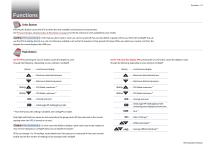
Functions units Units Button Pressing this button causes the XP2i to select the next available unit of pressure measurement. See Pressure Ranges, Display Scales, & Resolution on page 29 or the list of pressure units available for your model. Units that you don’t need or never use can be turned off. You can also define a special unit for your XP2i with ConfigXP. You can use the XP2i to display directly in a unit not otherwise available, such as feet of seawater, or foot-pounds of torque. When you select your custom unit from the keypad, the screen displays the USER icon. Hi Peak Button On the...
Open the catalog to page 5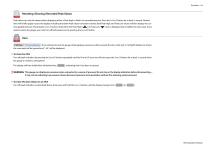
Resetting (Clearing) Recorded Peak Values Peak values can only be cleared when displaying either a Peak High or Peak Low recorded pressure. Press the (clear) button for at least ½ second. Dashed lines will briefly appear across the display indicating that both Peak values have been cleared. Both Peak High and Peak Low values will then display the current applied pressure. Pressing the (clear) button while either the Peak High ( ) icon is displayed will not affect the zero value. If you need to rezero the gauge, you must turn off both peak icons by pressing the (peak) button. zero Zero clear If...
Open the catalog to page 6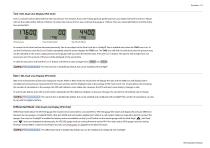
Tare (-DD, Dual-Line Display XP2i Only) Tare is a constant value subtracted from the true pressure. For instance, if you were mixing gases by partial pressure, you might want to fill a tank to 1760 psi with air, then add another 440 psi of helium. To reduce the chance of error, you could tare the gauge at 1760 psi. Then you would add helium until the indication reached 440. Press the Tare button Top-off with helium In contrast to the Zero function discussed previously, Tare is not subject to the Zero Limit set in ConfigXP. Tare is available only when the TARE icon is on. To use the Tare feature,...
Open the catalog to page 7
Automatic Shut-off The XP2i has a shutoff timer and will turn off automatically after 20 minutes of non-operation. Pressing any button or sending any command via the RS-232 connection resets the shutoff timer for another 20 minutes of operation. The XP2i will briefly display Auto Off 20 when turned on. To disable the shutoff feature, turn on the XP2i by pressing the (on/off) and (zero) buttons simultaneously. The XP2i will briefly display the words No Auto Off to indicate that it will not turn off. The shutoff feature can be enabled again when turning the XP2i on, by pressing the same (on/off)...
Open the catalog to page 8
Water Density (Inches of Water) The following applies only to models where inches of water is a selectable pressure unit. As shipped from the factory, the XP2i is set to display inches of water corresponding to the density of water at 4° C (39.2° F). You may require a different water density for your application, so the XP2i can be set to use the density of water at 20° C (68° F) or 15.6° C (60° F) instead. To check and/or change the water density setting from the keypad, turn on the XP2i by pressing the (on/off ) button and the (peak) button simultaneously. The display will indicate either 4C,...
Open the catalog to page 9
Calibration Due Reminder The XP2i has a calibration reminder feature that can help to assure that you never use the gauge after its calibration certificate has expired. It can be programmed to alert you prior to, on, and after the gauge's calibration due date. Due dates, reminder times, and message types can be set through our free ConfigXP software. Enter the Cal Due date and the notification time prior. Once the defined time prior is reached, the XP2i will flash Cal Soon three times during the startup process. It will do this on every start-up until the calibration due date is reached, or the...
Open the catalog to page 10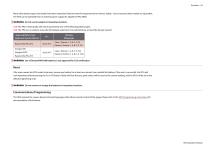
Many other battery types and models have been tested but failed to meet the requirements for Intrinsic Safety—do not assume other models are equivalent. The XP2i can be operated from an external power supply (AC adapter kit PN: 2984). ! WARNING: Do not use AC adapter in hazardous locations. CSA: The XP2i is Intrinsically Safe only if powered by one of the following battery types: CSA: The XP2i est un systeme a securite Intrinseque seulement s'il est alimente par un des Piles de type suivant: ! WARNING: Use of Duracell MN1500 batteries is not approved for CSA certification. If for some reason...
Open the catalog to page 11All Ametek Calibration catalogs and technical brochures
 Type T Deadweight Tester
8 Pages
 ATMi Temperature Module
7 Pages
 XP2i Data Recorder
6 Pages
 Temperature Pressure Process
12 Pages
 AMETEK Calibration Brochure
12 Pages
 Maritime Brochure
8 Pages
 CPF Brochure (D)
4 Pages
 APM Advanced Pressure Module
6 Pages
 Product Overview Brochure
8 Pages
 GaugeCalHP Manual
20 Pages
 24 VDC Power Supply Manual
7 Pages
 24 VDC Power Supply
4 Pages
 FastCalXP
9 Pages













- AMETEK temperature sensor
- Management software solution
- Automation software solution
- Data logger
- AMETEK resistance temperature sensor
- Process software
- AMETEK pressure gauge
- Real-time software
- AMETEK Windows software
- AMETEK calibrator
- Cloud-based software
- Control software
- Digital indicator
- Analog pressure gauge
- Industrial software
- AMETEK measurement software
- Interface software
- AMETEK thermocouple
- Pt100 temperature transducer
- Data-logger with screen