
- Catalogs
- Ametek Calibration
- GaugeCalHP Manual

- Products
- Catalogs
- News & Trends
- Exhibitions
GaugeCalHP Manual

GaugeCalHP Manual
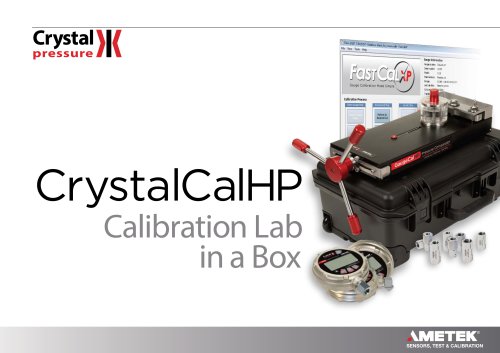
The GaugeCalHP is a precision hydraulic pressure comparator designed for calibrating pressure gauges up to 15,000 psi. It serves as a faster alternative to deadweight testers and automated pressure controllers, suitable for ISO9000 compliance. The device can be filled with water or oil and is capable of calibrating various pressure-related devices in under ten minutes.
The GaugeCalHP includes a fine adjust for precise pressure adjustments, a no-mess drip tray, and a pivot manifold for testing large gauges. It comes equipped with CPF Male fittings, a 1/4” Female NPT fitting, and other necessary components for setup and operation.
Assembly involves installing the handle and drip tray. The device can be mounted using brackets or an optional table mount kit and is stabilized by rubber feet for pressures up to 5000 psi.
Users must avoid physical damage to the system and ensure it is used only for its intended purpose by trained personnel. The system is not suitable for oxygen service and should not be connected to external pressure sources.
To generate pressure, prepare the fine adjust and fill the reservoir with the chosen fluid. Bleed air from the system before connecting the device under test and the reference indicator. Calibration involves venting the system, setting the reference indicator, and adjusting pressure using the handle and fine adjust knob.
The manual includes detailed specifications on performance, materials, dimensions, and accessories. It also provides information on ordering systems with or without reference indicators.
Guidance is provided for troubleshooting, maintenance, and ordering spare parts. Contact information for support and factory service is included, along with warranty details.
To calibrate the device, increase pressure slowly to avoid overshooting and record the peak reading at each test point. For hysteresis checks, start at full scale. FastCalXP software can automate data collection.
Loosen the reference indicator, turn the handle clockwise until fluid drips, then tighten the reference. Rotate counter-clockwise to generate up to -12.5 psi vacuum.
The document provides a detailed connection diagram for the GaugeCalHP to Crystal Reference Indicator, including various fittings and adapters.
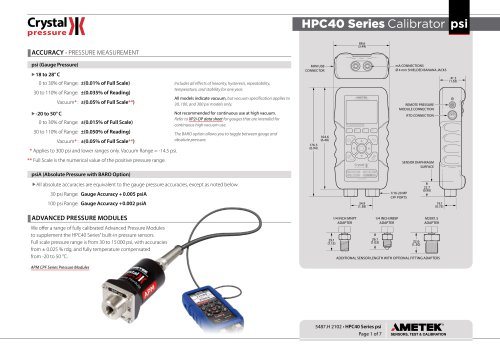
Hydraulic pressure max is 15,000 psi, vacuum is -12.5 psi. Pneumatic pressure max is 400 inH2O. Burst pressure exceeds 25,000 psi. Materials include stainless steel and anodized aluminum.
For unstable pressure, ensure all fittings are tight and test fluid is air-free. Adjust pressure after 5-10 minutes for stabilization.
Clean with a soft cloth or isopropyl alcohol for heavy soil. The reservoir can be removed for cleaning.
Includes part numbers for the GaugeCalHP, spare parts, and fitting kits. Recommended hydraulic oil is specified.
Contact details for Crystal Engineering are provided. The product has a one-year warranty against defects, excluding misuse or abnormal conditions.
Catalog excerpts

GaugeCalHPOperation Manua TEST & CALIBRATION INSTRUMENTS
Open the catalog to page 1
Contents Overview . . . . . . . . . . . . . . . . . . . . . . . . . . . . . . . . . . . . . . . . . . . . . . . . . . . . . . . . . . . . . . . Introduction . . . . . . . . . . . . . . . . . . . . . . . . . . . . . . . . . . . . . . . . . . . . . . . . . . . . . . . . . . . . . 1 Features and Parts Lists . . . . . . . . . . . . . . . . . . . . . . . . . . . . . . . . . . . . . . . . . . . . . . . . . . . 2 Safety Instructions . . . . . . . . . . . . . . . . . . . . . . . . . . . . . . . . . . . . . . . . . . . . . . . . . . . Operating Instructions . . . . . . . . . . . . . . . . . . . . . ....
Open the catalog to page 2
Overview INTRODUCTION Thank you for purchasing a GaugeCalHP™ Pressure Comparator from Crystal Engineering. The GaugeCalHP is a self-contained, precision hydraulic pressure comparator intended for the calibration of pressure gauges rated up to 15 000 psi / 1000 bar / 100 MPa. You may fill the GaugeCalHP with your choice of water or oil. Using this comparator for calibration is much faster than deadweight testers and most automated pressure controllers. The GaugeCalHP is so quick and easy to use, it is ideal for calibrating those low cost gauges that are often overlooked for ISO9000 compliance....
Open the catalog to page 3
FEATURES AND PARTS LISTS Each comparator includes a fine adjust for precise pressure adjustments. The reference indicator threads directly to the CPF Male fitting. The device under test connects to the supplied 1/4” Female NPT fitting. For more sizes see the Connection Diagram on page 13 and the CPF Datasheet. Parts Included with the GaugeCalHP Part Number Fine Adjust (installed) Connection Fitting With easy alignment swivel capability. Relief Valve No Mess Drip Tray Captures fluid from bleeding the system. Fine Adjust Easy to use, even at 15000 psi. Pivot Manifold Manifold rotates for testing...
Open the catalog to page 4
Parts Included with Pump Systems System G GOX and GWX (GaugeCalHP) Part Number CPF Female to 1/4" NPT Female Fitting CPF Female to 1/4" BSP Female Fitting 1/8” MPT Fitting (for 30 Series Calibrator) ** Fine Adjust (installed) Test Leads; Red & Black, including clips ** Pack Tape (1 roll) Rolling Waterproof Carrying Case * These fittings are rated to 10 000 psi/100 bar. ** The MPF-1/8MPT fittings and 1351 Test Leads are included only with Pump Systems for the 30 Series Calibrator. Hydraulic Fluid GaugeCalHP comparators are only available delivered empty. You will still need to specify what fluid...
Open the catalog to page 5
Setup ASSEMBLY XX Install the Handle Assembly Install the handle assembly by tightening the captive screw using the included wrench. XX Install the No Mess Drip Tray Press the no mess drip tray onto the pivot manifold. GaugeCalHP Comparator Operation Manual
Open the catalog to page 6
The GaugeCalHP includes rubber feet that stabilize the unit up to 5000 psi. At pressures above 5000 psi, the force required to rotate the handle may cause the base of the comparator to lift. One of two methods may be used to mount the GaugeCalHP to a bench or table. XX Using the Mounting Brackets 1 Loosen the mounting bracket screws. 2 Rotate the brackets, then slide them over the front of your table (max thickness of 1.75”). 3 Tighten the mounting bracket screws. Rotate the mounting brackets… then slide them over the front of your table. Note: To ensure the comparator is mounted securely,...
Open the catalog to page 7
Safety Instructions Follow these instructions for safe and reliable operation of your GaugeCalHP Pressure Comparator. GENERAL CAUTIONS • Avoid knocking, bumping or dropping the pressure system. This can cause permanent damage to the system and loss of accuracy. • The pressure system must not be used for any purposes other than those described in this manual and for any application other than precision pressure calibration jobs. • The pressure system should only be used by TRAINED PERSONNEL. • None of our calibration systems are cleaned or prepared for OXYGEN SERVICE. DO NOT USE our systems for...
Open the catalog to page 8
Operating Instructions GENERATING PRESSURE XX Prepare the Fine Adjust Turn the fine adjust counter-clockwise about 10 rotations to provide room to increase or decrease pressure as needed. The test fluid can be either water or lightweight oil. Note: If using oil, we recommend AMETEK MGAAA oil. 1 Turn the handle fully counter-clockwise until it stops. 2 Turn the reservoir knob fully counter-clockwise and remove it from the reservoir. Reservoir Knob GaugeCalHP Comparator Operation Manual
Open the catalog to page 9
3 Fill the reservoir to the fill line. Fill Line XX Bleed Air from the System Tighten the reservoir knob clockwise until fluid comes out of the fittings. The drip tray will collect the spilled fluid. XX Install the Device Under Test Your GaugeCalHP comes with two CPF male fittings (non-removable) and an adapter to 1/4" Female NPT that is rated to 15 000 psi (P/N MPF15K-1/4FPT). 1 Connect the adapter to your device under test. You will need to use thread tape or sealant to create a leak free seal. 2 Loosely tighten (3 turns only) the other end of the adapter to the connection manifold. Note: For...
Open the catalog to page 10
Operating Instructions 9 XX Install the Reference Indicator 1 Loosely tighten (3 turns only) the reference to the connection manifold. Note: If the reference will not fit because you have a large device under test, turn the pivoting manifold to create extra space. Shown with a Quick Test Fitting (not included). 2 Bleed the system of remaining air by turning the reservoir knob clockwise until fluid drips out of the CPF weep hole on the base of the reference and on the connection fitting. Turn the reservoir knob… until fluid drips from the CPF weep hole. GaugeCalHP Comparator Operation Manual
Open the catalog to page 11
3 Tighten the reference and the device under test. The connection only needs to be finger tight for a seal to 15 000 psi. 4 If necessary, continue to turn the devices clockwise until they are in the desired position. Note: If necessary, fill the fluid in the reservoir back up to the fill line. 1 Vent the system by turning the reservoir knob counter-clockwise until a gap is visible between the reservoir knob and the lid. 2 Turn on the reference indicator, and then select the pressure units required for the gauge to be tested. For detailed operating instructions, refer to the documentation you...
Open the catalog to page 12All Ametek Calibration catalogs and technical brochures
 Type T Deadweight Tester
8 Pages
 ATMi Temperature Module
7 Pages
 XP2i Data Recorder
6 Pages
 Temperature Pressure Process
12 Pages
 AMETEK Calibration Brochure
12 Pages
 Maritime Brochure
8 Pages
 CPF Brochure (D)
4 Pages
 APM Advanced Pressure Module
6 Pages
 Product Overview Brochure
8 Pages
 24 VDC Power Supply Manual
7 Pages
 24 VDC Power Supply
4 Pages
 FastCalXP
9 Pages











- AMETEK temperature sensor
- Automation software solution
- Management software solution
- Data logger
- AMETEK resistance temperature sensor
- Process software
- Real-time software
- AMETEK Windows software
- Cloud-based software
- Control software
- Digital indicator
- Analog pressure gauge
- Industrial software
- AMETEK measurement software
- Interface software
- AMETEK thermocouple
- Pt100 temperature transducer
- Data-logger with screen