
- Catalogs
- Ametek Calibration
- DataLoggerXP Digital Pressure Gauge Software

- Products
- Catalogs
- News & Trends
- Exhibitions
DataLoggerXP Digital Pressure Gauge Software

DataLoggerXP Digital Pressure Gauge Software
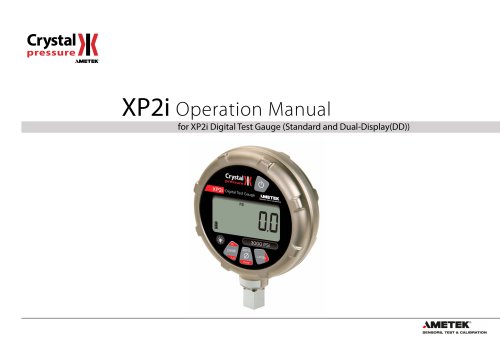
The XP2i Digital Test Gauge by Crystal Engineering Corporation is a high-accuracy pressure measurement device with temperature compensation. It features a durable aluminum alloy case, is dust and water-resistant, and operates on 3 AA batteries for up to 1500 hours. Key features include peak and valley pressure capture, user-defined units, and intrinsic safety.
The gauge is ready to use with pre-installed batteries and resumes in the last used mode. Installation requires a wrench, and users must adhere to pressure limits and secure connections to prevent damage.
The XP2i offers several functions via buttons:
- Units Button: Cycles through pressure units, with custom units available via ConfigXP software.
- Peak Button: Displays live, maximum, minimum, and average pressure, and datalogging mode.
- Zero Function: Allows zeroing with a default limit of 20 psi, adjustable via ConfigXP.
- Tare Function (Dual-Display Only): Subtracts a constant value for precise measurements.
- Rate Function (Dual-Display Only): Measures pressure change per minute.
- Differential Mode (Dual-Display Only): Connects to a second gauge for differential pressure display.
Instructions for using DataLoggerXP software for data logging are provided, including installation and operation. Excel templates are available for data analysis.
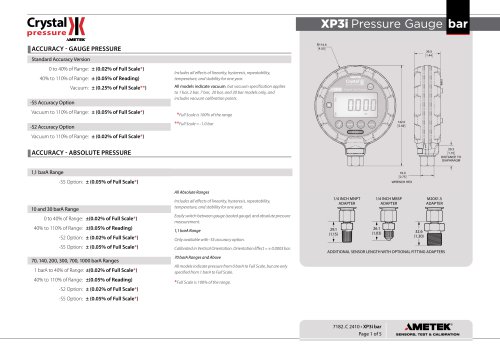
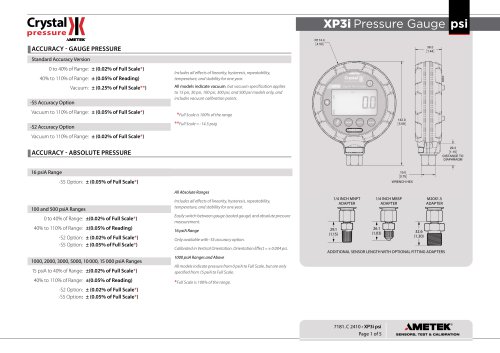
Specifications include power requirements, pressure ranges, display scales, and resolution, with a part numbering system for identification.
Safety instructions and certifications for hazardous locations, including ATEX/IECEx, are outlined.
Support information, troubleshooting tips, calibration procedures, and software details are provided.
Sections on replacement parts, accessories, contact information, factory service, trademarks, and warranty details are included.
The gauge requires an RS232 cable and null modem adapter for connection. ConfigXP software is needed for differential mode. Firmware version R0114 or later for XP2i-DD and R0014 or later for XP2i is required. The gauge can measure moderate vacuum, with certain ranges certified for vacuum operation.
Features include automatic shut-off after 20 minutes, adjustable backlight, and water density measurement. Settings can be changed via the keypad unless password protected.
The XP2i is intrinsically safe with specific battery types and can operate with an external power supply, but not in hazardous areas.
DataLoggerXP allows up to 32,000 pressure measurements, supports long battery life, and Ultra Low Power mode. Data can be downloaded and saved in Excel or text formats.
The gauge includes a calibration reminder feature and can be reset by removing the battery. Communication is possible through a query-based command language.
Parameters include logging interval (1 second to 18 hours) and logging type (Actual, Average, etc.).
Data can be downloaded to a computer using DataLoggerXP and saved in formats like Excel or CSV.
The gauge can record up to 32,000 data points and operate in Ultra Low Power Mode.
DataLoggerXP interfaces with Excel for reports and graphs, with password protection available.
The enclosure is nickel-plated aluminum, rated IP67, with accuracy specifications varying by model and conditions.
Safety instructions for hazardous environments emphasize not using the RS-232 connector and replacing batteries only in non-hazardous locations.
Specific battery types are required for intrinsic safety, with a temperature range of -20 to 50°C.
Common issues include noisy readings and error codes indicating calibration or sensor issues.
Annual calibration is recommended, with factory services offering NIST traceable standards.
ConfigXP software allows configuration changes, and various accessories are available.
Contact details and warranty information are provided, covering defects for one year.
Catalog excerpts

for XP2i Digital Test Gauge (Standard and Dual-Display(DD))
Open the catalog to page 1
Contents Overview . . . . . . . . . . . . . . . . . . . . . . . . . . . . . . . . . . . . . . . . . . . . . . . . . . . . . . . . . . . . . Introduction . . . . . . . . . . . . . . . . . . . . . . . . . . . . . . . . . . . . . . . . . . . . . . . . . . . . . . . . . . . 1 Operating Instructions . . . . . . . . . . . . . . . . . . . . . . . . . . . . . . . . . . . . . . . . . . . . . . . . . 2 Troubleshooting . . . . . . . . . . . . . . . . . . . . . . . . . . . . . . . . . . . . . . . . . . . . . . . . . . . . . . Calibration . . . . . . . . . . . . . . . . . . . . . . . . . . . . . . . . . ....
Open the catalog to page 2
Overview| INTRODUCTION Thank you for choosing theXP2i Digital Test Gauge from Crystal Engineering Corporation. Your XP2i is a combination of leading edge technology and rugged industrial design. Accuracy is 0.1 %"of reading", 0.02%"of Full Scale"or 0.05%"of Full Scale"—so any XP2i can typically replace several gauges you may have been using. The XP2i is fully temperature compensated—so there is no change in accuracy throughout the entire operating temperature range! The XP2i's case is made from rugged aluminum alloy utilizing a gasket to seal the enclosure against dust and water intrusion. Even...
Open the catalog to page 3
OPERATING INSTRUCTIONS The XP2i is shipped with batteries installed, so it’s ready to use. Press and hold the (on/off ) button. The XP2i will first test all LCD segments. Release the (on/off ) button when the XP2i indicates pressure. The XP2i always resumes operation in the mode and the units of the pressure last used, and it does not automatically rezero when turned on. Connect the XP2i to your system. ! CAUTION: ! CAUTION: Use a wrench (¾" or 19mm) for installation and removal of XP2i! There is a limit to how much rotational force can be applied to the case, so don’t rely on, or use, the...
Open the catalog to page 4
Functions units Units Button Pressing this button causes the XP2i to select the next available unit of pressure measurement. See Pressure Ranges, Display Scales, & Resolution on page 29 or the list of pressure units available for your model. Units that you don’t need or never use can be turned off. You can also define a special unit for your XP2i with ConfigXP. You can use the XP2i to display directly in a unit not otherwise available, such as feet of seawater, or foot-pounds of torque. When you select your custom unit from the keypad, the screen displays the USER icon. Hi Peak Button On the...
Open the catalog to page 5
Resetting (Clearing) Recorded Peak Values Peak values can only be cleared when displaying either a Peak High or Peak Low recorded pressure. Press the (clear) button for at least ½ second. Dashed lines will briefly appear across the display indicating that both Peak values have been cleared. Both Peak High and Peak Low values will then display the current applied pressure. Pressing the (clear) button while either the Peak High ( ) icon is displayed will not affect the zero value. If you need to rezero the gauge, you must turn off both peak icons by pressing the (peak) button. zero Zero clear If...
Open the catalog to page 6
Tare (-DD, Dual-Line Display XP2i Only) Tare is a constant value subtracted from the true pressure. For instance, if you were mixing gases by partial pressure, you might want to fill a tank to 1760 psi with air, then add another 440 psi of helium. To reduce the chance of error, you could tare the gauge at 1760 psi. Then you would add helium until the indication reached 440. Press the Tare button Top-off with helium In contrast to the Zero function discussed previously, Tare is not subject to the Zero Limit set in ConfigXP. Tare is available only when the TARE icon is on. To use the Tare feature,...
Open the catalog to page 7
Automatic Shut-off The XP2i has a shutoff timer and will turn off automatically after 20 minutes of non-operation. Pressing any button or sending any command via the RS-232 connection resets the shutoff timer for another 20 minutes of operation. The XP2i will briefly display Auto Off 20 when turned on. To disable the shutoff feature, turn on the XP2i by pressing the (on/off) and (zero) buttons simultaneously. The XP2i will briefly display the words No Auto Off to indicate that it will not turn off. The shutoff feature can be enabled again when turning the XP2i on, by pressing the same (on/off)...
Open the catalog to page 8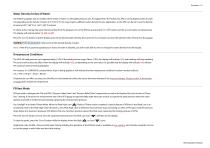
Water Density (Inches of Water) The following applies only to models where inches of water is a selectable pressure unit. As shipped from the factory, the XP2i is set to display inches of water corresponding to the density of water at 4° C (39.2° F). You may require a different water density for your application, so the XP2i can be set to use the density of water at 20° C (68° F) or 15.6° C (60° F) instead. To check and/or change the water density setting from the keypad, turn on the XP2i by pressing the (on/off ) button and the (peak) button simultaneously. The display will indicate either 4C,...
Open the catalog to page 9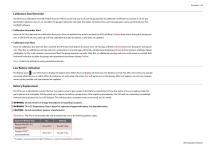
Calibration Due Reminder The XP2i has a calibration reminder feature that can help to assure that you never use the gauge after its calibration certificate has expired. It can be programmed to alert you prior to, on, and after the gauge's calibration due date. Due dates, reminder times, and message types can be set through our free ConfigXP software. Enter the Cal Due date and the notification time prior. Once the defined time prior is reached, the XP2i will flash Cal Soon three times during the startup process. It will do this on every start-up until the calibration due date is reached, or the...
Open the catalog to page 10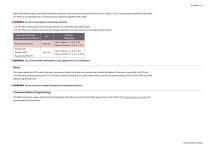
Many other battery types and models have been tested but failed to meet the requirements for Intrinsic Safety—do not assume other models are equivalent. The XP2i can be operated from an external power supply (AC adapter kit PN: 2984). ! WARNING: Do not use AC adapter in hazardous locations. CSA: The XP2i is Intrinsically Safe only if powered by one of the following battery types: CSA: The XP2i est un systeme a securite Intrinseque seulement s'il est alimente par un des Piles de type suivant: ! WARNING: Use of Duracell MN1500 batteries is not approved for CSA certification. If for some reason...
Open the catalog to page 11All Ametek Calibration catalogs and technical brochures
 Type T Deadweight Tester
8 Pages
 ATMi Temperature Module
7 Pages
 XP2i Data Recorder
6 Pages
 Temperature Pressure Process
12 Pages
 AMETEK Calibration Brochure
12 Pages
 Maritime Brochure
8 Pages
 CPF Brochure (D)
4 Pages
 APM Advanced Pressure Module
6 Pages
 Product Overview Brochure
8 Pages
 GaugeCalHP Manual
20 Pages
 24 VDC Power Supply Manual
7 Pages
 24 VDC Power Supply
4 Pages
 FastCalXP
9 Pages











- AMETEK temperature sensor
- Management software solution
- Automation software solution
- Data logger
- AMETEK resistance temperature sensor
- Process software
- AMETEK pressure gauge
- Real-time software
- AMETEK Windows software
- AMETEK calibrator
- Cloud-based software
- Control software
- Digital indicator
- Analog pressure gauge
- Industrial software
- AMETEK measurement software
- Interface software
- AMETEK thermocouple
- Pt100 temperature transducer
- Data-logger with screen