
- Catalogs
- American Hofmann Corporation
- Integrated Balancing System AB 9100

Integrated Balancing System AB 9100

Integrated Balancing System AB 9100
- Manual correction of operational unbalance
- Online monitoring of unbalance-induced vibrations
- Balancing of grinding wheels and spindles within machine tools
- Compensation of toolholder unbalance with HSC spindles
- Compensation of non-symmetric parts with lathes
- Balancing and monitoring of large fans and rotors with test stands
- Integrated solution without external systems
- Permanent vibration monitoring
- Link to machine control
- Balancing at high speeds
- Windows software for setup and operation
- Field balancing software supports various unbalance correction methods
The AB 9100 system allows in-situ balancing of grinding wheels, machine tool spindles, or fans. It integrates into the machine, continuously monitoring vibrations and indicating to the machine control when vibrations exceed preset limits. This system simplifies the unbalance correction process, as calibration is available from the system's commissioning.
A PC software guides the operator through the balancing process and can be installed on an external PC or the machine's PLC.
- Number of correction planes: 1 or 2
- Unbalance correction methods: polar, components, spread-angle
- Measuring channels: 2
- Speed range: 200 to 120,000 1/min
- Speed sensor: inductive or optical
- Vibration sensor: accelerometer (type HMA) or velocimeter (type PMG 81)
- Vibration units: µm, mm/s, m/s², g
- Measuring range: 0.01 to 1,000 (depending on speed and vibration sensor)
- Interface to PC: RJ 45
- Interface to PLC: D-Sub 25 pins and D-Sub 9 pins
- Dimensions (WxHxD): 210 x 120 x 280 mm
- Power supply: 230 V, 50 - 60 Hz, 400 W
- Measuring controller AB 9100
- PC software CS 9000
- Operation manual
- Vibration sensor
- Speed sensor
- Cable set
- Panel PC
- Upgrade to active balancing system AB 9000
Recommended minimum system requirements include a Pentium III 500 MHz Processor with 512 MB RAM, 60 MB available hard drive space, CD-ROM drive or USB port, free RJ45 network connection, SVGA monitor with a resolution of 800 x 600, and Windows 2000, XP, or 7 operating system.
Catalog excerpts

Measuring and monitoring of vibrations, in-situ balancing Integrated Balancing System AB 9100 Advantages Integrated solution, no exterernal systems required Permanent vibration monitoring Link to machine control Balancing at very high speeds Windows software for setup and operation Field balancing software supports many unbalance correction methods Application Manual correction of operational unbalance Online monitoring of unbalance induced vibrations Typical applications Balancing of grinding wheels and grinding spindles inside the machine tool Compensation of toolholder unbalance with HSC spindles Compensation of non-symetric parts with lathes Balancing and monitoring of large fans Balancing and monitoring of rotors with test stands Description In-situ balancing of grinding wheels, machine tool spindles or fans normally is performed using portable Hofmann field balancing instrumentation. Therefore first the vibration and speed sensors have to be attached to the balancing object. Then they will be hooked up to the balancing instrument. Prior to balancing one should check whether unbalance really is the source of vibrations. If yes, a calibration is being performed until the instrument presents to unbalance to be corrected. After completion of balancing the measuring equipment will be dismounted again. In case a balancing system AB 9100 is being used, that effort reduces to just the unbalance correction. Because that system will be integrated into the machine. It continuously monitors the vibrations. And it indicates to the machine control an event as soon as the vibration exceeds a preset limit. A necessary unbalance correction may then be done very quickly, because the calibration is available already since the commissioning of the system. As a result the unbalance correction is now directly shown. A PC software is being used to setup and operate the AB 9100 and to guide the operator through the balancing process. It may be installed on an external PC or laptop. It also may be installed on the PC of a machine's PLC.
Open the catalog to page 1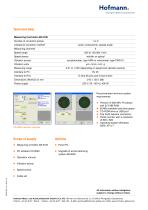
Intelligent Balancing Solutions Technical Data Number of correction planes Unbalance correction method polar, components, spread-angle Measuring channels Speed range Speed sensor Vibration sensor accelerometer, type HMA or velocimeter, type PMG 81 Vibration units Measuring range 0,01 to 1.000 (depending on speed and vibration sensor) D-Sub 25 pins and D-Sub 9 pins Power supply Recommended minimum system • 60 MB available hard drice space • CD-ROM drive or USB port • free RJ45 network connection • SVGA monitor with a resolution • Operating system Windows • Operation manual • Vibration sensor •...
Open the catalog to page 2All American Hofmann Corporation catalogs and technical brochures
 Vibration Sensors
2 Pages
 MinIbalancer MI 2100
2 Pages
 Balancing Scales AW 1000
2 Pages
 Ring Balancer AB 9000
4 Pages
 Active balancing
2 Pages
 Aluminium alloy wheels
2 Pages
 V-Line
2 Pages
 Pump Impellers
2 Pages
 Con rods
2 Pages
 Clutch parts
2 Pages
 Torque converters
2 Pages
 Brake discs
2 Pages
 Vertical Balancing Machines
2 Pages


Archived catalogs
 Economy Balancing Machines
2 Pages
 VibroLyzer VL 8000
2 Pages


- Measuring machine
- Portable tester
- Piezoelectric accelerometer
- Industrial tester
- Balancer
- Dynamic balancing system
- Triaxial acceleration sensor
- Horizontal balancing system
- Rotor balancing machine
- Automatic balancer
- Vibration analyzer
- Universal testing system
- High-accuracy balancing machine
- Portable vibration meter
- Two-plane balancing machine
- Fan balancing machine
- Static balancing machine
- Hard bearing balancing machine