


- Products
- Catalogs
- News & Trends
- Exhibitions
Performance Tuning Guidelines for Low Latency Response on AMD EPYC™-Based Servers Application Note
Performance Tuning Guidelines for Low Latency Response on AMD EPYC™-Based Servers Application Note
The document outlines guidelines for optimizing AMD EPYC™-based servers to achieve low latency responses, essential for sectors like financial trading and real-time processing. The goal is to maintain system response times under 10 microseconds through hardware configuration, BIOS settings, operating system kernel configurations, and execution timing data collection techniques.
Response times are influenced by the number of cores, execution threads per core, sockets, NUMA nodes, and cache topology. Tools such as lscpu and lstopo are recommended for system assessment. Optimizing memory placement and isolating application cores from interrupts are crucial for low latency.
SMM operates outside the OS to perform hardware tasks, with SMIs potentially increasing latency. Monitoring SMI counts with the perf subsystem is advised, and BIOS settings can be adjusted to reduce SMIs.
BIOS settings significantly impact system latency. Selecting a Low Latency profile is recommended. Key settings include enabling prefetchers, disabling SR-IOV and AMD IOMMU, and optimizing NUMA group size. Disabling SMT and Core Performance Boost can reduce latency by minimizing resource sharing and frequency transitions.
Disabling Node Interleaving and Secure Memory Encryption can preserve local memory allocation and reduce latency. If virtualization is unnecessary, disabling related technologies like AMD Virtualization Technology and SR-IOV is advised.
Using the RHEL 7 real-time kernel is recommended for latency requirements below 10 microseconds. The document provides tips for configuring the /proc filesystem and other kernel parameters to optimize performance.
- Verify running kernel and kernel command line parameters.
- Optimize parameters such as swappiness, dirty_ratio, and sched_latency_ns for low latency.
- Persistent tuning can be achieved by writing parameters into a sysctl configuration file.
- Recommended parameters include idle=poll, transparent_hugepage=never, and audit=0.
- Make these parameters permanent by modifying the /etc/default/grub configuration file.
- Use Tuned-adm profiles for tuning, ensuring the Tuned daemon is active.
- Create custom profiles to inherit settings from existing profiles.
- Disable or stop unnecessary services using systemctl to reduce latency.
- Unload unnecessary kernel modules to optimize performance.
- Blacklist modules to prevent loading at boot.
- Set the affinity of kswapd threads to non-benchmarking CPUs to avoid jitter.
- Affinitize interrupts to non-benchmarking CPUs to prevent jitter.
- Ensure CONFIG_HOTPLUG_CPU=y is set and manage CPU timers to optimize performance.
- Affinitize RCU operational threads to non-benchmarking CPUs.
- Latency benchmarks were conducted on HPE AMD EPYC™-based servers using HP-TimeTest7.4.
- Key considerations include setting the correct threshold and loopcount parameters.
Several references are provided for further reading on low latency performance tuning.
Catalog excerpts
Performance Tuning Guidelines for Low Latency Response on AMD EPYC™-Based Servers Application Note Issue Date: June 2018 Advanced Micro Devices £1
Open the catalog to page 1
© 2018 Advanced Micro Devices, Inc. All rights reserved. The information contained herein is for informational purposes only, and is subject to change without notice. While every precaution has been taken in the preparation of this document, it may contain technical inaccuracies, omissions and typographical errors, and AMD is under no obligation to update or otherwise correct this information. Advanced Micro Devices, Inc. makes no representations or warranties with respect to the accuracy or completeness of the contents of this document, and assumes no liability of any kind, including the implied...
Open the catalog to page 2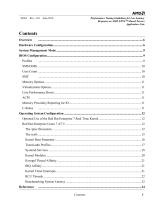
Performance Tuning Guidelines for Low Latency Response on AMD EPYC™-Based Servers Application Note Contents Overview
Open the catalog to page 3
Performance Tuning Guidelines for Low Latency Response on AMD EPYC™-Based Servers Application Note
Open the catalog to page 4
56263 Rev. 3.01 June 2018 Performance Tuning Guidelines for Low Latency Response on AMD EPYCM-Based Servers Application Note
Open the catalog to page 5
Performance Tuning Guidelines for Low Latency Response on AMD EPYC™-Based Servers Application Note Overview Low latency market segments, such as financial trading or real time processing, require for a server to provide consistent system response under 10 µs. This document provides guidance for tuning servers utilizing the AMD EPYC™ processor to reach this requirement. The guidelines cover hardware configuration, BIOS settings, operating system kernel configurations, scripts to control the environment of the target applications, and a description of the proper technique for collecting code execution...
Open the catalog to page 6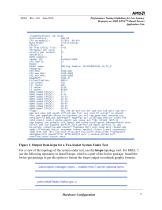
56263 Rev. 3.01 June 2018 Performance Tuning Guidelines for Low Latency Response on AMD EPYCM-Based Servers Application Note >oot@l Qcal host Architecture: Byte Order: On-line CPU(s) list Th r ead £s) per cure: Carets) per socket: Socket £s) : NUMA node(s): Model name: NUMA nodeO CPU(s) NUMA nodel CPU(s) NUMA node2 CPU(s) node3 CPUfs) node4 CPUfs) nodes CPU(s) node6 CPU(s) node7 CPU(s) Flags: fpu vine de pse tsc msr pae mce cxS apic sep mtrr pge mca cmov pat pse36 clflush ranx fxsr sse sse2 ht syscall nx ranxext fxsr_opt pdpelgb rdtscp lm constant_tsc art rep_good nopl nonstop_tsc extd_apicid...
Open the catalog to page 7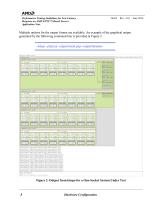
Performance Tuning Guidelines for Low Latency Response on AMD EPYC™-Based Servers Application Note Multiple options for the output format are available. An example of the graphical output generated by the following command line is provided in Figure 2. Figure 2. Output from lstopo for a One-Socket System Under Test Hardware Configuration
Open the catalog to page 8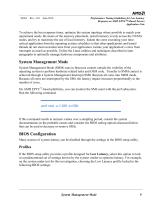
Performance Tuning Guidelines for Low Latency Response on AMD EPYC™-Based Servers Application Note To achieve the best response times, optimize the system topology where possible to match your operational needs. Be aware of the memory placement, install memory evenly across the NUMA nodes, and try to maximize the use of local memory. Isolate the cores executing your timecritical application from the operating system scheduler so that other applications and kernel threads do not steal execution time from your application. Isolate your application’s cores from interrupts as much as possible. Utilize...
Open the catalog to page 9
Performance Tuning Guidelines for Low Latency 56263 Rev. 3.01 June 2018 Response on AMD EPYC™-Based Servers Application Note • Prefetcher -Enabled • L2 Stream HW Prefetcher - Enabled • SR-IOV - Disabled • Min Processor Idle Power Core C-State - No C-State - Disabled • NUMA Group Size Optimization - Clustered • Memory patrol scrubbing - Disabled • Memory Refresh Rate - 1X If there are other options that differentiate between power and performance, latency, or deterministic performance, choose those over power. For example, if available, choose Performance Determinism to minimize performance jitter....
Open the catalog to page 10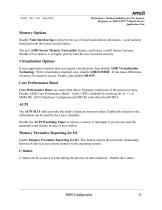
Performance Tuning Guidelines for Low Latency Response on AMD EPYC™-Based Servers Application Note Memory Options Disable Node Interleaving to preserve the use of local node memory allocation. Local memory should provide the lowest access latency. The new AMD Secure Memory Encryption feature could cause a small latency increase. Disable if low latency is of higher priority than the new increased security. Virtualization Options If your application scenario does not require virtualization, then disable AMD Virtualization Technology. With virtualization disabled, also, disable AMD IOMMU. It can...
Open the catalog to page 11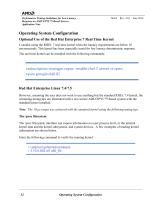
Performance Tuning Guidelines for Low Latency 56263 Rev. 3.01 June 2018 Response on AMD EPYCM-Based Servers Application Note Consider using the RHEL 7 real time kernel when the latency requirements are below 10 microseconds. This kernel has been especially tuned for low latency deterministic response. The real time kernel can be installed with the following commands: However, assuming the user does not want to use anything but the standard RHEL 7.4 kernel, the remaining tuning tips are illustrated with a two socket AMD EPYC™-based system with the standard kernel installed. Note: The 10 ps target...
Open the catalog to page 12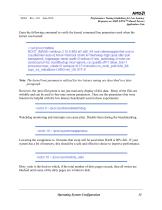
56263 Rev. 3.01 June 2018 Performance Tuning Guidelines for Low Latency Response on AMD EPYCM-Based Servers Application Note Enter the following command to verify the kernel command line parameters used when the kernel was booted: BOOTJMAGE=/vmlinuz-3.10.0-362.el7.x36_64 root=/dev/mapper/rhel-root ro crashkernel=auto rd.lvm.lv=rhel/raat rd.lvm.lv=rhel/swap rhgb quiet idle=poll transparent_hugepage=never audit=0 selinux=0 nmi_watchdog=0 riohz=on clocksource=tsc nosoftlockup mce=ignore_ce cpuidle.off=1 skew_tick=1 processor.max_cstate=0 isolcpus=8-15 rcunocbs rcu_nocb_poll nohz_full acpi_irq_noba...
Open the catalog to page 13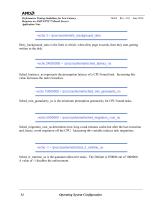
Performance Tuning Guidelines for Low Latency 56263 Rev. 3.01 June 2018 Response on AMD EPYCM-Based Servers Application Note Dirty_background_ratio is the limit to which, when dirty page exceeds, then they start getting written to the disk. Sched_lantency_ns represents the preemption latency of a CPU bound task. Increasing this value increases the task's timeslice. Sched_min_granularity_ns is the minimum preemption granularity for CPU bound tasks. Sched_migration_cost_ns determines how long a task remains cache-hot after the last execution and, hence, avoid migration off the CPU. Increasing this...
Open the catalog to page 14All AMD catalogs and technical brochures


Archived catalogs
 turion-athlon-neo-x2
2 Pages
 33358f_lx
2 Pages
 47589A_SR5690_chipset
2 Pages
 M690T
M690T2 Pages
 E2400
E24002 Pages
 E6760 Embedded GPU
2 Pages
 E6760-MXM
2 Pages
 45626B_Sempron_BGA
2 Pages
 E4690 MXM V3.0 Module
2 Pages
 AMD FirePro W7000
2 Pages
 32284a_nxfamily
2 Pages
 _Athlon_II_785E_AM3
2 Pages
 ATI FirePro? V5800 DVI
2 Pages
 46110A_High_Perf_PB
2 Pages
 AMD FirePro 2270
2 Pages
 E4690
E46902 Pages
 53738_PDS_Athlon
12 Pages
 AMD FirePro W8000
2 Pages
 Opteron_Product
12 Pages
 ATI FirePro 2460
2 Pages
 Sempron
12 Pages
 AMD FirePro W9000
2 Pages
 Socket AM3/AM2 Processors
2 Pages
 G-Series
12 Pages
 E-Series
12 Pages
 E6460
E64602 Pages
 43887C_Athlon_PB
2 Pages
 2nd Gen R series
2 Pages
 W5000
W50002 Pages
 R series
5 Pages
 V5800
V58002 Pages
 V7900
V79002 Pages
 W9100
W91002 Pages
 W600
W6002 Pages
 W4100
W41002 Pages
 E6760 PCI Express Board
2 Pages
 W2100
W21002 Pages
 W7100
W71002 Pages
 W4300
W43002 Pages
 FirePro-W7100
2 Pages
 V3900
V39002 Pages
 W8100
W81002 Pages
 G-SERIES SOC PLATFORM
5 Pages
 FirePro-W5100
2 Pages
 Radeon™ Pro WX 7100
2 Pages
 radeon-pro-ssg
3 Pages
 Radeon-Pro-WX5100
2 Pages
 Radeon™ Pro WX 4100
2 Pages


- Embedded video card
- PCI Express graphics card
- DisplayPort graphics card
- Linux graphics card
- Windows 10 graphics card
- HDMI graphics card
- ARM processor
- Mobile device processor
- Windows 11 graphics card
- Starter kit
- X64 processor
- GDDR6 graphics card
- GDDR5 graphics card
- Quad-core processor
- Dual core processor
- AMD Radeon graphics card
- Embedded processor
- Desktop computer processor
- PCIe graphics card