
- Catalogs
- Alpha Moisture Systems Ltd
- AMT Modbus RTU Dewpoint Transmitter Setup Guide

- Company
- Products
- Catalogs
- News & Trends
- Exhibitions
AMT Modbus RTU Dewpoint Transmitter Setup Guide
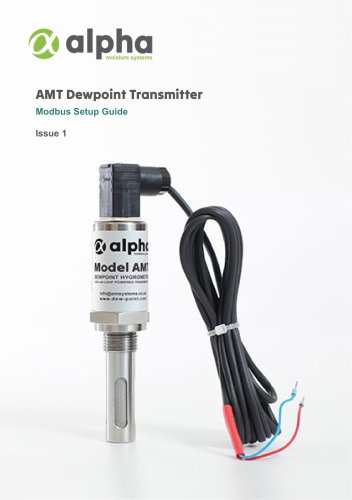
AMT Modbus RTU Dewpoint Transmitter Setup Guide
What is Modbus: Modbus is a digital communication protocol used in industrial automation for data exchange between electronic devices and a central controller. It supports bidirectional communication for transferring process values, status signals, and control commands. A typical Modbus network includes one client and up to 247 servers, each with a unique address.
Benefits of Modbus: Modbus is an open protocol, allowing manufacturers to implement it without licensing fees. It supports bidirectional communication, enabling both data reading and command writing. Variants include Modbus RTU, Modbus ASCII, and Modbus TCP, each optimized for different communication needs.
Ensure all necessary components are available. Install Modbus test software, such as GModbus, which is free and accessible online.
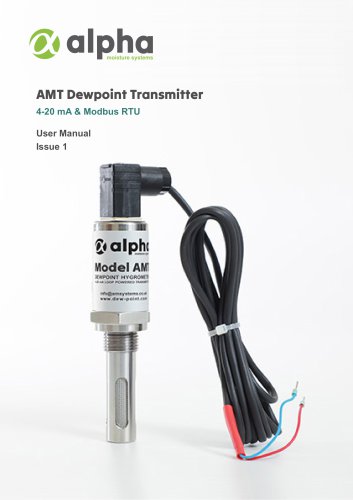
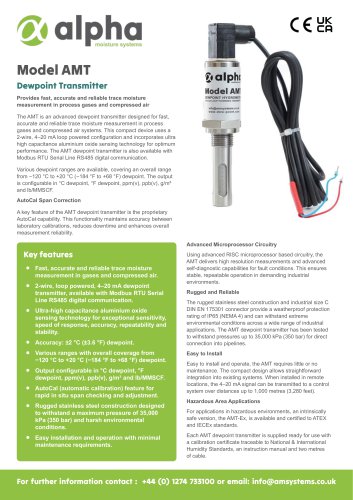
Components needed include the AcuDew Modbus RTU dewpoint transmitter, transmitter cable, USB to RS485 converter, USB cable, and power supply.
Download GModbus from the specified website. Extract the files and open the application to install the software.
Equipment Set Up: Connect wires to the screw terminals of the converter and attach the M12 screw collar to the transmitter. Connect the USB converter to the USB cable.
Connecting to Computer: Open Device Manager, connect the USB cable to the PC, and note the COM port number. Enter this number in the GModbus software and configure the communication parameters. Click 'Connect to port' and 'Read registers' to verify functionality.
Common issues include incorrect COM port selection, baud rate, parity, and wiring. Solutions involve checking connections, setting the correct baud rate and parity, and verifying wiring order.
For support, contact Alpha Moisture Systems Ltd. via phone or email.
Catalog excerpts
AMT Dewpoint Transmitter Modbus Setup Guide Issue 1
Open the catalog to page 1
1 Introduction Modbus 1.1 What is Modbus Modbus is a digital communication protocol used in industrial automation to enable data exchange between multiple electronic devices and a central controller, such as a programmable logic controller (PLC). It supports the transfer of process values, status signals and control commands between field instrumentation and higher level controllers or data acquisition systems, with communication flowing in both directions. Within the Modbus protocol, the device that initiates data requests is called the Modbus **client**, and the devices that respond and supply...
Open the catalog to page 3
2 Getting Started Before starting please check you have all the necessary components. If you do not have access to Modbus test software, please install it. The software is free and this guide will explain how to access it. 3 Equipment Required Please ensure you have the following components to set up your AcuDew Modbus RTU dewpoint transmitter. TRANSMITTER CABLE USB CONVERTER POWER SUPPLY 4 Downloading and Installing Modbus Test Software Access to Modbus software is necessary for testing the equipment; however, you do not require a specific version to do this. For this tutorial we will use GModbus,...
Open the catalog to page 4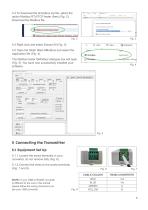
4.3 To download the Gmodbus zip file, select the option Modbus RTU/TCP tester (free) (Fig. 2). Download the Modbus file. 4.4 Right click and select Extract All (Fig. 3). 4.5 Open the folder titled GModbus and select the Application file (Fig. 4). The Modbus tester GModbus dialogue box will open (Fig. 5). You have now successfully installed your software. 5 Connecting the Transmitter5.1 Equipment Set Up 5.1.1 Loosen the screw terminals in your converter, do not remove fully (Fig. 6). 5.1.2 Connect the wires to the screw terminals (Fig. 7 and 8). NOTE: If your USB to RS485 converter is different...
Open the catalog to page 5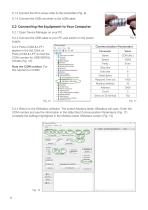
5.1.3 Connect the M12 screw collar to the transmitter (Fig. 9). 5.1.4 Connect the USB converter to the USB cable. 5.2.1 Open Device Manager on your PC. 5.2.2 Connect the USB cable to your PC and switch on the power supply. 5.2.3 Ports (COM & LPT) appear in the list. Click on Ports (COM & LPT) to find the COM number for USB-SERIAL CH340 (Fig. 10). 5.2.4 Return to the GModbus software. The screen Modbus tester GModbus will open. Enter the COM number and use the information in the table titled Communication Parameters (Fig. 11) complete the settings highlighted in the Modbus tester GModbus screen...
Open the catalog to page 6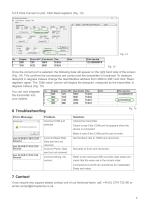
5.2.5 Click Connect to port. Click Read registers (Fig. 13). Once the correct port is selected, the following data will appear on the right hand side of the screen (Fig. 14). This confirms the connections are correct and the transmitter is functional. To measure dewpoint in degrees Celsius change the read Modbus address from 3009 to 3001 and click ‘Read registers' again. The ‘32bit value' column will display the dewpoint, measured by the transmitter, in degrees Celsius (Fig. 15). You can now integrate the transmitter into your system. 6 Troubleshooting Error Message If you require any support...
Open the catalog to page 7
Alpha Moisture Systems Ltd. Network House 5 Lister Hill Leeds LS18 5AZ England Telephone: +44 (0) 1274 733100 Email: [email protected] www.dew-point.com AMT Modbus RTU Setup Guide Issue1 © ALPHA MOISTURE SYSTEMS LTD 2026
Open the catalog to page 8All Alpha Moisture Systems Ltd catalogs and technical brochures
 Model AWS-6020 Sample System
3 Pages
 Trace Moisture In Welding
4 Pages
 Model 6020 User Manual
41 Pages
 SADPmini2 User Manual
57 Pages
 AMT User Manual
14 Pages
 AMT-Ex User Manual
15 Pages
 PSS User Manual
17 Pages
 SADPmini2-Ex User Manual
86 Pages
 DS1200-Exd-AMT-Ex
3 Pages
 DS1500-Exd
2 Pages
 DS4000-Exd-AMT-Ex
3 Pages
 DSP-FCI Portable Hygrometer
3 Pages
 Model 6020 Exd
4 Pages
 Model 6020
3 Pages
 DS1500
3 Pages










- Digital indicator
- 4-20 mA indicator
- Automatic sampler
- Stainless steel sampler
- Gas sampler
- Humidity meter
- Sampler for the food industry
- Sampler for the pharmaceutical industry
- Humidity hygrometer
- 4-digit indicator
- Relative humidity hygrometer
- Digital hygrometer
- Portable sampler
- Compact sampler
- Alpha Moisture Systems dew-point transmitter
- Laboratory sampler
- Industrial hygrometer
- Dew-point humidity meter
- Analog dew-point transmitter
- Dew-point meter