


- Company
- Products
- Catalogs
- News & Trends
- Exhibitions
Assembly2cam product brochure
Assembly2cam product brochure
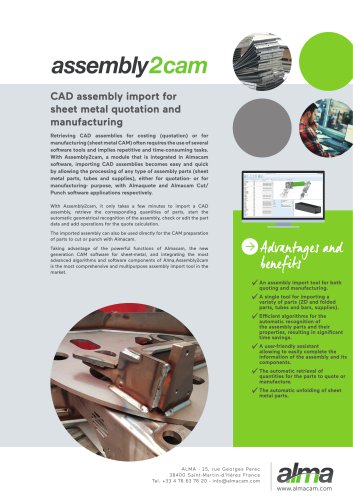
- Automatic Analysis: The tool automatically recognizes assembly components such as 2D parts, tubes, bars, and supplies, retrieving their quantities and properties like thickness and section dimensions.
- 3D Visualization: Users can view and manipulate the assembly in 3D, with options to select and edit components to complete geometrical analysis.
- Automatic Unfolding: Sheet metal parts are automatically unfolded for further processing.
- Multipurpose Management: The tool manages assembly multiplicity, allowing selection of parts for production or quotation and addition of manufacturing data and operations at both assembly and part levels.
- Format Support: Supports multiple assembly formats including Parasolid® X_T, STEP, IGES, Catia®, and more.
Catalog excerpts

CAD assembly import for sheet metal quotation and manufacturing Retrieving CAD assemblies for costing (quotation) or for manufacturing (sheet metal CAM) often requires the use of several software tools and implies repetitive and time-consuming tasks. With Assembly2cam, a module that is integrated in Almacam software, importing CAD assemblies becomes easy and quick by allowing the processing of any type of assembly parts (sheet metal parts, tubes and supplies), either for quotation- or for manufacturing- purpose, with Almaquote and Almacam Cut/ Punch software applications respectively. With Assembly2cam, it only takes a few minutes to import a CAD assembly, retrieve the corresponding quantities of parts, start the automatic geometrical recognition of the assembly, check or edit the part data and add operations for the quote calculation. The imported assembly can also be used directly for the CAM preparation of parts to cut or punch with Almacam. Taking advantage of the powerful functions of Almacam, the new generation CAM software for sheet-metal, and integrating the most advanced algorithms and software components of Alma,Assembly2cam is the most comprehensive and multipurpose assembly import tool in the market. An assembly import tool for both quoting and manufacturing. A single tool for importing a variety of parts (2D and folded parts, tubes and bars, supplies). Efficient algorithms for the automatic recognition of the assembly parts and their properties, resulting in significant time savings. A user-friendly assistant allowing to easily complete the information of the assembly and its components. The automatic retrieval of quantities for the parts to quote or manufacture. The automatic unfolding of sheet metal parts.
Open the catalog to page 1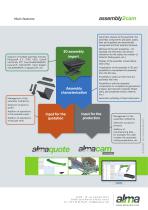
Main features Automatic analysis of the assembly: the assembly components (2D parts, tubes, bars and supplies) are automatically recognized and their quantity retrieved. Support of multiple assembly formats: Parasolid® X_T, STEP, IGES, Catia® V4/V5/V6, PTC Creo/ProENGINEER®, Inventor®, SAT/ACIS®, Solid Edge®, SOLIDWORKS®, Unigraphics®, etc. Retrieval of the part properties – for example, the thickness, the section dimension for the tubes, the number of folds for folding parts, etc.) Display of the assembly nomenclature (tree view). Visualization of the assembly in 3D and possibility to manipulate...
Open the catalog to page 2All ALMA catalogs and technical brochures
 Almaquote product brochure
2 Pages
 Almacam Routing Brochure
2 Pages
 Product Flyer almaCube
1 Page




- Computer-aided design software
- Cloud-based software
- 3D software solution
- Simulation software solution
- Programming software solution
- Optimization software
- 2D software
- Modeling software
- High-performance software
- Web-based software solution
- CAD/CAM software
- Machining software
- Cutting software
- Cutting machine software
- 2D/3D software
- Off-line software
- Nesting software
- Robot software
- Sheet metal software