
- Catalogs
- Agilent Technologies - Life Sciences and Chemical
- N8830A 100GBASE-CR4 Electrical Performance Validation and Conformance Software

N8830A 100GBASE-CR4 Electrical Performance Validation and Conformance Software

N8830A 100GBASE-CR4 Electrical Performance Validation and Conformance Software
- Setup wizard for easy configuration and testing.
- Comprehensive range of 100GBASE-CR4 Ethernet electrical tests for standards conformance.
- Accurate and repeatable results using Agilent Infiniium oscilloscopes.
- Automated HTML reporting with margin analysis.
Catalog excerpts

N8830A 100GBASE-CR4 Electrical Performance Validation and Conformance Software For Infiniium Oscilloscopes Data Sheet Features The N8830A 100GBASE-CR4 Ethernet electrical test software offers several features to simplify the validation of Ethernet designs: • Setup wizard for quick and clear setup, configuration, and test • Wide range of 100GBASE-CR4 Ethernet electrical tests enabling standards conformance • Accurate and repeatable results with Agilent Infiniium oscilloscopes • Automated reporting in a comprehensive HTML format with margin analysis With the 100GBASE-CR4 Ethernet electrical test software, you can use the same oscilloscope you use for everyday debugging to perform automated testing and margin analysis based on the IEEE P802.3bj standard. Easy and Accurate 100GBASE-CR4 Ethernet Transmitter Design Validation and Debug The N8830A 100GBASE-CR4 Ethernet electrical performance validation and conformance software for Infiniium oscilloscopes gives you an easy and accurate way to verify and debug your 100GBASE-CR4 Ethernet designs. The Ethernet electrical test software allows you to automatically execute Ethernet physical-layer (PHY) electrical tests, and it displays the results in a flexible report format. In addition to the measurement data, the report provides a margin analysis that shows how closely your device passed or failed each test. The N8830A 100GBASE-CR4 Ethernet compliance software performs a wide range of electrical tests required to meet the IEEE P802.3bj Ethernet electrical specifications. To meet signal quality requirements, your product must successfully pass conformance testing based on these specifications. Performing these tests gives you confidence in your design. The software helps you execute a wide subset of the conformance tests that can be measured with an oscilloscope.
Open the catalog to page 1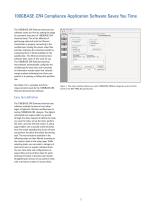
100GBASE-CR4 Compliance Application Software Saves You Time The 100GBASE-CR4 Ethernet electrical test software saves you time by setting the stage electrical tests. Part of the difficulty of performing electrical tests for Ethernet transmitters is properly connecting to the oscilloscope, loading the proper setup files, and then analyzing the measured results by comparing them to limits published in the specification. The Ethernet electrical test software does much of this work for you. test software automatically configures the oscilloscope for each test, and it provides an informative results...
Open the catalog to page 2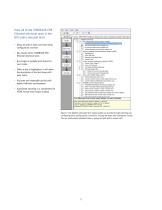
Ethernet electrical tests in the GUI under selected tests. • Setup wizard for quick and clear setup, Ethernet electrical tests. • Run single or multiple tests based on your needs. • When a test is highlighted, it will show the description of the test along with pass limits. • Accurate and repeatable results with Agilent Infiniium oscilloscopes. • Automated reporting in a comprehensive HTML format with margin analysis. File View Tools Help Set Up SelectTests j Configure 1 Connect 1 Run Tests 1 Automation | Results 1 Html Report 1 Differential Peak to Peak Output Voltage Test with TV. disabled...
Open the catalog to page 3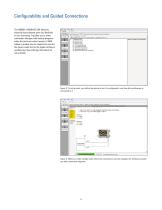
Configurability and Guided Connections electrical test software gives you flexibility in your test setup. It guides you to make connection changes with hookup diagrams when the tests you select require it. SMA cables or probes may be required to connect the device under test to the Agilent Infiniium oscilloscope. See ordering information for more details. File View Tools Help Set Up : Select Tests Configure Connect | Run Tests j Automation ' Results : Html Report ] Mode: G Compliance C Debug Artrvate/Refresh Limit Set.. | active: {Official) IEEE Sf2.3 iCCGE.*SE-CR4 Test Limit ■ 9 TX On Voltage...
Open the catalog to page 4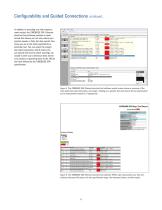
Configurability and Guided Connections continued.. In addition to providing you with measure- ment results, the 100GBASE-CR4 Ethernet electrical test software provides a report format that shows you not only where your product passes or fails, but also reports how close you are to the limits specified for a particular test. You can select the margin test report parameter, which means you can specify the level at which warnings are issued to alert you to electrical tests where your product is operating close to the official test limit defined by the 100GBASE-CR4 Setup | SelectTests | Configure...
Open the catalog to page 5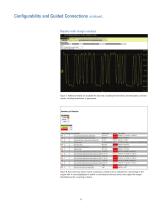
Configurability and Guided Connections continued... Reports with margin analysis abs Coefficient Step Size c(1)dec c(0)hold c(-1)hold Figure 7. Additional details are available for each test, including the test limits, test description, and test results, including waveforms, if appropriate. Margin Thresholds Figure 8. How close your device comes to passing or failing a test is indicated as a percentage in the margin field. A result highlighted in yellow or red indicates that your device has tripped the margin threshold level for a warning or failure.
Open the catalog to page 6
Switch Matrix - Support for Multi-Lane Channels The Agilent switch matrix software option for the compliance application, used together with switch matrix hardware, enables fully- automated testing for multi-lane digital bus interfaces. The benefits of this automated switching solution include: • Eliminate reconnections, which saves time and reduces errors through automating test setup for each lane of a • Maintain accuracy with the use of unique InfiniiSim features to compensate for switch path losses and skew. • Customize testing by using remote user-defined application tool for device control,...
Open the catalog to page 7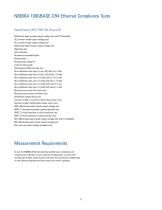
N8830A 100GBASE-CR4 Ethernet Compliance Tests Specification IEEE P802.3bj Clause 92 Differential peak-to-peak output voltage test with TX disabled DC common mode output voltage test AC common mode output voltage test Differential peak-to-peak output voltage test Signaling rate Even-odd jitter Bounded uncorrelated jitter Random jitter Steady-state voltage Vf Linear fit pulse peak Normalized coefficient step size Abs coefficient step size c(1) inc c(0) hold c(-1) hold Abs coefficient step size c(1) dec c(0) hold c(-1) hold Abs coefficient step size c(1) hold c(0) inc c(-1) hold Abs coefficient...
Open the catalog to page 8All Agilent Technologies - Life Sciences and Chemical catalogs and technical brochures
 Agilent 280 Series AA Systems
12 Pages
 Inorganic Standards
40 Pages
 InfinityLab LC Supplies
148 Pages
 General Chromatography
164 Pages
 Sample Preparation (2018/2019)
144 Pages
 MS500
MS50012 Pages
 FLAME ATOMIC ABSORPTION SPECTROSCOPY
104 Pages
 Agilent training
27 Pages
 AGILENT VACUUM PRODUCTS CATALOG
536 Pages
 Vacuum Measurement Catalog
44 Pages
 AGILENT ION Pumps
53 Pages
 AGILENT DIFFUSION PUMPS
35 Pages
 AGILENT Rotary Vane Pumps
29 Pages
 Agilent InfinityLab LC Series
16 Pages
 3100 fractionator
8 Pages
 4200 MP-AES
12 Pages
 Agilent GPC/SEC Solutions
12 Pages
 Agilent?s biomass solutions
12 Pages
 X-ray Crystallography
12 Pages
 Agilent ProPulse NMR System
5 Pages
 An autosampler like no other
4 Pages
 Agilent U1450A/U1460A
19 Pages
 Agilent B1507A
22 Pages
 Agilent M9703A
16 Pages
 W1905 Radar Model Library
16 Pages
 M8048A ISI Channels
7 Pages
 Agilent J-BERT M8020A
27 Pages
 Agilent N8900 Series
10 Pages
 I/O Hardware
16 Pages
 Advanced Design System
16 Pages
 RF & Microwave Attenuators
4 Pages
 E4980AL Precision LCR Meter
8 Pages
 FieldFox Handheld Analyzers
8 Pages
 AFM/SPM Accessories
20 Pages
 VEE 9.32
24 Pages
 89600 VSA Software
9 Pages
 Command Expert
2 Pages
 E5061B Network Analyzer
8 Pages
 E5071C ENA Network Analyzers
18 Pages
 N9038A MXE EMI Receiver
2 Pages
 N9322C Basic Spectrum Analyzer
10 Pages
 Digital Multimeters
25 Pages
 M9361A PXI Downconverter
2 Pages
 Power Meters and Power Sensors
34 Pages
 E7515A UXM Wireless Test Set
2 Pages
 Agilent Power Products
31 Pages
 E5063A Network Analyzer
8 Pages
 Leak Detection Catalog
41 Pages
 Agilent 7820A GC brochure
8 Pages
 Agilent GC-MSD and QTOF
96 Pages
 Agilent GC-MSD 5977
39 Pages
 Agilent Intro BERLIN
24 Pages









Archived catalogs
 1290 Infinity Quaternary LC
24 Pages
 1260 Infinity Bio-inert
26 Pages
 Diffusion Pumps Catalog
37 Pages


- Pressure transmitter
- Analog pressure transmitter
- Agilent spectrometer
- Gas detector
- Membrane pressure transmitter
- Automatic tester
- Automatic test kit
- Sensitive element pressure transmitter
- Agilent spectrophotometer
- Agilent chromatograph
- Agilent laboratory spectrometer
- Agilent laboratory chromatograph
- Visible spectrophotometer
- Agilent mass spectrometer
- Rugged tester
- Compact spectrometer
- Benchtop spectrophotometer
- Benchtop spectrometer
- Industrial workstation
- Real-time detector