


- Company
- Products
- Catalogs
- News & Trends
- Exhibitions
Fusion Smart Sound & Vibration Anaslyser

Fusion Smart Sound & Vibration Anaslyser
Catalog excerpts

Smart Sound & Vibration Anaslyser With FUSION, Acoem launches its new sound level meter: simply unique, designed to fulfil your needs in all situations. Easy to use, as effective in the hand as on a tripod, this instrument offers the best available technology to handle all measurement situations. Powerful functions, including vibration measurements, are integrated to meet your needs for on-site analysis, making FUSION the most innovative sound level meter & an exceptionally communicating tool, increasing your productivity!
Open the catalog to page 1
Simply Unique! Certified Class 1 solution according to IEC 61672, FUSION offers the highest standard in metrological quality for your data. Multitasking it gathers performance & simplicity within one single instrument. Connection to an intelligent wireless sensor FUSION can even record vibrations signals on 3 axes simultaneously with acoustic indicators & audio signals. FUSION is a new member within Acoem ecosystem focused on improving your productivity. You will appreciate its simplicity of use, its degree of remote controllability & the power of its processing software. Main Applications FUSION...
Open the catalog to page 2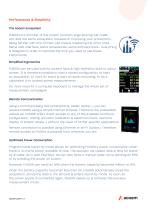
Performance & Simplicity The Acoem Ecosystem FUSION is a member of the Acoem product range sharing with CUBE, ACT-400 the same ecosystem focused on improving your productivity. Being familiar with one of them just means mastering the other ones. Same web interface, same accessories, same software tools… everything is designed in order to optimize the time you need to use these instruments. Simplified Ergonomics FUSION can be used with its context keys & high-definition built-in colour screen. It is therefore possible to load a stored configuration, to start an acquisition, to mark an event &...
Open the catalog to page 3
GPS Location The built-in GPS allows FUSION to get measurement data include GPS location for easy visualization of the measurement position in dBTRAIT post-processing software. In case of an unexpected displacement of FUSION, a user defined movement detection function will warn the operator by sending an SMS with the new geographical coordinates & the distance from the previous location. Advanced Analysis Based On Synchronized Levels Difference Using several FUSION instruments synchronized on a single site allows for a detailed analysis of the recorded phenomena. It becomes possible to clearly...
Open the catalog to page 4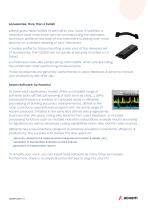
Accessories: More Than A Detail! Lateral grips make FUSION fit well within your hand. In addition a neoprene hand strap which can be mounted using the dedicated aluminium profile on the back of the instrument is adding even more security for a perfect handling of your instrument. A fixation profile for tripod mounting is also part of the delivered set of accessories. The FUSION can be quickly & securely mounted on a tripod. A windscreen claw also comes along with FUSION, which prevent losing the windscreen when performing measurements. Those accessories are genuinely useful thanks to users feedback...
Open the catalog to page 5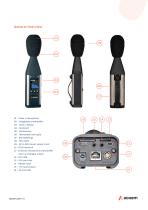
03 – Colour display 04 – Keyboard 05 – Windscreen 06 – Removable hand grip 07 – Rail fastening 08 – Mini HDMI 09 – DC 8-28V power supply input 10 – RJ45 Network 11 – External microphone preamplifier input & analogue output 12 – Mini USB 13 – SIM card slot 14 – RS232 input 15 – TTL input/output 16 – SD
Open the catalog to page 6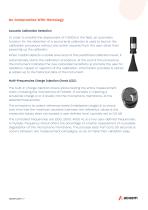
No Compromise With Metrology Acoustic Calibration Detection In order to simplify the deployment of FUSION in the field, an automatic function for the detection of a sound level calibrator is used to launch the calibration procedure without any action required from the user, other than powering up the calibrator. When FUSION detects a stable level around the predefined calibration level, it automatically starts the calibration procedure. At the end of this procedure, the instrument indicates the new calculated sensitivity & prompts the user for validation, repeat or rejection of the calibration....
Open the catalog to page 7
Reference Directions During a measurement with the instrument in hand, the sound level meter must be pointed at the source according to standard IEC 60651. This is why FUSION is delivered with a free field microphone for measurements with an angle of incidence of 0° with respect to its main axis. The IEC-61672 standard requires a perfect control of the frequency response polar diagram, in particular at ± 30°. The fine shape of FUSION, along with its conical upper part, allows complying with this criterion. During unattended monitoring measurement, multiple sources are usually measured with a...
Open the catalog to page 8
FUSION in LOG mode includes the storage of time histories. It is designed for experts familiar with the short term Leq method. Instantaneous values & spectra are stored at every logging period T. When the trigger option is active, up to 5 different markers can be entered manually. In addition an event detector can be defined with limits based on 24 possible consecutive periods of the day. FUSION can record a (non-compressed) metrological audio signal simultaneously with the events. When an event occurs, a fast logging period set by the user becomes active. Finally, during acquisition, written...
Open the catalog to page 9
Communication Modules The integration of communication modules in FUSION allows communicating with the instrument using in 4 different ways: • USB storage • Ethernet network (RJ45) • Point-to-point Wi-Fi network • Infrastructure Wi-Fi network All connection parameters are accessible from the web interface. Crossed triggers between instruments (with fusion, cube & orion) It is now possible to cross the triggers between acoustic & acoustic or vibration for more relevance on the identification of sources. Although it is often desirable to be able to link noise & vibration events to different locations,...
Open the catalog to page 10
Details Of Web Interface Statuts Bar Always on display, the status bar can be used to rapidly check the operating of the main functions of FUSION: current acquisition mode, battery status, detection of an error (overload, electrical check), possible marker(s) in progress, activation of a timer or not, number of GPS satellites picked up & type of connection. Measurement Configuration A measurement configuration for FUSION can be set using ergonomic sub-menus. It is then possible to remotely configure the parameters to store, the automatic trigger thresholds, the logging period & delayed starts....
Open the catalog to page 11All ACOEM catalogs and technical brochures
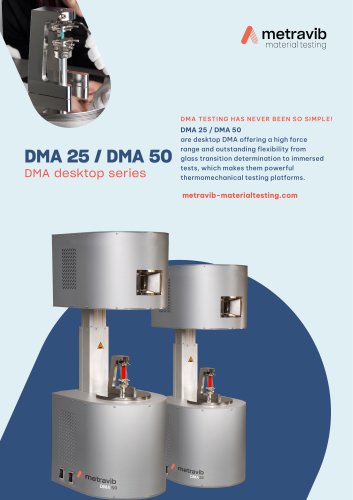 DMA25 EN
3 Pages
 DMA+ series
2 Pages
 Xpander EN
3 Pages
 ACOEM Sparrow EN
8 Pages
 Bearing Defender EN
3 Pages
 NEST i4.0 EN
12 Pages
 EAGLE GB
8 Pages
 FALCON_EN
6 Pages
 MVX_EN
8 Pages
 KITE_EN
6 Pages
 FUSION GB
6 Pages
 DUO GB
6 Pages
 CUBE_EN
6 Pages
 ORION_EN
6 Pages
 IRIS_EN
2 Pages
 01dB WebMonitoring EN
2 Pages
 VIB_EN
2 Pages
 WED_EN
2 Pages

- Gas analyzer
- Concentration analyzer
- Management software solution
- Monitoring analyzer
- Data logger
- Analysis software solution
- Process software
- Real-time software
- Cloud-based software
- Benchtop analyser
- Solids analyser
- Monitoring software solution
- Measurement software
- Continuous analyzer
- Interface software
- USB datalogger
- Gas sensor
- Laboratory analyzer
- Infrared analyser
- Calibration analyzer