
- Catalogs
- The MathWorks
- Simulink

Simulink
1 /6Pages

Simulink
1 /6Pages
Catalog excerpts
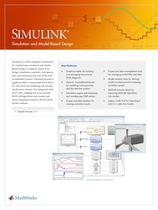
Simulation and Model-Based Design Simulink® is a block diagram environment for multidomain simulation and ModelBased Design. It supports system-level design, simulation, automatic code generation, and continuous test and verification of embedded systems. Simulink provides a graphical editor, customizable block libraries, and solvers for modeling and simulating dynamic systems. It is integrated with MATLAB®, enabling you to incorporate MATLAB algorithms into models and export simulation results to MATLAB for further analysis. Graphical editor for building and managing hierarchical block diagrams Libraries of predefined blocks for modeling continuous-time and discrete-time systems Scopes and data displays for viewing simulation results Project and data management tools for managing model files and data Model analysis tools for refining model architecture and increasing simulation speed MATLAB Function block for importing MATLAB algorithms into models Legacy Code Tool for importing C and C++ code into models Simulation engine with fixed-step and variable-step ODE solvers Simulink model of a wind turbine.
Open the catalog to page 1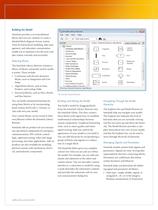
Simulink Library Browser File Edit View Help Enter search term ■ Commonly Used Blocks Lookup Tables Model-Wide Utilities Signal Attributes Signal Routing User-Defined Functions + ■■ Aririitinnal Math R r>«.rrRte Library: Simulink/Commonly Used Blocks Search Results; Showing: Simulink/Commonly Used Blocks Simulink provides a set of predefined blocks that you can combine to create a detailed block diagram of your system. Tools for hierarchical modeling, data man- agement, and subsystem customization enable you to represent even the most com- plex system concisely and accurately. Selecting Blocks...
Open the catalog to page 2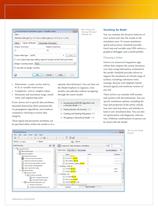
1^1 Function Block Parameters: engine + impeller inertia Element-wise gain (y = K.*u) or matrix gain (y = K*u or y = u*K). Signal Attributes Parameter Attributes Output minimum: Output maximum: Output data type: uint32 Lock output data type setting against changes by the feed-point tools Integer rounding mode: | Floor H Saturate on integer overflow • Dimensions—scalar, vector, matrix, • Complexity—real or complex values • Minimum and maximum range, initial value, and engineering units If you choose not to specify data attributes, Simulink determines them automatically via propagation algorithms,...
Open the catalog to page 3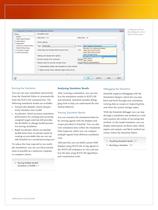
Configuration Parameters: sf_car/Configuration [Active] Simulation time Hardware Implementat. Solver options Type: Fixed-step Fixed-step size (fundamental sample time): discrete (no continuous states) Tasking and sample time options Periodic sample time constraint: Tasking mode for periodic sample times: | Sinnld ode!4x (extrapolation) D Automatically handle rate transition for data transfer Higher priority value indicates higher task priority Configuration Param- eters dialog box show- You can run your simulation interactively from the Simulink Editor or systematically from the MATLAB command...
Open the catalog to page 4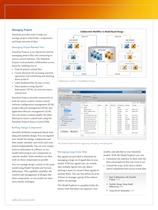
SIMULINK PROJECT S> □ *s ource Control (iy Manage New Open Archive i^p Create -% Modified Files Revision * Classificati... Owner Saurabh Approved Saurabh Approved Saurabh Approved Saurabh Approved The Simulink Projects tool for organizing, managing, and sharing files. Managing Projects Simulink provides tools to help you manage project-related files, components, and large amounts of data. Managing Project-Related Files Simulink Projects is an interactive tool for managing project files and connecting to source control software. The Simulink Projects tool promotes collaboration across • Find all...
Open the catalog to page 5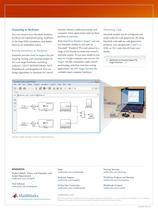
Connecting to Hardware You can connect your Simulink model to hardware for rapid prototyping, hardwarein the-loop (HIL) simulation, and deployment on an embedded system. Running Simulations on Hardware Simulink provides built-in support for prototyping, testing, and running models on low-cost target hardware, including Arduino®, LEGO® MINDSTORMS® NXT, PandaBoard, and BeagleBoard. You can design algorithms in Simulink for control systems, robotics, audio processing, and computer vision applications and see them perform in real time. With Real-Time Windows Target™, you can run Simulink models in...
Open the catalog to page 6All The MathWorks catalogs and technical brochures
 MATLAB Production Server
6 Pages
 Database Toolbox
4 Pages
 MATLAB Report Generator
4 Pages
 Stateflow
8 Pages
 SimEvents
7 Pages
 SimDriveline
7 Pages
 SimHydraulics
7 Pages
 SimPowerSystems
8 Pages
 Simulink Control Design
5 Pages
 Aerospace Blockset
5 Pages
 SimRF
SimRF6 Pages
 Simulink Coder
6 Pages
 Embedded Coder
8 Pages
 Simulink PLC Coder
4 Pages
 Fixed-Point Designer
9 Pages
 MATLAB Coder
5 Pages
 Simulink 3D Animation
10 Pages
 Gauges Blockset
2 Pages
 Simulink Report Generator
3 Pages
 Polyspace Bug Finder
6 Pages
 global-optimization-toolbox
10 Pages
 Phased Array System Toolbox
9 Pages
 OPC Toolbox
5 Pages
 Simulink Design Verifier
7 Pages
 Simulink Design Optimization
10 Pages
 Filter Design HDL Coder
5 Pages
 Bioinformatics Toolbox
9 Pages
 SimBiology
6 Pages
 Computer Vision System Toolbox
10 Pages
 DSP System Toolbox
11 Pages
 Fuzzy Logic Toolbox
5 Pages
 Polyspace Client for C/C++
5 Pages
 xPC Target
5 Pages
 SimMechanics
7 Pages
 Simscape
7 Pages
 Data Acquisition Toolbox
8 Pages
 Image Processing Toolbox
7 Pages
 Signal Processing Toolbox
10 Pages
 Control System Toolbox
6 Pages
 Symbolic Math Toolbox?
6 Pages
 Parallel Computing Toolbox?
7 Pages
 MATLAB®
6 Pages
 Mapping Toolbox 3.2
7 Pages
 Instrument Control Toolbox
7 Pages
 Optimization Toolbox 6.0
14 Pages



Archived catalogs
 MATLAB Release Notes
505 Pages
 C and Fortran API Reference
263 Pages
 External Interfaces
649 Pages
 Function Reference: Volume 3 (P-Z)
1696 Pages
 Function Reference: Volume 2 (F-O)
1568 Pages
 Function Reference: Volume 1 (A-E)
1298 Pages
 Creating Graphical User Interfaces
520 Pages
 3-D Visualization
212 Pages
 Graphics
667 Pages
 MATLAB Programming Tips
66 Pages
 Programming Fundamentals
840 Pages
 Data Analysis
220 Pages
 Mathematics
316 Pages
 MATLAB® Getting Started Guide
250 Pages


- Automation software solution
- Management software solution
- Analysis software solution
- Process software
- Windows software
- Real-time software
- Computer-aided design software
- Cloud-based software
- Design software solution
- 3D software solution
- Measurement software
- Visualization software solution
- Simulation software solution
- Automated software
- Programming software
- Network software
- Reporting software
- Engineering software
- Machine software