
- Catalogs
- SOLIDWORKS
- CAD productivity software for design comparison


CAD productivity software for design comparison
1 /2Pages

CAD productivity software for design comparison
1 /2Pages
Catalog excerpts
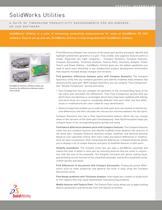
PRODUCT INFORMATION A SUITE OF TIMESAVING PRODUCTIVITY ENHANCEMENTS FOR SOLIDWORKS 3D CAD SOFTWARE Find differences between two versions of the same part quickly and easily. Identify andhighlight problematic geometry in a part. Find, modify, and suppress features within a model. Organized into eight categories Ζ Compare Geometry, Compare Features,Compare Documents, Thickness Analysis, Feature Paint, Geometry Analysis, PowerSelect, and Power Editing SolidWorks Utilities gives you the added capabilities you need to work more efficiently in any collaborative product development environment that requires multiple design changes and revisions. Find geometry differences between parts with Compare Geometry. The CompareGeometry utility lets you compare geometry and identify modified areas between two versions of the same part. With Compare Geometry, you can compute ֓Face Comparison and ԓVolume Comparison quickly and easily.ԕFace Comparison lets you compare the geometry of the corresponding faces of thetwo parts and calculates the differences. Then Face Comparison quickly tells you which faces are identical or unchanged, which faces have been modified with editing, and which faces are unique or completely different from each other. Any face differ-ences or modifications are color-coded for easy identification. Volume Comparison enables you to subtract both parts from one another to find the vol-umedifferences and then calculate the intersection volumes between the two parts. Compare Geometry also has a View Synchronization feature, which lets you changeviews of two versions of the same part simultaneously. View Synchronization helps you compare faces of the corresponding parts quickly and easily. Find feature differences between parts with Compare Features. The Compare Featuresutility lets you compare features and identify modified areas between two versions of the same part. Compare Features identifies unique, modified, and identical features based on user-specified criteria, then color-codes any feature differences or modifica-tions for easy visualization. After computing the differences, Compare Features allowsyou to display a list of unique features and pairs of modified features in both parts. > SolidWorks Utilities software helps youvisualize the differences between parts more easily. Simplify assemblies. The Simplify utility lets you take a SolidWorks assembly andreduce the level of detail in each part by removing features that are small in conjunc-tion with the size of the assembly. The Simplify command will ignore mating faces,guaranteeing correct function of the simplified assembly, and build a simplified config- uration quickly and easily. Find differences in documents with Compare Documents. Finding document differ-ences such as mass properties and general file sizes is easy using the Compare Documents utility. Find design problems with Thickness Analysis. Interrogate your models to locate thickor thin regions that may cause downstream manufacturing problems. Modify features with Feature Paint. The Feature Paint utility allows you to apply existingfeature parameters and attributes from one feature to another. >
Open the catalog to page 1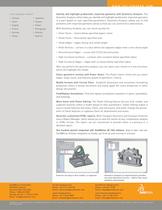
WWW.SOLIDWORKS.COM Local language support Identify and highlight problematic imported geometry with Geometry Analysis. TheGeometry Analysis utility helps you identify and highlight problematic imported geometry in a part based on user-specified parameters. Geometry Analysis allows you to find problems with imported geometry easily so that you can avoid errors downstream.With Geometry Analysis, you can check quickly for: Sliver Faces Ֆ slivers below specified aspect ratiosSmall Faces Ֆ faces below specified areaSmall Edges Ֆ edges having very small lengthKnife Vertices Ֆ corners in a face where...
Open the catalog to page 2All SOLIDWORKS catalogs and technical brochures
 SOLIDWORKS VISUALIZE
6 Pages
 SOLIDWORKS Solutions
6 Pages
 SOLIDWORKS PDM
2 Pages
 SOLIDWORKS Premium_2016
6 Pages
 SOLIDWORKS Composer
2 Pages
 SolidWorks Plastics
2 Pages
 SOLIDWORKS ENTERPRISE PDM
4 Pages
 3D COMPONENT DESIGNER
2 Pages
 INDUSTRY INNOVATION
3 Pages
 3D SCULPTOR
2 Pages
 SOLIDWORKS ELECTRICAL SUITE
6 Pages
 SOLIDWORKS Simulation Suite
4 Pages
 SOLIDWORKS MBD
4 Pages
 3DVIA COMPOSER
4 Pages
 SW_Plastics_DS_2013
4 Pages


Archived catalogs
 SOLIDWORKS PREMIUM 2011
4 Pages
 SOLIDWORKS Simulation_2016
6 Pages
 2017 SWK PDM
4 Pages
 PROJECT PLANNER
2 Pages
 SOLIDWORKS Subscription
2 Pages
 SOLIDWORKS Flow Simulation
4 Pages
 SOLIDWORKS CircuitWorks
4 Pages
 SOLIDWORKS EPDM
4 Pages
 SolidWorks Simulation_2014
6 Pages
 DRAFTSIGHT
2 Pages
 SW2014 Datasheet EPDM
4 Pages
 SW2014 Datasheet Top Ten
2 Pages
 EPDM
EPDM4 Pages
 hcv
hcv2 Pages
 em
em2 Pages
 SW_Electrical_DS_2013
4 Pages
 Business Innovation
6 Pages
 SolidWorks Premium_2013
8 Pages
 SOLIDWORKS SIMULATION 2010
6 Pages
 SOLIDWORKS PREMIUM_2015
6 Pages
 SolidWorks Routing
2 Pages
 PhotoWorks Product Overview
2 Pages
 COSMOSWorks Designer
2 Pages
 SolidWorks 2008
2 Pages



- SOLIDWORKS automation software
- SOLIDWORKS management software
- Analysis software solution
- SOLIDWORKS process software
- Windows software
- SOLIDWORKS real-time software
- SOLIDWORKS cloud software
- SOLIDWORKS control software
- SOLIDWORKS design software
- Monitoring software solution
- SOLIDWORKS 3D software
- Industrial software
- SOLIDWORKS interface software
- SOLIDWORKS quality software
- Visualization software solution
- SOLIDWORKS simulation software
- Automated software
- Programming software
- SOLIDWORKS development software