
- Catalogs
- Schniewindt GmbH & Co. KG
- CSN® SV-Viewer

CSN® SV-Viewer

CSN® SV-Viewer
The CSN® SV Viewer is a software solution developed by Schniewindt GmbH & Co. KG for visualizing and recording the digital IEC 61850-9-2 LE Protocol. It allows users to view current and voltage values from different Merging Units.
Key Features
- Values Function: Displays eight current and voltage values, with an option to show a DC offset. In real-time mode, a selected value is continuously displayed.
- Phasor Function: Calculates the phase shift between sampled values channels.
- Waveforms Function: Visualizes sample values from different Merging Units. Users can add or remove channels, save waveforms as screenshots, or print them.
- Recorder Function: Records up to two data streams on the hard drive in .txt, Microsoft Excel, or COMTRADE format. The .txt files can be edited with any spreadsheet software.
- Report Function: Generates an overview of important information such as MAC address, AppID, sample counter, and synchronization flags. Displays IEC 61850 frames in hex format and allows direct printing of reports.
System Requirements
- Pre-Installation: Requires WinPcap (version 4.1.2) and a wired network interface.
- Operating System: Compatible with Microsoft Windows XP/Vista/7 (x64).
- Memory and CPU: Minimum memory as specified for the OS. A processor performance index of 6 or better is recommended for real-time acquisition. High-performance CPUs like Intel i5-66x are suggested.
- Disk Space: Requires ~20MB for installation. Additional space needed for data recording. USB or Flash drives are not recommended for long recordings.
- Screen Resolution: Optimized for 1024 x 768 pixels.
Additional Notes
- For Vista and Windows 7, UAC must be deactivated, and administrative rights are needed for the first use.
- It is recommended to install the software on a dedicated computer and shut down unused processes to enhance performance.
Availability
A demo version of the CSN® SV Viewer is available for download at www.schniewindt.de.
Catalog excerpts

Der CSN® SV Viewer (Sampled Values) ist unsere Lösung um das digitale IEC 61850-9-2 LE Protokoll zu visualisieren und aufzuzeichnen. Die Software ermöglicht die Visualisierung der Strom- und Spannungsmesswerte unterschiedlicher Merging Units. The CSN® SV Viewer (Sampled Values) is our solution for visualizing and recording the digital IEC 61850-9-2 LE Protocol. This software allows the user to visualize the current and voltage values of different Merging Units. Die Funktion Values zeigt die acht Strom- und Spannungswerte, wie in der vorstehenden Abbildung zu sehen. Zusätzlich besteht die Möglichkeit, einen DC Offset anzuzeigen. Im Echtzeit Modus (real-time mode) kann ein Messwert kontinuierlich angezeigt werden. The function Values displays the eight current and voltage values as shown above. Additionally it is possible to display a DC offset. In real-time mode, a selectable value is shown continuously. Die Funktion Phasor zeigt die Phasenverschiebung zwischen den Kanälen an. Die Funktion Waveforms visualisiert die Kurvenverläufe von verschiedenen Merging Units. Der Benutzer kann einzelne Kanäle ein- und ausblenden. Der Kurvenverlauf kann als Screenshot gespeichert werden oder mit der integrierten Druckfunktion gedruckt werden. The function Phasor calculates the phase shift between the sampled values channels. The function Waveforms charts the sample values of different Merging Units. The user can add or remove the desired sample values. The waveform can be saved as a screenshot or can be printed by the integrated print function. Schniewindt GmbH & Co. KG Schöntaler Weg 58809 Neuenrade, Germany [email protected] www.s
Open the catalog to page 1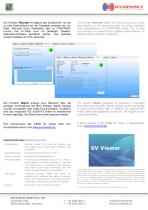
Die Funktion Recorder ermöglicht das Aufzeichnen von bis zu zwei Datenströmen auf der Festplatte entweder als .txtDatei, Microsoft Excel Arbeitsblatt oder im COMTRADE Format. Die txt.-Datei kann mit beliebiger TabellenKalkulation-Software bearbeitet werden, eine spezielle Analyse Software ist nicht notwendig. The function Recorder allows the user to record up to two data streams on the hard drive either as .txt-file, Microsoft Excel Spreadsheet or in COMTRADE format. The .txt files can normally be handled by any spread-sheet-software; no special analysis software is required. Die Funktion Report...
Open the catalog to page 2All Schniewindt GmbH & Co. KG catalogs and technical brochures
 Type 803
2 Pages
 Type 802
2 Pages
 TYPE SERIES 97
1 Page
 THE POWER OF ELECTRIFYING IDEAS.
32 Pages
 TYPE SERIES 97 D/…
1 Page
 HEATING TECHNOLOGY EW 2.93
11 Pages
 HEATING TECHNOLOGY EW EX
40 Pages
 HEATING TECHNOLOGY EW 2.75
11 Pages
 heaTing TechnOLOgY eW 2.95
12 Pages
 HEATING TECHNOLOGY EW MSR
3 Pages
 HEATING TECHNOLOGY EW PTH
8 Pages
 HEATING TECHNOLOGY EW 2.94
20 Pages
 HEATING TECHNOLOGY EW 2.01
9 Pages
 HEATING TECHNOLOGY EW 2.92
32 Pages
 CSN® AIR HEATER TYPE 830
1 Page
 CSN® AIR HEATER TYPE 860
1 Page
 CSN® Airheater Type 803
2 Pages
 CSN® Process controls
1 Page





- Electrical cable
- Copper cable
- Copper electrical cable
- Power cable
- Windows software
- Real-time software
- Insulated cable
- Insulated electrical cable
- Visualization software solution
- Industrial cable
- Current sensor
- Switch electrical cable
- Resistance heater
- Single-conductor cable
- Heater
- Solid electrical cable
- AC current sensor
- DC current sensor
- Wire-wound resistor
- Calculation software