


Motoman EasyLoad Machine Tending Software
1 /2Pages

Motoman EasyLoad Machine Tending Software
1 /2Pages
Catalog excerpts
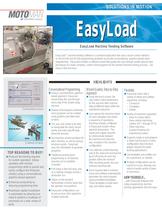
EasyLoad machine tending software is a pendant application that uses a touch screen interface on the DX100 and NX100 programming pendants to provide conversational, graphics-based robot programming. EasyLoad includes a software wizard that guides the user through simple step-by-step procedures to create complete, custom robot programs for the desired machine tending process. Job setup is fast and easy. Once required data is entered, EasyLoad software automatically generates the robot program, using pre-de ned templates. These templates include basic logic and safety signals. User attaches simple teaching aids to the robot arm and teaches touch-off points for each key position within the workcell. After recording points, the user removes teaching aids. > Using a conversational, graphics-based approach, EasyLoad wizard leads the user through every step of the simple setup process. Instead of text-based commands, most programs can be created using graphics and data input screens. The user only needs to be able to manipulate the robot, record points and enter speci c data about the process. User teaches several positions for each machine, as well as pickup/ set-down points. EasyLoad uses this information to generate programs. Traditional point-to-point programming is not typically required, but is available, if needed. Part setup is fast and easy, and so is making changes during a production run. > User selects the machine model for each operation and enters a sequence of operations. Machines already con gured in EasyLoad include critical machine dimensions. The inputs and outputs required to communicate between the machine and robot are also included in the machine con guration. EasyLoad works with a variety of infeed and outfeed equipment, including: ٖ Conveyors Turntables֖ Pallets Videos on the pendant demonstrate common tasks that the operator must perform. Using the touch screen, the user enters critical dimensions for the part and other process data at different steps within the operational sequence. EasyLoad con gurations can be set up once, then applied to multiple workcells. Variety of machines supported: Haas SL-series lathes֖ Haas vertical machining centers (VF-1 through VF-5) Other machines (contact Motoman for engineering review) > OPERATIONS SCREEN Supports single or dual grippers in either back-to-back or inline con guration (back-to-back gripper required for pallet tending applications). Job templates and pro les can be customized, as needed. Multiple con gurations can be saved for re-use, allowing one robot to handle variety of parts or processes. > Back-to-BackInline GRIPPER OPTIONS ...with EasyLoad software and make programming machine tending applications fast and easy. >
Open the catalog to page 1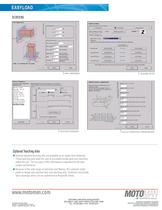
EASYLOAD EASYLOAD > SCREENS PART DIMENSION PROCESS SEQUENCE MACHINE SETUP PALLET-CONVEYOR CONFIGURATION Optional Teaching Aids Several standard teaching aids are available as an option from Motoman. These teaching aids allow the user to accurately locate parts and machines within the cell. The accuracy of this information is important for the best system performance. Because of the wide range of part sizes and xtures, the customer might prefer to design and machine their own teaching aids. Motoman will provide basic drawings which can be customized to t speci c needs. MOTOMAN CORPORATE HEADQUARTERS805...
Open the catalog to page 2All MOTOMAN catalogs and technical brochures


Archived catalogs
 Motoman MotoFTP Software
1 Page
 Motoman G-Code Converter EG
2 Pages
 Motoman MotoCalv EG Software
2 Pages
 Motoman MH50-20 Robot
2 Pages
 Motoman SIA50D 7-Axis Robot
2 Pages
 Motoman MH6-Series Robots
2 Pages
 MPP3
MPP32 Pages
 Motoman FabWorld II
2 Pages
 Motoman Positioner Brochure
12 Pages
 Motoman Corporate Brochure
12 Pages
 MHJF
MHJF2 Pages
 Motoman RobotPro DX Software
2 Pages
 MH5S
MH5S2 Pages
 MH3F
MH3F2 Pages
 MH5F
MH5F2 Pages
 MH5LS(MLX100)
2 Pages
 MH6F
MH6F2 Pages
 YSH850L
2 Pages
 HP20D-A80
2 Pages
 HP20F
HP20F2 Pages
 HP20RD
2 Pages
 FS100 Controller
2 Pages
 NX100 Controller
2 Pages
 Motoman robots
7 Pages
 MA1440
2 Pages
 MS165/MS210
2 Pages
 MH3BM
MH3BM2 Pages
 VA1400 II
2 Pages
 HP20
HP202 Pages
 MA2010
2 Pages
 MH50 II-20
2 Pages
 MA3120
2 Pages


