
- Catalogs
- SIEMENS EDA
- PADS AutoRouter


PADS AutoRouter
1 /4Pages

PADS AutoRouter
1 /4Pages
Catalog excerpts
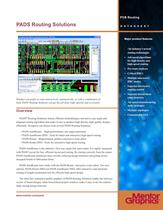
PCB Routing com D A T A S H E E T www.mentor.com/pads Major product features The industry’s newest routing technologies • Advanced algorithms for high-density and high-speed routing • Pre-route analyses • Critical DRCs • Multiple interactive DRC modes • Superior interactive routing control • Superior hierarchical rules structure • Advanced manufacturing route strategies • Multiple topologies • Customizable GUI PADS Routing Solutions Whether you prefer to route interactively, automatically, or with a combination of both, PADS®Routing Solutions can get the job done right, quickly and accurately. Overview PADS® Routing Solutions feature efficient methodologies and native, any-angle and diagonal routing algorithms that make it easy to produce high-density, high-quality designs efficiently. Designers can choose from several PADS Routing Solutions: • PADS AutoRouter - High-performance, any-angle autorouter • PADS AutoRouter HSD - Tools for batch and interactive high-speed routing • PADS Router - Shaped-based, gridless interactive route editor • PADS Router HSD - Tools for interactive high-speed routing PADS AutoRouter is the industry’s first true, angle-free auto-router. It is tightly integrated with PADS Layout for fast, efficient layout and routing. By routing correctly from the outset, PADS AutoRouter minimizes trace rework, reducing design iterations and getting newlydesigned boards to fabrication faster. PADS AutoRouter now works with the PADS Router interactive route editor. Two new options, PADS Router HSD and PADS AutoRouter HSD, offer interactive and automatic routing of length-constrained nets for efficient high speed design. The ultra-fast, animation-quality graphics of PADS Routing Solutions enable fast and easy review of board designs, while hierarchical project windows make it easy to see the relationships among design elements.
Open the catalog to page 1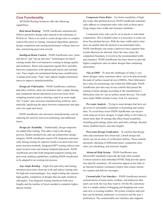
Component Entry Rules – For better routability of high pin-count, fine-pitched devices, PADS AutoRouter automatically adheres to component entry rules such as those specifying unique trace width and clearance attributes. Component entry rules can be set to decals or individual components. This is helpful when it is necessary to route out from fine-pitched devices.With the trace width and/or clearance set smaller than the desired or recommended rules, PADS AutoRouter can create a narrower trace segment than would otherwise be allowed. Once the trace clears the component boundary, it reverts to...
Open the catalog to page 2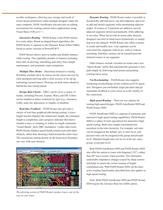
The plowing action of PADS Router pushes traces out of the way as you route. savable workspaces, allowing easy storage and recall of screen layout preferences when multiple designers share the same computer. PADS AutoRouter also provides an editing environment for creating custom macro applications using Visual Basic (VB) or C++. Interactive Routing – PADS Router is the PADS interactive route editor. Based on shaped-based algorithms, the PADS Router is superior to the Dynamic Route Editor (DRE) found in earlier versions of PowerPCB™ PADS Router allows users to enable and disable features while...
Open the catalog to page 3
Differential Pairs – Differential pairs are critical to high-speed design, and PADS AutoRouter HSD provides a way to control signal skew, timing windows, and susceptibility to interference in differential circuits. It maximizes noise-canceling effects automatically. Alternatively, PADS Router HSD provides interactive control over these same effects, offering designers choices in routing differential pairs: together, by selecting a single pin-pair member, or separately. Both PADS AutoRouter HSD and PADS Router HSD keep the differential pair signals together for as much of the routing path as possible....
Open the catalog to page 4All SIEMENS EDA catalogs and technical brochures
 Calibre nmDRC
4 Pages


Archived catalogs
 Calibre nmOPC
2 Pages
 Mechanical Analysis FloEFD
7 Pages
 PCB Systems Board Station XE
4 Pages
 TransLayout™
2 Pages
 VeSys
VeSys2 Pages
 CHS
CHS4 Pages
 Mentor Embedded Inflexion UI
2 Pages
 MAJIC JTAG Probe
3 Pages
 NUCLEUS RTOS SOLUTIONS
2 Pages
 Catapult C Synthesis
4 Pages
 Olympus-SoC
2 Pages
 Calibre OPCverify
2 Pages
 FloTHERM® IC
2 Pages
 FloTHERM PCB
2 Pages
 FloVENT
12 Pages
 AccuParts™
1 Page
 AccuSim II
2 Pages
 PADS Suites
3 Pages
 Board Architect
2 Pages
 Board Station XE (BSXE
9 Pages
 Mentor Embedded Linux
10 Pages
 Nucleus
2 Pages
 Calibre® OPCverify™
2 Pages
 Volcano Bootloader
2 Pages
 Capital Logic
2 Pages
 Capital Integrator
2 Pages
 Capital HarnessXC
2 Pages
 Capital ModularXC
2 Pages
 Capital Harness MPM
2 Pages
 Capital Migration Services
2 Pages
 Sourcery Analyzer
2 Pages
 Atmel SAM9263
2 Pages
 RC340
RC3402 Pages
 RC250
RC2502 Pages
 Questa® Codelink Turbo
3 Pages
 iSolve DigIQ Interface
2 Pages
 Questa ADMS
7 Pages
 Calibre RealTime
2 Pages
 ADiT
ADiT2 Pages
 Calibre nmDRC
4 Pages
 Calibre xL
2 Pages
 Calibre DESIGNrev
2 Pages
 floefd
12 Pages
 flotherm
8 Pages
 flovent
12 Pages
 VolcanoBootloader
2 Pages
 ces-ds
2 Pages
 Calibre xRC-CB
2 Pages
 Calibre xRC
3 Pages
 Volcano? VSA
2 Pages
 Calibre xACT 3D
2 Pages
 TransBridge
2 Pages
 TransOVM
2 Pages
 TranSACT
2 Pages
 TransCable
2 Pages
 EDGE Developer Suite
2 Pages
 TransDesign
6 Pages
 Inflexion UI
2 Pages
 ReadyStart?
2 Pages
 CAT/TransCable
2 Pages
 Volcano VSTAR AUTOSAR
2 Pages
 Volcano VSTAR Ethernet
2 Pages
 Multicore Framework
2 Pages
 Calibre OPC and PSM
6 Pages
 Calibre ® MPCpro
2 Pages
 Nucleus RTOS
2 Pages
 HDL Designer
2 Pages
 ReqTracer
2 Pages
 Tanner T-Spice Simulation
2 Pages
 Tanner Waveform Viewer
2 Pages
 Tanner Designer
2 Pages
 Tanner L-Edit IC Layout
4 Pages
 Calibre LFD
3 Pages
 Calibre nmLVS
3 Pages
 Calibre RVE
3 Pages
 ICanalyst
4 Pages
 Olympus-SoC
5 Pages
 Oasys-RTL
3 Pages
 LeonardoSpectrum
4 Pages
 Calibre® MPCpro
2 Pages
 Tessent IJTAG
2 Pages
 Vista Architect
4 Pages
 Vista Virtual Prototyping
4 Pages
 Calibre LFD
3 Pages
 Tessent Connect
3 Pages
 Vista
Vista4 Pages
 LeonardoSpectrum™
4 Pages


- SIEMENS automation software
- SIEMENS management software
- SIEMENS analysis software
- SIEMENS process software
- Windows software
- Real-time software
- SIEMENS CAD software
- Cloud-based software
- SIEMENS control software
- SIEMENS design software
- SIEMENS 3D software
- Industrial software
- Measurement software
- SIEMENS interface software
- SIEMENS quality software
- Visualization software solution
- SIEMENS simulation software
- SIEMENS automated software
- SIEMENS development software
- Network software