
- Catalogs
- Hexagon PPM
- ISOGEN ®


- Company
- Products
- Catalogs
- News & Trends
- Exhibitions
ISOGEN ®

ISOGEN ®
Isogen is a widely used software for generating piping isometric drawings automatically. It supports data file formats like Piping Component File (PCF) and Isogen Data File (IDF), making it compatible with most 3D design solutions for piping systems.
Isogen offers two main editions: Team and Solo. The Team Edition allows unlimited pipeline processing, suitable for large projects. The Solo Edition uses a token-based licensing model, ideal for smaller projects. Isogen can operate in two modes: interactive (Isogen-R) and automatic (Isogen-S).
Isogen provides tools like I-Configure and Symbol Editor to help users set up and customize their output. I-Configure offers a visual interface for configuration, while Symbol Editor allows customization of 2D shapes for fittings.
Isogen automatically creates unscaled isometric drawings with features like dimensions, item tagging, and standard industry symbols. It supports various drawing types, sizes, and orientations, and offers extensive customization options for materials, text, and symbols.
Isogen outputs CAD drawings and text reports in formats like AutoCAD (DWG), MicroStation (DGN), and Intergraph SmartSketch (IGR). A basic viewer is provided for reviewing outputs.
Hexagon PPM, part of Hexagon, provides information technology solutions to enhance productivity and quality in geospatial and industrial sectors.
Catalog excerpts
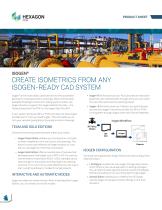
PRODUCT SHEET CREATE ISOMETRICS FROM ANY ISOGEN-READY CAD SYSTEM Isogen® is the most widely used software for the automated generation of piping isometric drawings. Most commercially available 3D design solutions for piping systems either use Isogen directly or support the Isogen data file formats – the Piping Component File (PCF) or the Isogen Data File (IDF). If your system produces IDFs or PCFs, but does not have Isogen bundled with it, then you need Isogen. This will enable you to turn your valuable piping data into piping isometric drawings. TEAM AND SOLO EDITIONS Choose the licensing model that best meets your needs: • Isogen Team Edition enables you to process an unlimited number of pipelines, from any source, into drawings. This option is more cost-effective for larger projects, or if you plan to use Isogen for more than one project. • Isogen Solo Edition offers a counted pool of licenses that decreases each time Isogen runs a PCF or IDF. You can buy license tokens in batches of 500 or 1,000, making sure you have enough for the project, and allowing for any testing, revisions, or re-runs. This is a cost-effective, low-risk way to start using the software. It is ideal for small projects. INTERACTIVE AND AUTOMATIC MODES Isogen provides two mode choices. When installing either Isogen Edition, you can install one or both modes: • Isogen-R (formerly known as I-Run) provides an interactive graphical user interface (GUI) through which you can select the input files and view the resulting output. • Isogen -S (formerly known as I-Serve) runs automatically as a service. Isogen-S monitors a folder for IDFs or PCFs, running them through Isogen when new files are detected. Isogen Workflow 3D Piping Design IDF PCF ISOGEN CONFIGURATION Two tools are supplied with Isogen Editions to help configure the required output. • I-Configure includes the new Isogen Configuration panel, which offers a new visual approach to setting up Isogen. You can alter the settings and see the results immediately before proceeding to run your drawings through Isogen. • Symbol Editor enables you to redefine the 2D shape used by Isogen to represent certain fittings on the fin
Open the catalog to page 1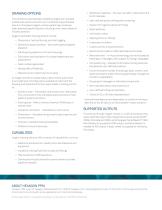
DRAWING OPTIONS • Additional materials – The user can add in materials to the bill of materials The isometrics automatically created by Isogen are unscaled andthe tube sections are shrunk or stretched to give the best layout on the paper. Isogen’s unique system logic produces clear, practical pipeline layouts, including cross-overs, based on industry practice. • User-defined spool prefixing and numbering • Support for hygienic pipework fittings • Detail sketches • Information notes Isogen’s automatic drawing options include: • Tapping points on fittings • Dimensions, text positioning, and item...
Open the catalog to page 2All Hexagon PPM catalogs and technical brochures
 CAESAR II®
2 Pages
 GT STRUDL®
2 Pages
 Intergraph Smart® 3D
2 Pages
 Intergraph Smart® Yard
4 Pages
 PV Elite®
2 Pages
 PDS ®
PDS ®2 Pages
 HxGN Smart Build™ Insight
8 Pages
 CloudWorx PDS®
2 Pages
 INTERGRAPH SMART® P&ID
4 Pages
 Intergraph Smart® Electrical
4 Pages
 SmartSketch®
2 Pages
 CAESAR II ® NUCLEAR
2 Pages


Archived catalogs
 SMARTPLANT® ELECTRICAL
2 Pages
 SMARTSKETCH ®
2 Pages
 SmartPlant® PES
2 Pages
 SmartPlant® Explorer
2 Pages
 Smart P&ID
4 Pages
 SmartPlant Electrical
4 Pages
 BricsCAD
6 Pages
 CADWORX ®
2 Pages


- Display module
- LCD display panel
- Automation software solution
- Management software solution
- Analysis software solution
- Process software
- Real-time software
- Windows software
- Computer-aided design software
- Cloud-based software
- Control software
- Touch screen display panel
- Design software solution
- Monitoring software solution
- Industrial software
- 3D software solution
- Measurement software
- Interface software
- Visualization software solution
- Quality software