
- Catalogs
- Gerber Technology, a Lectra company
- GERBERdigitizer XLd


GERBERdigitizer XLd
1 /2Pages

GERBERdigitizer XLd
1 /2Pages
Catalog excerpts
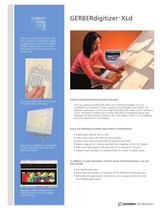
Get up and running quickly on your new CutWorks or AccuMark system by digitizing your existing templates. Simply capture points around the perimeter of each piece and you're Place existing templates on the digitizer surface and capture perimeter and internal geometry Digitize existing templates quickly and easily. You can quickly and efficiently input your existing templates into your CutWorks® or AccuMark® system using the XLd Digitizer from Gerber. The Digitizer workstation consists of a digitizing table with menu, and a 16-button cursor. The system enables you to enter descriptive information about each template. All information is stored in the CAD system, where it is immediately ready for modification and nesting. Enjoy the flexibility to satisfy many pattern requirements. • Digitize parts directly from a nest • Copy a part using rules from an existing piece • Mirror a part along a horizontal line to ensure symmetry • Digitize large parts in sections and join them together in the CAD system • Add a true right angle to the perimeter of, or internal to, the part • Digitize a part and add it to the perimeter of a master or parent piece In addition to piece perimeter, internal points and drill locations, you can also include: • Part identification data • Notch type and location, a maximum of five different notches per piece • Part labels and special point information, such as special instructions for Part data is entered directly into the CAD system and is ready for editing and/or nesting GERBER TECHNOLOGY
Open the catalog to page 1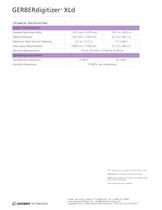
GERBERdigitizer XLd ™ TECHNICAL SPECIFICATIONS System Characteristics Useable Table Area (A00) 1273 mm x 1675 mm 50.1 in x 65.9 in Table Dimensions 1327 mm x 1730 mm 52.3 in x 68.1 in 2,2 m x 13,5 m 7 ft x 44 ft 1300 mm x 1730 mm 51.2 in x 68.1 in Maximum Piece Size for Digitizing Floor Space Requirements Electrical Requirements 110 or 220 VAC +/-10% at 47-63 Hz Operating Environment Temperature (maximum) Humidity (maximum) 5º-40ºC 41-104ºF 15-80% non condensing NOTE: Specifications are subject to change without notice. GERBERdigitizer is a trademark of Gerber Technology. GERBERcutter, CutWorks...
Open the catalog to page 2All Gerber Technology, a Lectra company catalogs and technical brochures
 EN DCS 2500 Product Sheet
2 Pages
 EN AccuScan Product Sheet
2 Pages
 EN YuniquePLM Product Sheet
4 Pages
 EN YuniquePLM V8 Brochure
8 Pages
 EN AccuNest Product Sheet
2 Pages
 EN Z1 Product Sheet
2 Pages
 GERBERplotter XLp+ Series
2 Pages
 GERBERcutter Taurus
2 Pages
 GERBERcutter DCS 2600
2 Pages
 Spreading Table Model G
2 Pages
 GERBERspreader 250s
2 Pages
 Single-Ply Feeder
1 Page


- Cutting system
- CNC cutting center
- Laser cutting machine
- Automatic cut-off machine
- Management software solution
- Knife cutting system
- Analysis software solution
- High-precision cutting center
- Real-time software
- Computer-aided design software
- High-speed cut-off machine
- Design software solution
- Precision cut-off machine
- Monitoring software solution
- 3D software solution
- Fabric cutting machine
- Cutting machine for the automotive industry
- Visualization software solution
- Sheet cutting machine
- High-performance cutting machine